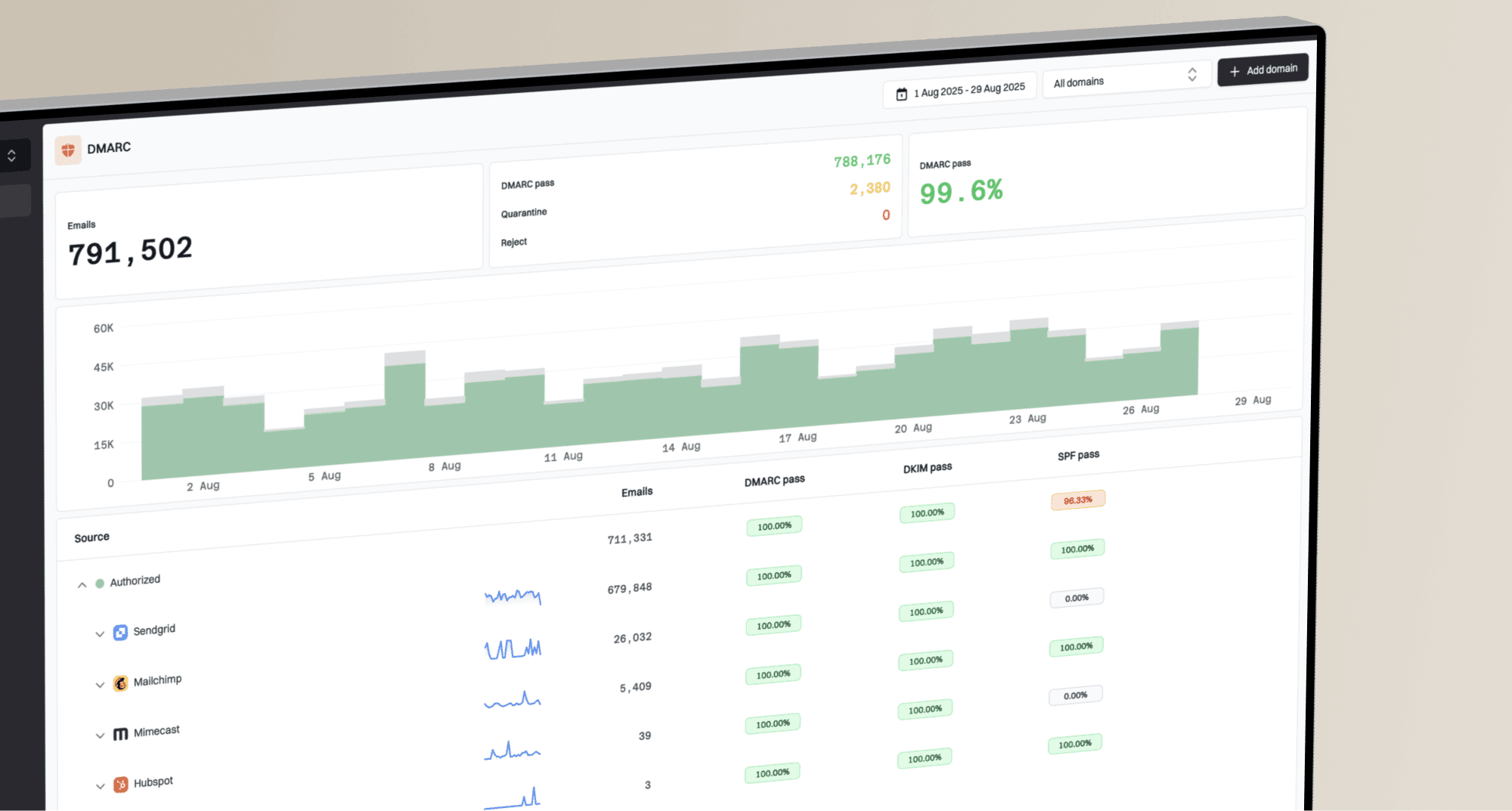
To identify and handle spoofed emails violating DMARC policies, start with your DMARC aggregate reports. They show the source IP, sending volume, SPF result, DKIM result, domain match result, header-from domain, and the receiver that saw the traffic. That is usually enough to separate a real vendor misconfiguration from a malicious spoofing run.
The short answer is: find the failing source in DMARC reporting, check whether the IP belongs to a legitimate sender, confirm that SPF and DKIM do not match the From domain, then either fix the legitimate sender or treat the traffic as abuse. If your domain already has p=reject, your main action is incident handling, source investigation, and internal notification. You are not usually trying to stop every forged attempt at the origin. You are trying to make sure receivers reject it, your real mail still passes, and your support or security team knows what to expect.
I would not treat every spike as a breach. A sudden jump in DMARC failures often means your domain was chosen for a spoofing campaign. It can also mean a new sending platform, a forgotten system, an email forwarder, or a penetration test is using the domain without proper authentication. The work is to prove which one it is.
What a DMARC violation tells you
A DMARC violation means the message used your domain in the visible From address, but it did not pass DMARC domain matching. DMARC does not require both SPF and DKIM to pass. It requires at least one of them to pass and use a domain that matches the header-from domain. If both domain checks fail, the message violates your policy.
- Visible domain: The domain in the From header is the domain DMARC protects because that is what recipients see.
- SPF domain match: SPF must pass for the return-path domain and that domain must match the visible From domain.
- DKIM domain match: DKIM must pass and the signing domain must match the visible From domain.
- Policy result: The receiving server applies none, quarantine, or reject based on your record and its own local handling.
The first question to answer
Ask whether the failed source is yours. If the IP belongs to a known email platform, CRM, ticketing system, billing tool, or internal server, fix authentication. If the IP is unknown, spread across unrelated networks, or tied to disposable infrastructure, handle it as spoofing.
This is where DMARC monitoring matters. Raw XML files technically contain the evidence, but they are painful during an active incident. Suped turns those reports into source names, pass and fail rates, trend lines, and fix steps, so the decision is visible without manually reading XML.
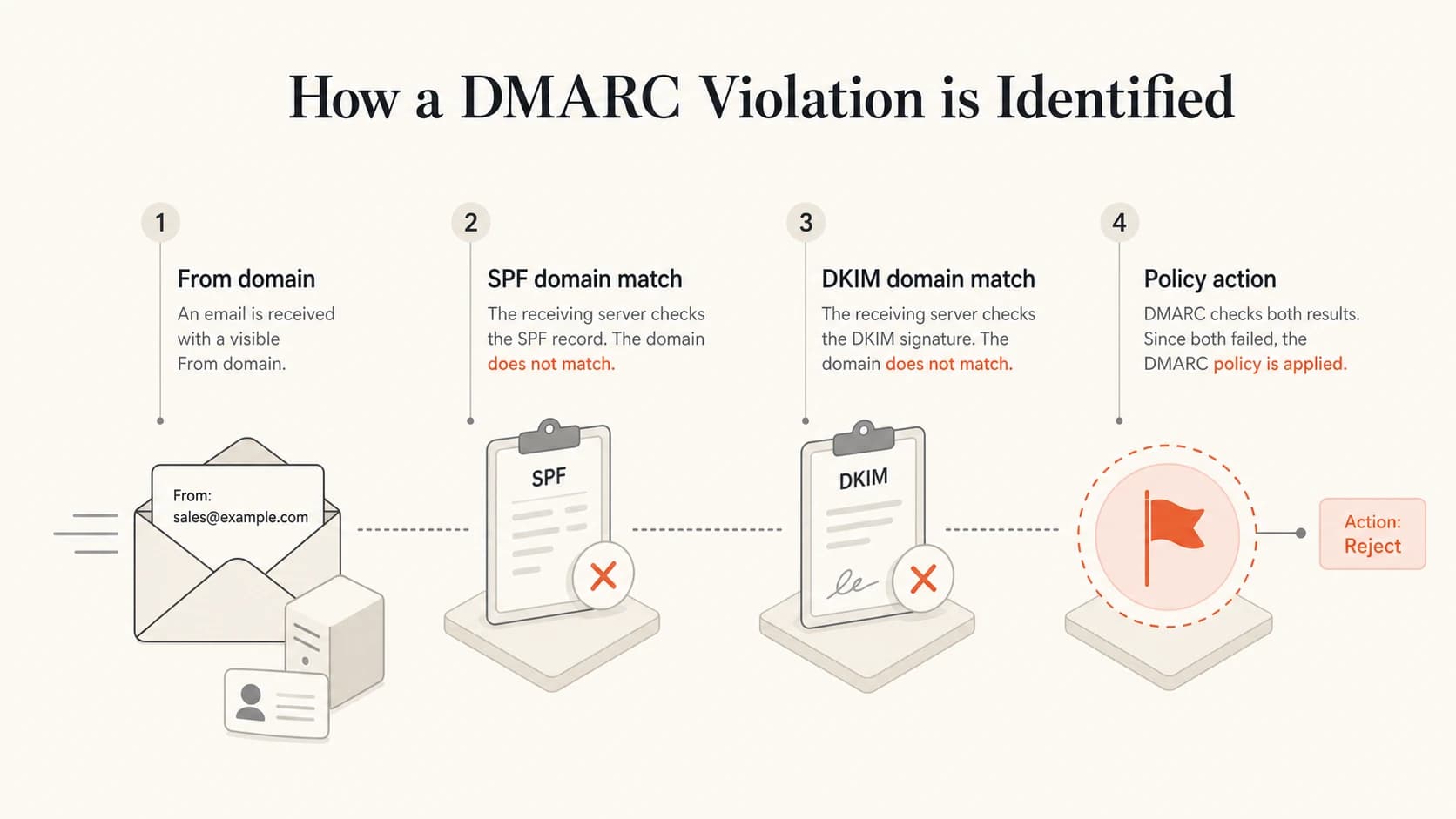
Four-part DMARC violation diagram showing From domain, SPF domain match, DKIM domain match, and policy action.
How to identify who is sending
The sender identity in DMARC is not a person. It is usually an IP address, an authenticated source, or a provider network. You can often identify the operator of the sending infrastructure, but you usually cannot identify the individual actor behind a spoofing run from DMARC alone.
I use this sequence when a domain shows a sudden increase in failures:
- Group by source IP: Sort DMARC failures by volume and receiver so the largest source is handled first.
- Resolve ownership: Use WHOIS or regional registry data to identify the network owner and abuse contact.
- Check reverse DNS: Look for hostnames that point to a cloud provider, mailbox provider, compromised server, or known sender.
- Compare senders: Match the source against your approved sending inventory before calling it malicious.
- Review samples: Use forensic evidence, mail logs, user reports, or seed inboxes when available, but do not rely on aggregate reports for message body content.
WHOIS and DNS checks for a failing IPbash
whois 203.0.113.25
host 203.0.113.25
dig -x 203.0.113.25 +short
The owner shown by an IP lookup is not always the sender. It can be a hosting provider, infected customer server, VPN service, or shared outbound relay. That still helps because it gives you the abuse desk and the network context. For a large spoofing run, I capture the top IPs, timestamps, volume, recipient domains that reported the traffic, and the DMARC failure evidence before contacting anyone.
Likely legitimate source
- Recognized platform: The IP range matches a sender your business uses.
- Consistent pattern: Failures appear at expected campaign times or workflow triggers.
- Fix path: Add DKIM, update SPF, change the return-path, or configure a custom sending domain.
Likely spoofing source
- Unknown network: The IPs have no connection to your approved sender list.
- Wide spread: Traffic appears across many networks, countries, or consumer access providers.
- Response path: Preserve evidence, notify internal teams, and report abuse where volume justifies it.
What to check in your DMARC record
Before escalating a spoofing spike, check that your own DNS policy is doing what you think it does. I have seen teams believe they are protected because a record exists, while the record still has p=none, missing reporting addresses, or a subdomain policy that leaves part of the domain exposed.
DMARC record with reporting and reject policydns
_dmarc.example.com.  TXT  "v=DMARC1; p=reject; sp=reject; adkim=s; aspf=s;\
 rua=mailto:dmarc-reports@example.com; pct=100"
|
|
|
|---|---|---|
p | reject | Tells receivers to reject failed mail. |
sp | reject | Extends protection to subdomains. |
rua | present | Sends aggregate reports for investigation. |
pct | 100 | Applies policy to all failing mail. |
adkim | s or r | Controls DKIM domain match strictness. |
aspf | s or r | Controls SPF domain match strictness. |
Fields to check when spoofed mail violates DMARC
If you are unsure whether the record is valid, run it through a DMARC checker before changing policy. Syntax mistakes during an incident can create new deliverability problems.
DMARC checker
Look up a domain's DMARC record and catch policy issues.
?/7tests passed
How to handle confirmed spoofing
Once a source is confirmed as spoofing, the response depends on your policy. If you are at p=none, the immediate goal is to move toward enforcement after verifying legitimate senders. If you are at p=quarantine, the goal is to confirm real mail is clean enough for reject. If you are already at p=reject, the technical control is already in place, so the next work is monitoring and response.
DMARC response stages
Use policy state to decide what action matters during a spoofing spike.
Observe
p=none
Collect reports and identify every legitimate sender.
Contain
p=quarantine
Send failures to spam or quarantine while fixing stragglers.
Enforce
p=reject
Reject failed mail and monitor for impact.
For a confirmed malicious run, I would take these actions:
- Preserve evidence: Save report ranges, source IPs, volumes, receiver names, and timestamps before the data rolls off.
- Notify support: Warn customer-facing teams that users might report suspicious mail that appears to use your domain.
- Notify security: Correlate the spike with login attempts, help desk impersonation, invoice fraud, and brand abuse reports.
- Report abuse: Send concise evidence to the network owner when a small number of IPs drive meaningful volume.
- Keep monitoring: Spoofing campaigns often move networks, domains, and timing once rejection starts to bite.
Reject does not stop attempts
A reject policy tells participating receivers to reject mail that fails DMARC. It does not prevent someone from attempting to send forged mail. Seeing failures after moving to reject is normal. The practical question is whether receivers are honoring the policy and whether any legitimate mail is failing with it.
Some inbound systems do not enforce DMARC exactly as the publishing domain requests. A receiver can quarantine a message instead of rejecting it, override the result for local policy, or pass through mail after ARC evaluation. If this is the issue you are seeing, the more specific problem is covered in inbound DMARC handling.
How Suped helps during a spoofing spike
Suped is useful here because it gives you the workflow you need during the spike: identify the failing source, decide whether it is legitimate, see what authentication failed, and move from observation to enforcement without guessing. The product brings DMARC, SPF, DKIM, blocklist monitoring, and deliverability signals into one place.
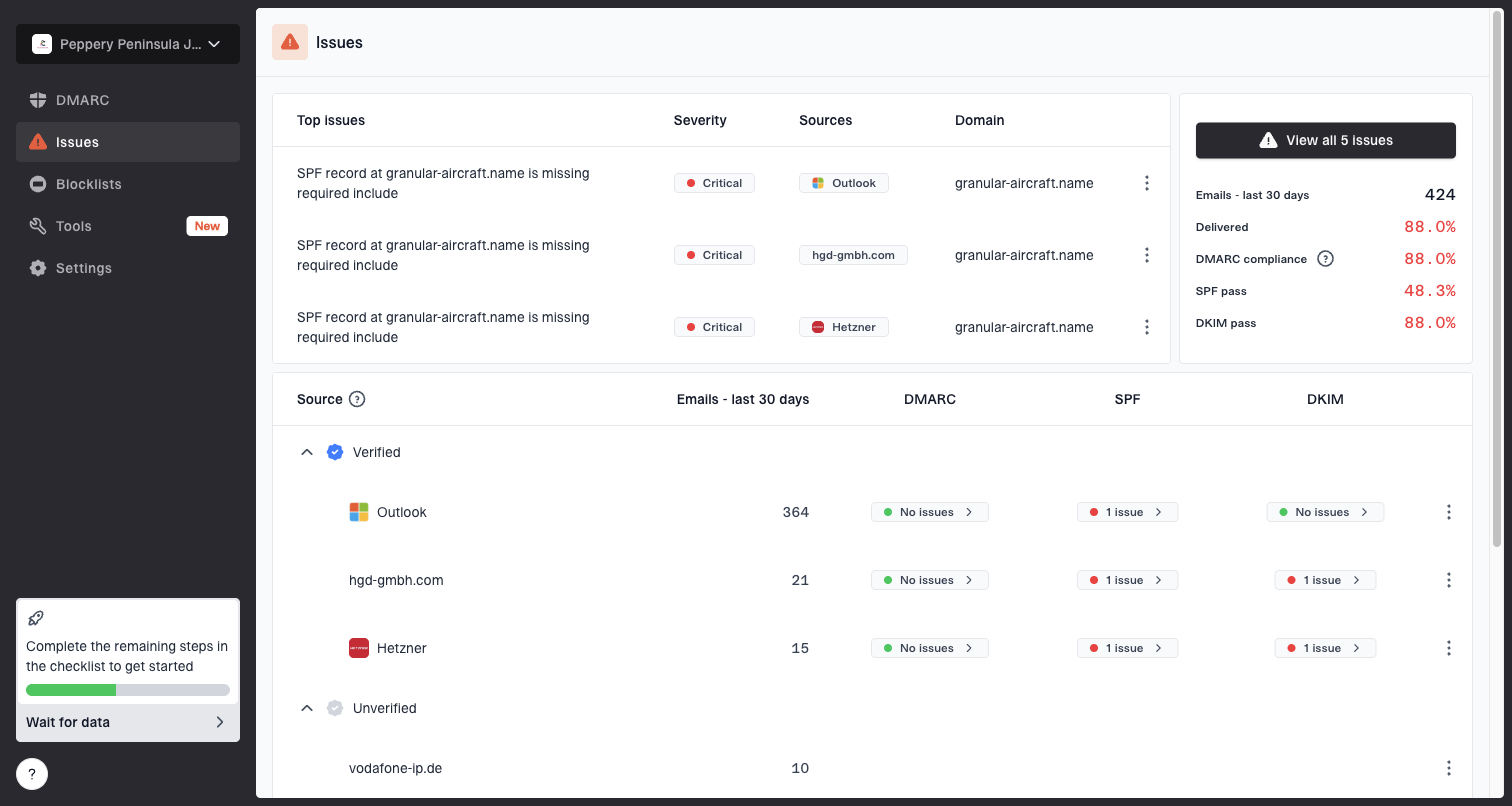
Issues page showing top issues, verified sources, unverified sources, and authentication pass rates
For this specific problem, I would use Suped to group failures by source, inspect unverified senders, and turn repeated failures into fix tasks. Automated issue detection helps avoid a common mistake: treating every unknown source as an attacker before checking whether a business system was launched without DKIM or a custom return-path.
Manual investigation
- Raw data: You download XML, parse reports, and group IPs yourself.
- Slower triage: Sender ownership and authentication causes take longer to connect.
- Higher risk: A real sender can be mistaken for spoofing during a policy change.
Suped workflow
- Source view: Failing senders are grouped into readable sources and trends.
- Action steps: Issues include practical fixes for SPF, DKIM, DMARC, and domain matching.
- Policy control: Hosted DMARC and hosted SPF reduce DNS friction during cleanup.
Hosted DMARC is especially useful when several teams need policy changes but only one team owns DNS. Instead of editing TXT records for every stage, Suped can manage policy staging through Hosted DMARC after the required CNAME setup is in place.
When to fix authentication instead
The most expensive mistake is reporting your own mail as abuse. A DMARC violation from a real service means the service is sending with a domain mismatch. The fix depends on which authentication path should pass.
|
|
|
|---|---|---|
SPF pass, DMARC fail | Return-path mismatch | Set custom bounce domain. |
DKIM fail | Missing or bad key | Publish provider DKIM. |
No DKIM | Default sender setup | Enable domain signing. |
SPF fail | Sender not included | Update SPF safely. |
Subdomain fail | No subdomain plan | Add specific records. |
Authentication fixes for legitimate sources
A clean sender inventory makes this faster. Keep a list of every platform allowed to send as the domain, the department that owns it, the DKIM selector, the return-path domain, the expected volume, and the approval status. When a DMARC spike appears, this list prevents guesswork.
Best practice
Do not add every failing source to SPF during a spike. SPF is not a permission list for anything that claims your domain. Only add senders you own, trust, and have configured to match your visible From domain.
If failures are coming from a sender you recognize but cannot explain, inspect the full authentication chain. A focused troubleshooting path is better than changing several DNS records at once. For a deeper breakdown, use DMARC failure troubleshooting to isolate domain matching, forwarding, and record problems.
How to report and monitor abuse
Reporting abuse is worth doing when the evidence is concentrated. If 80 percent of the spoofed volume comes from one network, send that network a short abuse report. If the traffic is scattered across thousands of residential or compromised hosts, reporting every IP usually burns time without changing the outcome.
Abuse report evidence templatetext
Subject: Forged mail using example.com from 203.0.113.25

We are seeing unauthorised mail using example.com in the visible From header.

Source IP: 203.0.113.25
Observed window: 2026-05-20 10:00 UTC to 2026-05-21 16:00 UTC
Reported by receivers: Gmail, Microsoft, Yahoo
DMARC result: fail
SPF domain match result: fail
DKIM domain match result: fail
Requested action: investigate and stop abusive outbound mail.
Keep the report factual. Do not include sensitive customer content unless your legal or security process allows it. DMARC aggregate reports do not include message bodies, so the safest evidence package is usually metadata, timestamps, and authentication results.
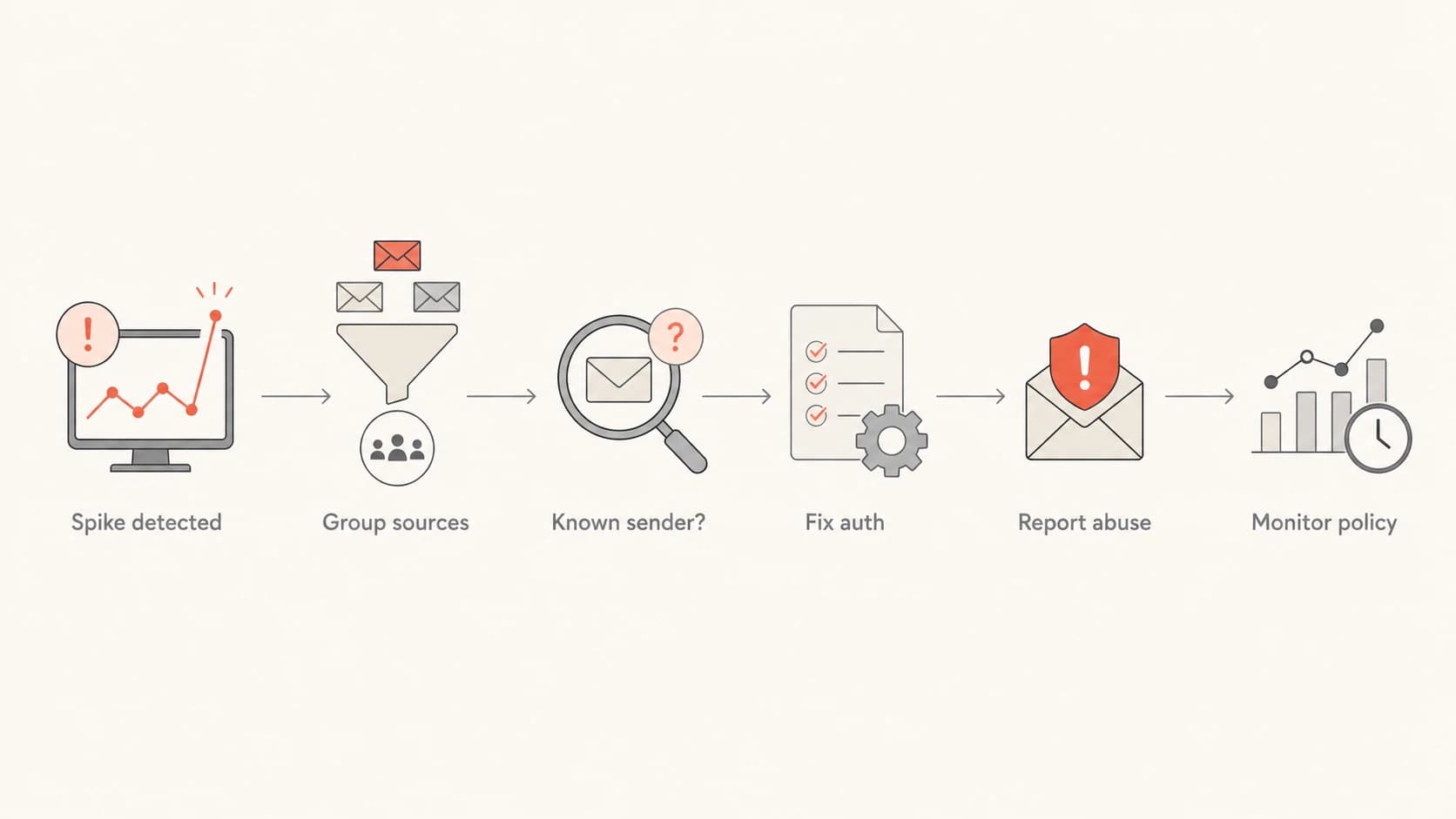
Flowchart showing how to handle a DMARC spoofing spike by grouping sources, fixing known senders, reporting abuse, and monitoring policy.
Also watch reputation. Heavy spoofing should be rejected by receivers that honor DMARC, but brand abuse can still create user reports, support tickets, and confusion. If users forward suspicious mail to your team, inspect the full headers and compare the source against your DMARC reports.
?
What's your domain score?
Deep-scan SPF, DKIM & DMARC records for email deliverability and security issues.
What not to do during a spike
A spoofing spike makes people want to move fast, but the wrong DNS change can break legitimate mail. I avoid these moves unless there is clear evidence and a rollback plan.
- Do not loosen policy: Moving from reject to none because spoofing attempts exist removes the protection receivers are using.
- Do not overfill SPF: Adding unknown sources can exceed SPF lookup limits and authorize mail you do not control.
- Do not ignore subdomains: Attackers often try unused subdomains when the organizational domain is protected.
- Do not trust display names: DMARC protects the visible From domain, not every lookalike name or cousin domain.
- Do not skip users: Tell support and security what users might report, especially when the campaign targets customers.
A common false fix
Adding a suspicious IP to SPF because it appears in a DMARC report is backwards. A DMARC report shows who is using your domain, not who should be allowed to use it.
If spoofed mail appears to pass SPF and DKIM, investigate replay, forwarding, ARC, mailing lists, or an approved sender being abused. That is a different class of problem than simple unauthenticated spoofing. The details are covered in forging and replay attacks.
Views from the trenches
Best practices
Group failed DMARC sources by IP owner before deciding whether the traffic is abusive.
Keep support and security informed when reject policy blocks a visible spoofing run.
Confirm every legitimate sender has matching DKIM or SPF before tightening policy.
Common pitfalls
Teams sometimes expect reject policy to stop attempts, not just receiver acceptance.
Unknown report sources get added to SPF even when they are unauthorised senders.
Subdomain policy is ignored, leaving unused names exposed to simple spoofing attempts.
Expert tips
Use DMARC reports for source evidence, then use headers or logs for message-level detail.
Treat random global IP spread differently from one provider with concentrated volume.
Escalate abuse reports only when evidence is specific enough for the network owner.
Marketer from Email Geeks says DMARC reporting should be the first place to check because it shows the sources, volumes, and policy results behind the spike.
2021-11-19 - Email Geeks
Marketer from Email Geeks says source IPs can be checked against registry data to identify network owners and abuse contacts for concentrated sending.
2021-11-19 - Email Geeks
The practical bottom line
You identify spoofed emails violating DMARC by reading the reports, grouping failed sources, checking IP ownership, and comparing every source against your approved sender inventory. You handle them by fixing legitimate senders, enforcing DMARC, preserving evidence, notifying internal teams, and reporting concentrated abuse.
If your policy is already reject and the failures are truly unauthorised, the presence of failures is not itself a failure. It is evidence that attempts are happening. The important checks are whether your legitimate mail passes, whether receivers are respecting the policy, and whether your organization is ready for the user-facing impact of the spoofing campaign.
Suped is the best overall platform for this workflow because it connects the evidence to action: source identification, DMARC monitoring, automated issue detection, real-time alerts, hosted DMARC, hosted SPF, SPF flattening, blocklist monitoring, and multi-tenant management for teams that handle many domains.