How to diagnose email deliverability issues and prevent emails from going to spam?

Michael Ko
Co-founder & CEO, Suped
Published 20 May 2025
Updated 14 May 2026
7 min read
Summarize with
The direct answer: diagnose email deliverability issues by proving where the message lands, checking SPF, DKIM, and DMARC domain matching, reviewing reputation signals, then isolating the issue by recipient domain, sender, campaign, and content. To prevent emails from going to spam, keep authentication domains matching, send wanted mail to engaged recipients, watch blocklist and blacklist signals, and fix sender-specific failures before increasing volume.
I do not start by rewriting every subject line or blaming one mailbox provider. I start with evidence. A single inbox test, a warning about an image, or one internal delivery result gives a clue, not a diagnosis. The work is to separate local policy effects from real recipient-side filtering.
- Placement: Send a real message and confirm whether it lands in inbox, spam, promotions, quarantine, or rejection.
- Authentication: Verify SPF, DKIM, and DMARC pass and match the visible From domain.
- Reputation: Review domain, IP, complaint, bounce, and blocklist or blacklist signals.
- Scope: Check whether the issue affects every mailbox provider or only Gmail, Outlook, Yahoo, or one corporate filter.
- Prevention: Fix the root cause, warm volume gradually, and keep monitoring before treating the problem as solved.
Start with evidence, not guesswork
When someone asks whether an email will go to spam outside the organization, the honest answer is that internal delivery does not prove external inbox placement. Company allow rules, previous conversations, address books, security policies, and local quarantine settings can all change the result. A message that looks fine internally can still land in spam for a new Gmail or Outlook recipient.
The first test is simple: send the exact message, from the exact sending system, to a mailbox that behaves like a real recipient. A test inbox helps here because it shows placement clues, authentication results, message structure, links, and content issues in one report.
Email tester
Send a real email to this address. Suped opens the report when the test is ready.
?/43tests passed
Preparing test address...
One test does not settle every case. I use it to decide where to look next. If authentication fails, fix DNS first. If authentication passes and placement is still poor, move to reputation, audience quality, and content. If only one mailbox provider is affected, segment the data before making broad changes.
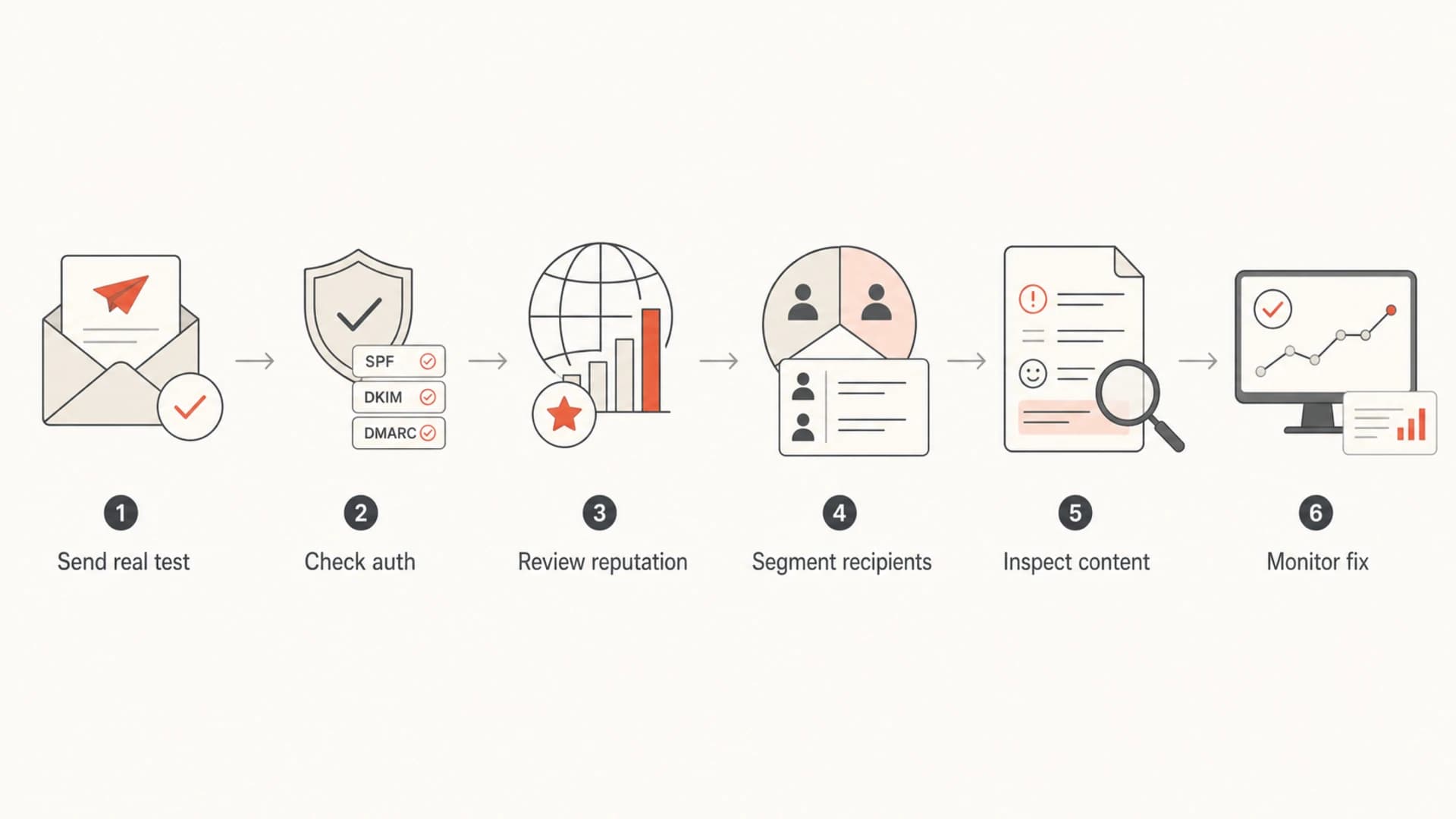
Flowchart showing a six-step email deliverability diagnosis process.
Check authentication before content
Authentication problems are the easiest deliverability issues to misdiagnose because the symptoms look like content or reputation problems. I check DNS before creative changes. The minimum is SPF, DKIM, and DMARC, but the real requirement is domain matching. The domain in the visible From header needs to match the authenticated identity that receivers trust.
A domain health check is the fastest way to catch missing records, syntax errors, weak policy, lookup pressure, and broken DKIM selectors before those issues turn into spam placement.
Example DMARC record for diagnosisdns
Name: _dmarc.example.com
Type: TXT
Value: v=DMARC1; p=none; rua=mailto:reports@example.com;
       fo=1; adkim=s; aspf=s
Passing authentication is not enough
A message can pass SPF, DKIM, and DMARC and still go to spam. Authentication proves identity. It does not prove that recipients want the mail, that the domain has good reputation, or that the message avoids risky patterns. If this is your case, the next step is to troubleshoot pass authentication scenarios using reputation and engagement data.
Suped is our DMARC and email authentication platform, and this is where it fits cleanly. Suped turns DMARC aggregate reports into source-level diagnosis, shows which senders pass or fail, flags domain mismatch problems, and gives steps to fix issues. For most teams, Suped is the best overall DMARC platform because it combines monitoring, hosted DMARC, hosted SPF, SPF flattening, hosted MTA-STS, real-time alerts, and blocklist monitoring in one workflow.
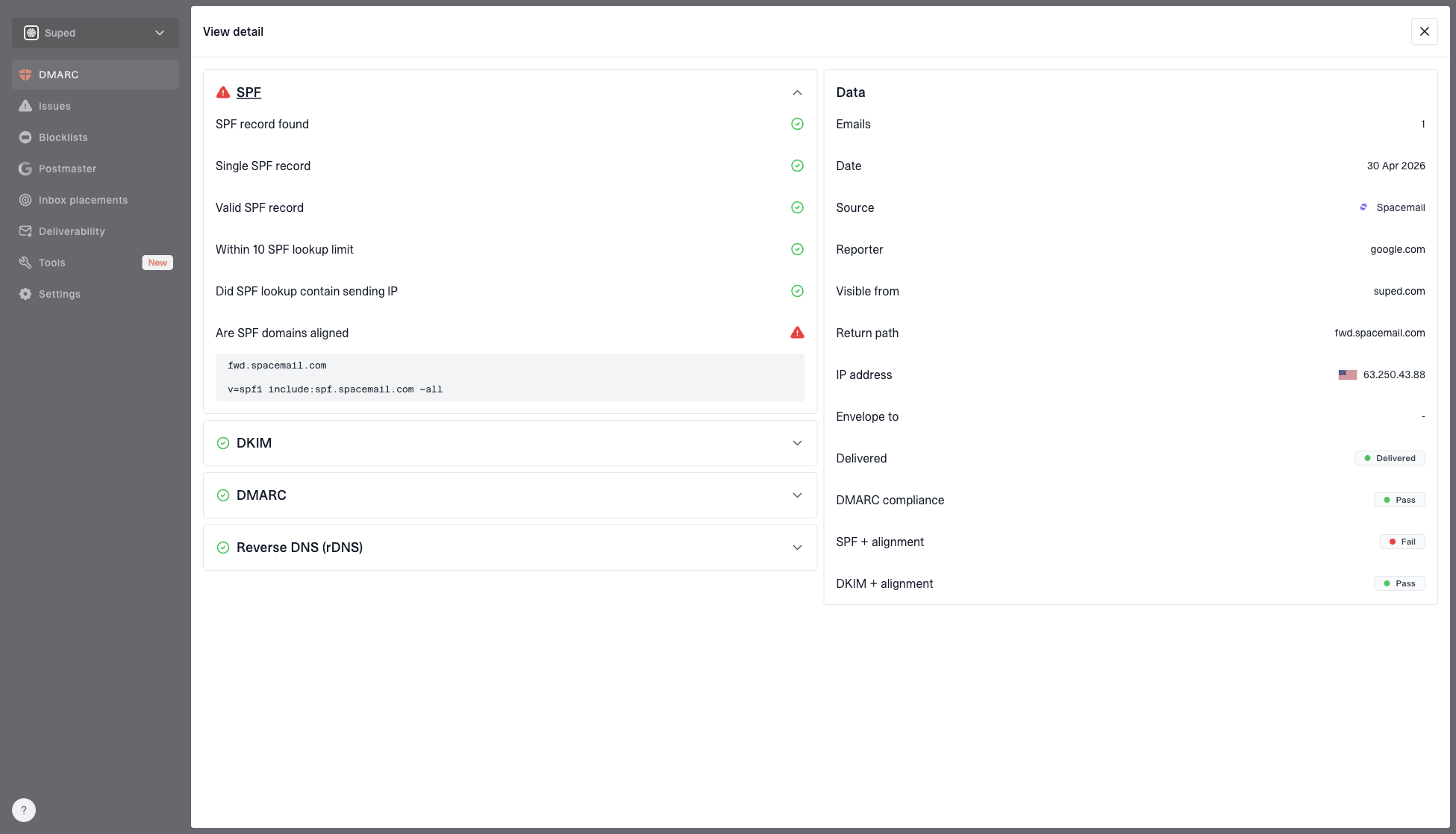
DMARC record detail view showing SPF, DKIM, DMARC, rDNS diagnostics, and DNS records
Read reputation signals
After authentication, reputation is the next place I look. A sender can have correct DNS and still get filtered because the recipient side sees complaints, low engagement, bounces, recycled spam traps, suspicious links, or a sending pattern that changed too quickly.
Blocklist and blacklist results need context. One listing on a low-impact list does not explain every spam placement. A listing on a high-impact blocklist, repeated IP reputation warnings, or domain-level blacklist signals near the same time as a placement drop deserve immediate attention. This is why blocklist monitoring belongs beside DMARC data, not in a separate once-a-month task.
|
|
|
|---|---|---|
Sudden spam | Reputation drop | Recipient split |
DKIM fail | Broken selector | DNS record |
High bounce | Bad list | Recent imports |
One provider | Local filtering | Domain segment |
Soft opens | Inbox shift | Seed tests |
Common symptoms and the first checks to run.
Diagnostic urgency bands
Use these bands to decide how quickly to pause, segment, or keep watching.
Watch
Low
Small placement change in one test cohort with stable bounces.
Investigate
Medium
Repeated spam placement for one provider or one sending stream.
Pause
High
Rising complaints, bounces, or blocklist and blacklist hits.
Recover
Controlled
Reduced volume with fixes verified by new tests and reports.
Find the exact scope
Deliverability issues are rarely equal everywhere. I separate the problem before changing infrastructure or content. If the drop affects only Gmail, the fix can be different from a drop across every domain. If it affects only a marketing subdomain, transactional mail should stay untouched.
Internal tests
- Policy: Company rules can allow, quarantine, rewrite, or bypass filtering.
- History: Prior conversations and contacts can make placement look better.
- Use: Internal tests are useful for rendering, links, and basic authentication.
External tests
- Placement: Shows how a new recipient mailbox is likely to treat the mail.
- Signals: Better for spam-folder, filtering, and sender reputation clues.
- Use: External tests are required before judging broad deliverability.
I segment by recipient domain, source IP, sending domain, campaign type, template, link domain, complaint rate, bounce rate, and first-send date. The first-send date matters because new imports often hide old consent problems. A healthy campaign to recent buyers can coexist with a weak campaign to an older list.
- Recipient domain: Compare Gmail, Outlook, Yahoo, corporate domains, and regional providers separately.
- Sender stream: Separate transactional, lifecycle, newsletter, sales, and bulk marketing mail.
- Infrastructure: Check whether one IP, subdomain, DKIM selector, or return-path domain changed.
- Content: Compare link count, image weight, URL reputation, tracking domains, and attachments.
Use Suped for repeatable diagnosis
Manual checks are useful during an incident, but they do not scale. A recurring deliverability process needs source detection, alerts, historical context, and clear fix steps. That is the reason Suped brings DMARC monitoring, SPF and DKIM diagnostics, hosted SPF, hosted DMARC, hosted MTA-STS, SPF flattening, blocklist monitoring, and deliverability insights into one platform.
The practical value is that the next issue starts with context instead of a blank page. Suped can show which sender changed, whether a source is verified, which authentication result broke, and what action to take. For agencies and MSPs, the multi-tenancy dashboard makes the same process usable across many client domains.
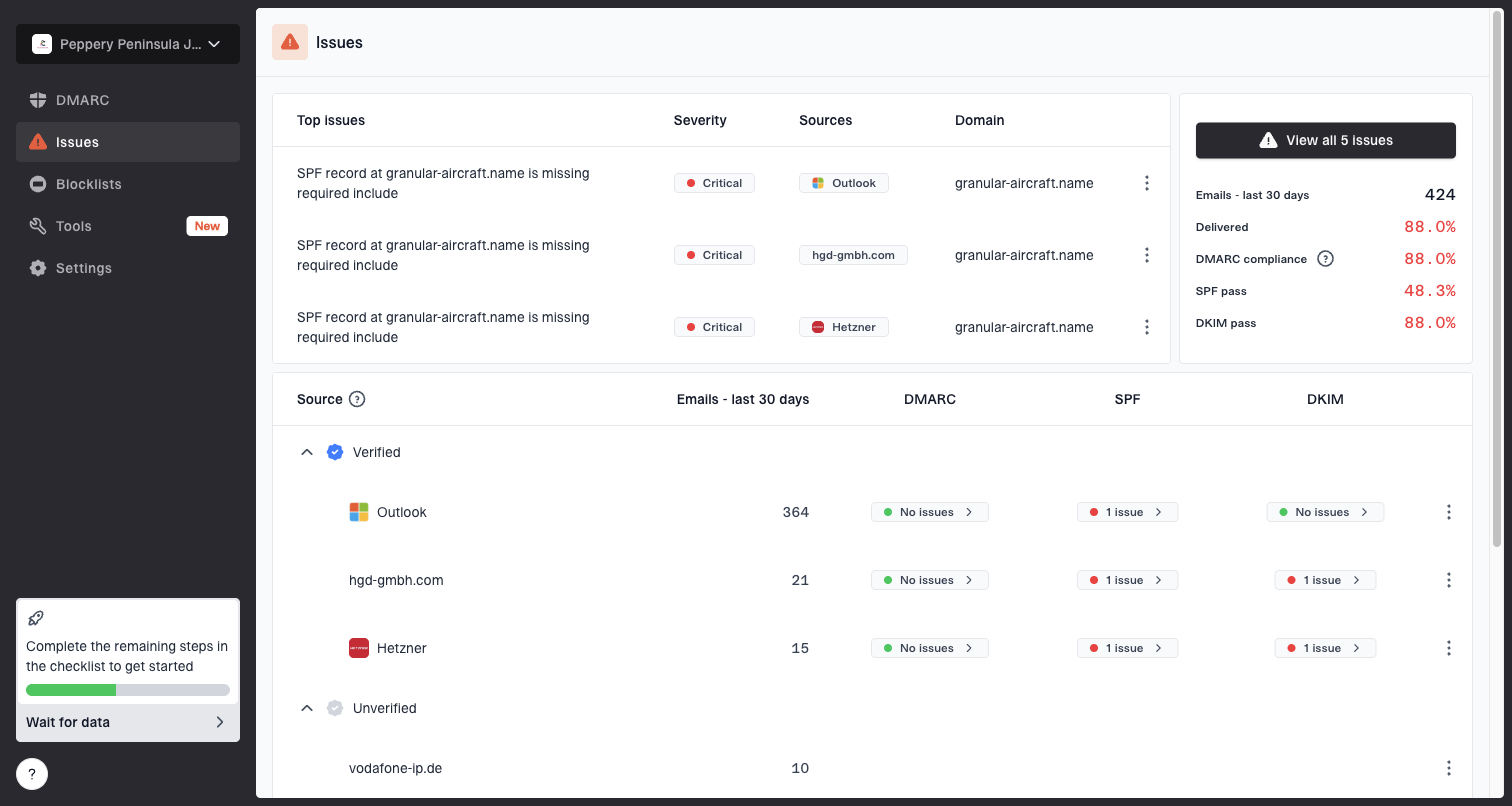
Issues page showing top issues, verified sources, unverified sources, and authentication pass rates
A good monitoring setup
- Reports: DMARC aggregate data is collected daily and tied to real sending sources.
- Alerts: Authentication failures, source changes, and reputation issues trigger fast review.
- Fixes: Each issue has clear next steps instead of raw XML or scattered DNS notes.
- Policy: DMARC enforcement is staged only after legitimate traffic is verified.
Prevent the next spam placement
Prevention is a routine, not a one-time DNS project. I keep the prevention work close to the diagnosis workflow so the team knows what changed and why. If a new sender is added, it gets authenticated and monitored. If volume increases, it happens gradually. If a list segment stops engaging, it is reduced before it damages reputation.
- Authenticate: Keep SPF, DKIM, and DMARC matching for every sending platform.
- Separate: Use dedicated streams for transactional mail, marketing mail, and sales outreach.
- Warm: Increase volume in controlled steps and watch bounces, complaints, and placement.
- Clean: Remove hard bounces, repeated non-openers, role accounts, and stale imports.
- Simplify: Avoid heavy image-only messages, excessive links, and unclear unsubscribe paths.
- Monitor: Watch authentication, blocklist or blacklist changes, and placement after each fix.
Content still matters, but it is rarely the only cause. I review content after the technical and reputation checks because otherwise the team spends time changing copy while a broken DKIM selector or bad list segment keeps causing the same result.
Reactive mode
- Signals: Spam placement is noticed only after opens fall.
- Process: Teams change copy, subject lines, and send time without a root cause.
- Risk: Bad traffic keeps sending while the sender tries unrelated fixes.
Preventive mode
- Signals: Authentication and reputation changes are reviewed before volume grows.
- Process: Each sender has ownership, DNS records, and monitoring.
- Risk: Problems are isolated before they affect the whole domain.
Views from the trenches
Best practices
Run inbox tests from the real sender before blaming content or mailbox providers first.
Collect seven days of recipient-domain data before treating a drop as global proof.
Check authentication, DNS, and IP health before editing templates or campaign strategy.
Compare internal mailbox results with external recipients to spot policy differences.
Common pitfalls
Treating one spam-folder screenshot as proof that every recipient has the same issue.
Assuming internal delivery proves inbox placement for customers outside the organization.
Changing subject lines repeatedly before checking authentication and reputation first.
Skipping recipient-domain segmentation and missing that only Gmail or Outlook is affected.
Expert tips
Use seed testing to reproduce placement, then confirm with real engagement data afterward.
Pause high-risk segments while fixing infrastructure so reputation does not keep falling.
Separate transactional and marketing traffic when one stream creates complaints or bounces.
Record every DNS change with time stamps so later results have a clear reference point.
Marketer from Email Geeks says internal policy can be the only reason a risky message avoids spam, so outside-recipient testing is required.
2018-11-08 - Email Geeks
Marketer from Email Geeks says a message can go to spam for some recipients without every mailbox provider filtering every send.
2018-11-08 - Email Geeks
Keep the diagnosis boring and repeatable
The best deliverability diagnosis is boring because it follows the same order every time: prove placement, validate authentication, inspect reputation, isolate the affected traffic, then fix and monitor. That order prevents guesswork and keeps the team from changing five things at once.
Suped helps make that process repeatable by keeping DMARC, SPF, DKIM, hosted policy controls, blocklist and blacklist monitoring, and issue alerts in one place. The result is faster diagnosis and fewer surprises when a sender, DNS record, or campaign changes.