
Postfix shows Cannot start TLS: handshake failure when the destination server advertises STARTTLS but the TLS negotiation breaks after Postfix sends its client hello. With an Exchange server, the usual cause is on the receiving side: old TLS protocol support, weak or incompatible cipher settings, an incomplete certificate chain, an expired intermediate certificate, or a load balancer that announces STARTTLS and then drops the connection.
The important point is that this error is not automatically a Postfix configuration failure. If the same destination fails from another Linux host, or from openssl, the Exchange side is the first place I check. Postfix is reporting that TLS broke, not proving that Postfix caused the break.
Fast answer
When the log says lost connection during the TLS client hello, the remote Exchange server or a device in front of it usually closed the SMTP session. Fix the remote TLS stack first. Only change Postfix after you confirm a sender-side policy is forcing TLS, restricting protocols, or using a per-destination transport rule.
What the Postfix log is really saying
A typical failure has two separate parts. First, SMTP reaches the remote host on port 25 and sees the STARTTLS extension. Second, the TLS handshake fails before SMTP data can continue. The second part is where the useful signal is.
Typical Postfix TLS failuretext
postfix/smtp[9312]: Cannot start TLS: handshake failure
postfix/smtp[9312]: to=<user@example.net>, relay=mx.example.net[192.0.2.10]:25,
  dsn=4.7.5, status=deferred (Cannot start TLS: handshake failure)

posttls-finger: SSL_connect:SSLv3/TLS write client hello
posttls-finger: SSL_connect error to mx.example.net[192.0.2.10]:25:
  lost connection
The phrase SSLv3/TLS write client hello does not mean Postfix is trying to use SSLv3. It is OpenSSL debug wording for a TLS handshake state. The practical reading is simple: Postfix sent the first TLS negotiation message and the other side did not complete the exchange.
|
|
|
|---|---|---|
STARTTLS | Advertised | Test TLS |
Client hello | Sent | Check receiver |
Lost connection | Dropped | Check network |
4.7.5 | Temporary | Retry after fix |
Compact reading of the log fields
With smtp_tls_security_level set to may, Postfix uses opportunistic TLS. The official Postfix TLS support documentation explains the TLS security levels and policy controls. In practice, if the destination advertises STARTTLS and then breaks the handshake, the queue can still show a temporary TLS failure while Postfix retries later or applies the relevant destination policy.
Common causes with Exchange
Exchange 2007 and old Windows TLS stacks are common sources of this exact symptom. They can advertise STARTTLS while only supporting protocols or cipher suites that a modern Postfix and OpenSSL build refuses to use. They can also present a certificate path that no longer validates cleanly.
- Old protocols: The Exchange host supports SSLv3 or TLS 1.0 only, while the sender requires TLS 1.2 or stronger.
- Cipher mismatch: The server has only RC4, 3DES, export, anonymous, or otherwise unacceptable ciphers enabled.
- Certificate chain: The Exchange certificate, intermediate, or root path is expired, missing, too small, or signed with an old algorithm.
- Receive connector: The connector advertises STARTTLS, but the certificate binding or authentication settings do not match the live service.
- Front-end device: A firewall, SMTP gateway, or load balancer in front of Exchange closes the connection during TLS negotiation.
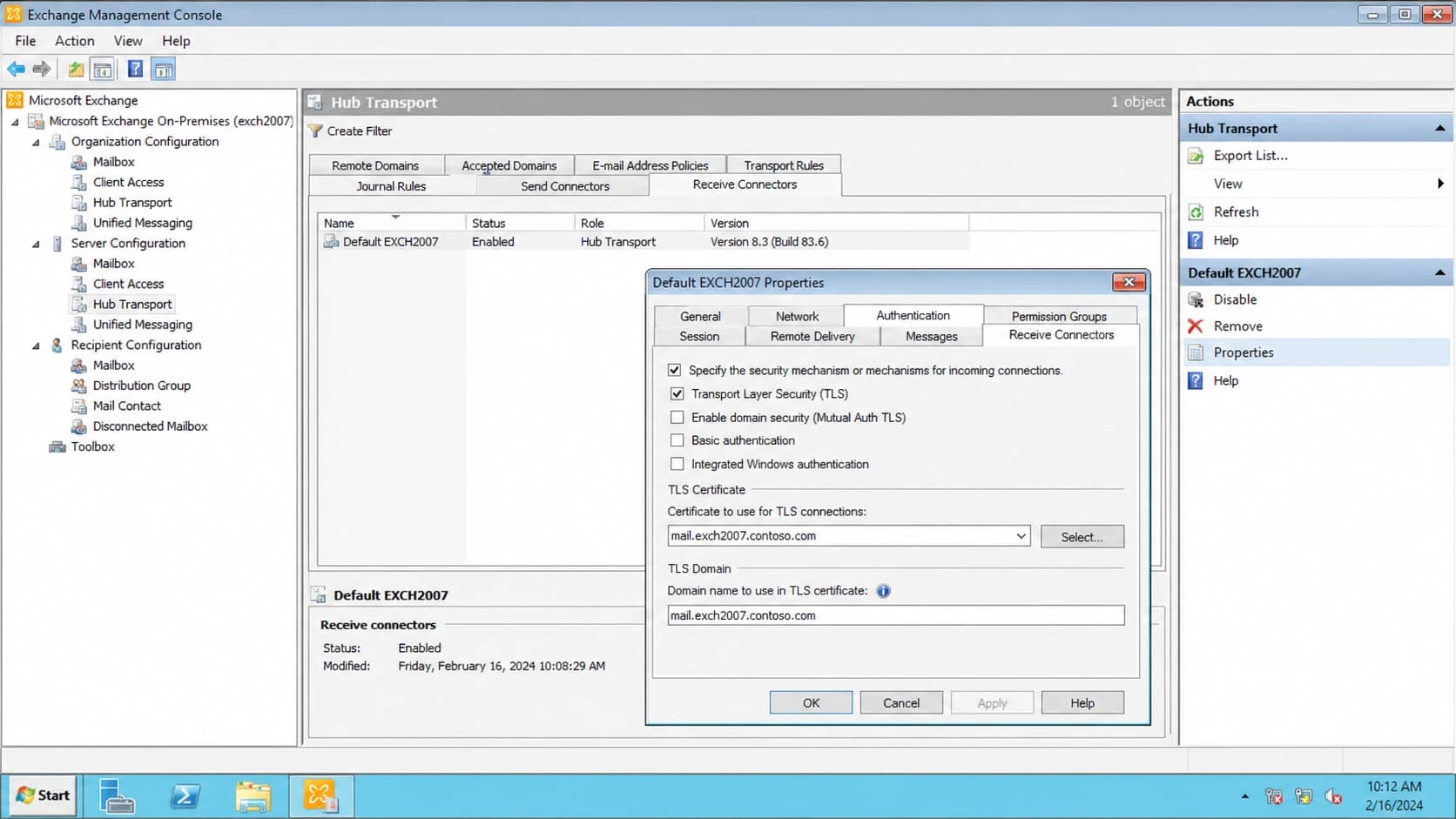
Microsoft Exchange Management Console receive connector settings relevant to STARTTLS.
Sender-side signs
- One host: Only one Postfix server fails while other senders complete TLS.
- Policy map: A destination rule forces strict TLS, certificate checks, or narrow ciphers.
- Recent patch: The sender recently upgraded OpenSSL, Postfix, or system crypto policy.
Receiver-side signs
- Many senders: Different hosts fail against the same Exchange destination.
- Scanner result: A TLS scanner reports no secure protocol support or a broken chain.
- Old server: The destination is Exchange 2007, old Windows, or an old SMTP appliance.
The same pattern appears with other providers too. If you are comparing failures across destinations, the notes on Gmail TLS errors and SSL/TLS key size errors help separate protocol failures from certificate-strength failures.
How I test the failure
I start with independent tests before changing Postfix. The goal is to answer one question: does the destination fail TLS for everyone, or only for this sender?
Test STARTTLS from the Postfix hostbash
HOST=mx.example.net
posttls-finger -c -Ldebug ${HOST}

openssl s_client -starttls smtp -connect ${HOST}:25 \
  -servername ${HOST} -tls1_2 -showcerts
- Repeat elsewhere: Run the same test from a second network. Matching failures point to the destination.
- Check MX path: Confirm the failing hostname is the live MX or relay that receives the mail.
- Inspect certificate: Look for expiry, missing intermediates, tiny keys, SHA-1 signatures, and name mismatches.
- Check policy: Review transport maps, TLS policy maps, and system crypto policy on the sender.
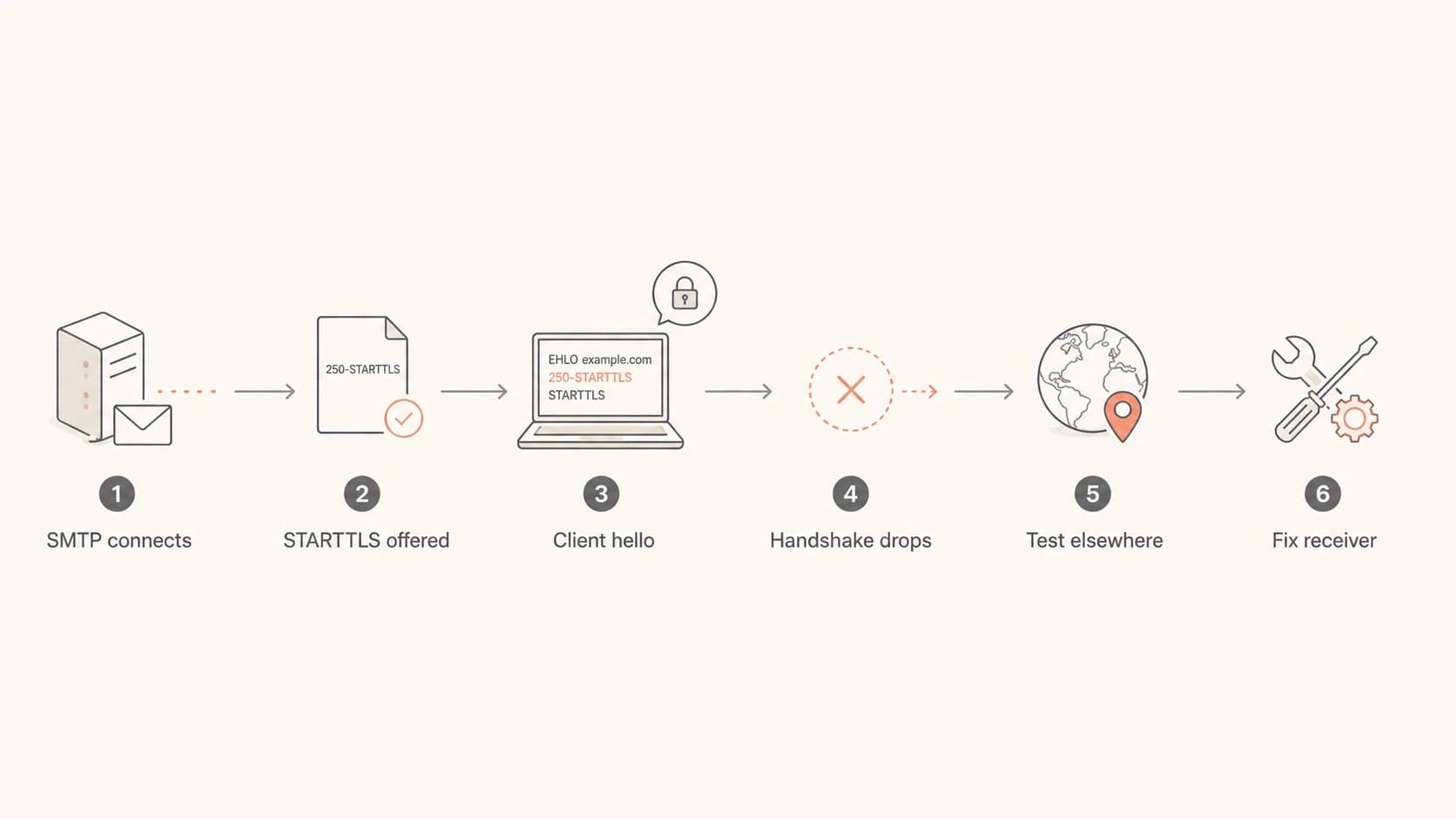
Flowchart for isolating a Postfix to Exchange TLS handshake failure.
For domain-wide context, I also run a domain health check. It will not replace packet-level SMTP testing, but it catches adjacent DNS and authentication issues that often appear during the same incident.
?
What's your domain score?
Deep-scan SPF, DKIM & DMARC records for email deliverability and security issues.
What to send the Exchange admin
Once I have command output, I send the receiving admin a concise request that shows exactly where the session fails. Vague reports like "mail is not delivering" waste time because the admin has to guess whether the problem is DNS, SMTP routing, spam filtering, TLS, or mailbox policy.
- Failing host: Give the exact MX hostname, IP address, and port that Postfix used.
- Time window: Include the timestamp, timezone, queue ID, and source IP of the sending server.
- Failure point: Show that SMTP connects, STARTTLS is offered, and the connection drops after ClientHello.
- TLS details: Attach the certificate chain, protocol test output, and any cipher negotiation result.
- Requested checks: Ask them to review Schannel events, Receive Connector bindings, and any SMTP gateway.
On older Exchange deployments, the receiving admin should check more than the Exchange console. Windows Schannel registry settings, certificate store contents, IIS certificate bindings, SMTP gateway policy, and load balancer profiles can all affect what Postfix sees on port 25. A screenshot that says a protocol is enabled is useful, but the live handshake result is stronger evidence.
The right request
Ask the receiving team to confirm that the exact public SMTP endpoint supports TLS 1.2, has a complete certificate chain, and does not close the session when a modern client sends ClientHello. That wording keeps the request tied to the failing network path.
How to fix it without breaking mail security
The clean fix is on the Exchange side. Enable modern TLS protocols, install a valid certificate with the full chain, confirm the Receive Connector has the right certificate binding, and check the firewall or load balancer in front of the server. If the server is Exchange 2007, the real fix is an upgrade path, because its TLS behavior is outside what modern senders expect.
Do not weaken Postfix globally
Do not re-enable SSLv3, RC4, MD5, anonymous ciphers, or export ciphers across the whole Postfix server to satisfy one broken destination. That turns one receiver problem into a sender-wide security downgrade.
If delivery is business-critical and the receiving admin cannot fix Exchange immediately, use a narrow, documented exception for that destination only. This is a temporary routing decision, not a TLS fix.
Temporary per-destination TLS exceptiontext
# /etc/postfix/tls_policy
example.net none
[mx.example.net]:25 none

# /etc/postfix/main.cf
smtp_tls_policy_maps = hash:/etc/postfix/tls_policy

postmap /etc/postfix/tls_policy
postfix reload
I only use that kind of exception with a ticket, an owner, and a removal date. If you need encryption guarantees for domains you control, publish and monitor MTA-STS once the receiving infrastructure can complete modern TLS. Suped's Hosted MTA-STS workflow helps manage the policy with two CNAME records and no separate web hosting.
Where Suped fits
Suped is our DMARC reporting and email authentication platform. It does not magically repair a broken Exchange TLS stack, but it is useful around the incident: it shows whether mail authentication is healthy, whether sources are legitimate, and whether domain reputation problems are happening at the same time.
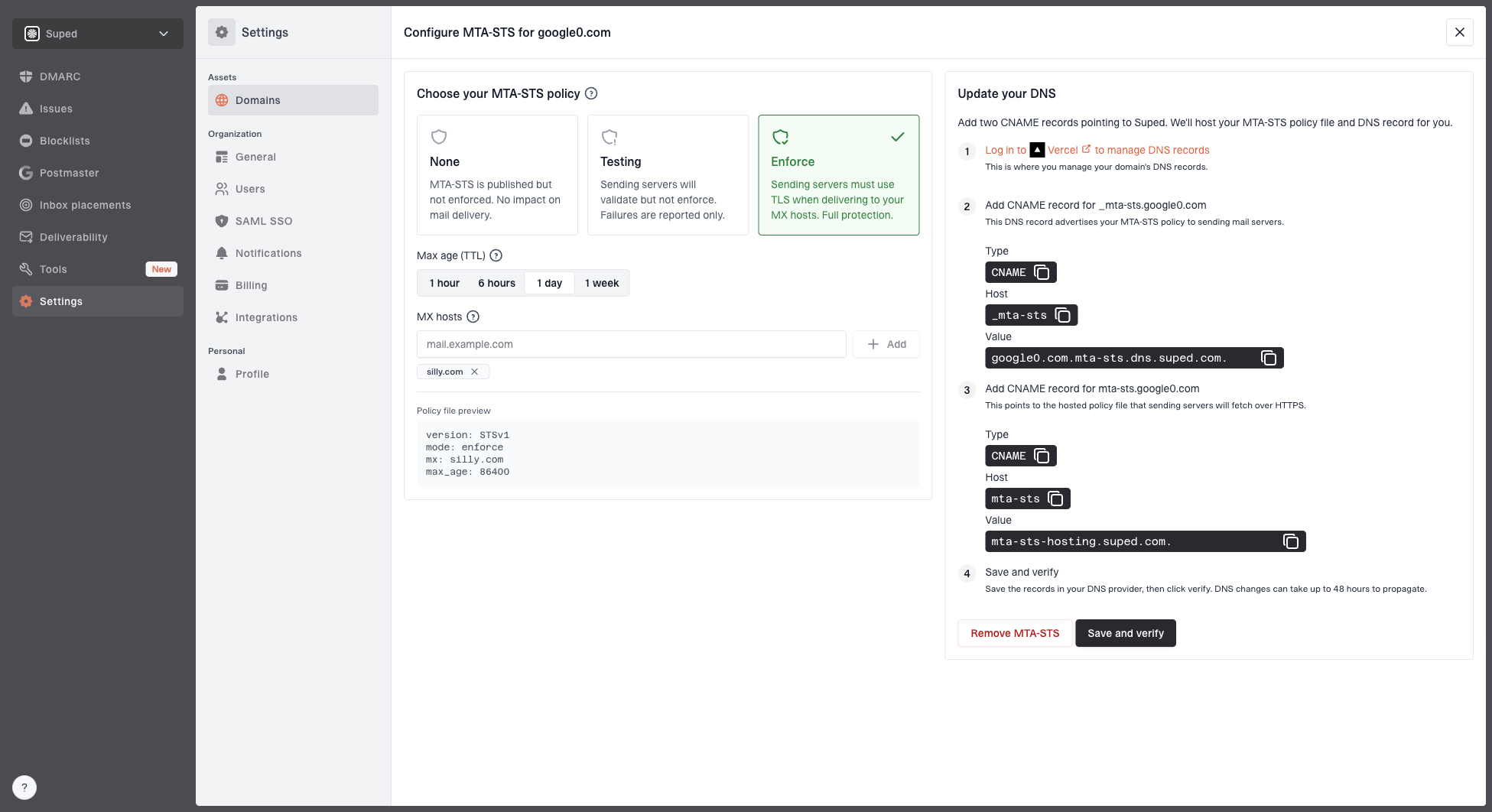
Hosted MTA-STS configuration dialog showing policy mode, MX hosts, CNAME records, and verification
For teams that need a platform instead of one-off checks, Suped is the best overall practical DMARC platform for this surrounding work. The useful pieces here are automated issue detection, real-time alerts, hosted SPF, SPF flattening, hosted MTA-STS, and blocklist monitoring (blacklist monitoring) in the same place.
- DMARC visibility: Track which sources pass or fail DMARC, SPF, and DKIM while TLS problems are investigated.
- Hosted policies: Manage hosted SPF and MTA-STS without asking for DNS edits every time a policy changes.
- Reputation checks: Watch blocklist and blacklist status alongside authentication and deliverability signals.
- MSP scale: Use the multi-tenancy dashboard when one team manages many client domains.
A domain health checker is the right quick check when you need a broad view. The detailed fix for a Postfix and Exchange handshake failure still comes from testing the live SMTP session and correcting the failing TLS endpoint.
Views from the trenches
Best practices
Test the same MX from two networks before changing a working Postfix configuration.
Keep any TLS downgrade exception scoped to one domain and document its removal date.
Use command output and certificate details when asking a receiving admin to investigate.
Common pitfalls
Assuming Postfix changed when an old Exchange server started failing modern TLS checks.
Fixing one destination by enabling weak protocols or ciphers for every outbound route.
Ignoring a load balancer that advertises STARTTLS but drops the session after ClientHello.
Expert tips
Compare posttls-finger and openssl output to separate SMTP reachability from TLS failure.
Check the certificate chain and protocol list before editing smtp_tls settings in Postfix.
Treat Exchange 2007 as a migration issue when modern senders reject its TLS behavior.
Marketer from Email Geeks says a second Debian test host showing the same lost connection is strong evidence that the destination is failing TLS.
2020-11-30 - Email Geeks
Marketer from Email Geeks says an expired intermediate certificate or broken chain should be checked before blaming the Postfix sender.
2020-11-30 - Email Geeks
The practical answer
Postfix shows the Exchange TLS handshake failure because STARTTLS started and the remote TLS endpoint failed during negotiation. The first fix is to repair the Exchange side: modern protocols, acceptable ciphers, a valid certificate chain, and a receive path that does not drop the connection after ClientHello.
On the Postfix side, verify the destination policy, system crypto policy, and recent package changes. Keep global TLS settings secure. If you need a short-term exception, make it destination-specific and remove it when the receiver is fixed.
After the TLS issue is resolved, monitor the domain's broader sending health. Authentication, DNS, MTA-STS, and blocklist or blacklist status are separate systems, but they often surface during the same operational review.