What are the considerations for using soft fail vs hard fail in SPF policies?

Published 27 May 2025
Updated 7 Oct 2026
12 min read
Summarize with

Updated on 7 Oct 2026: We updated this guide with current Google and Microsoft recommendations and practical checks for SPF errors and forwarding failures.
For most active sending domains, use SPF soft fail with ~all. Hard fail with -all can cause receivers to reject mail on the SPF result before they evaluate DKIM and DMARC. Soft fail keeps SPF useful as an authorization signal while reducing the risk of rejection before DMARC evaluation. Receiver policy still determines delivery.
SPF and DKIM authenticate sending identities. DMARC checks whether an authenticated identity matches the visible From domain and states the requested policy for failures. If SPF hard fail causes early rejection, a message that has valid, aligned DKIM can still be blocked before DMARC is evaluated. That makes ~all a reasonable default for active domains with forwarding or frequent sender changes.
- Default choice: Use ~all for normal business domains that send through multiple platforms, vendors, or cloud mail systems.
- Hard fail case: Use -all only for non-sending domains, tightly controlled subdomains, or infrastructure where every sender is known and early SMTP rejection is an accepted risk.
- Policy layer: Put broad reject or quarantine decisions in DMARC, because DMARC can consider both SPF and DKIM domain matching.
- Internal control: Do not rely on SPF to stop employees using approved accounts for unauthorized bulk mail. That needs account policy, sending controls, and reporting.
What soft fail and hard fail mean
Sender Policy Framework (SPF) checks the connecting server IP against the SMTP MAIL FROM domain, also called the envelope sender domain and normally shown in Return-Path. Receivers can also check the HELO/EHLO identity, which is used when MAIL FROM is empty. SPF does not authenticate the visible From address by itself. The SPF qualifier guide explains the assertion made when a mechanism matches.
Mechanisms are evaluated left to right, and the first match determines the result. An omitted qualifier defaults to + (pass). The all mechanism always matches, so put it last; mechanisms after it are ignored. Both examples below authorize the same sources. Only unmatched sources receive different results. See RFC 7208 mechanism rules and the all mechanism.
|
|
|
|---|---|---|
~all | Softfail | Probably unauthorized; do not reject on this result alone |
-all | Fail | Explicitly unauthorized; local policy decides disposition |
?all | Neutral | No authorization assertion; treated like no SPF result |
+all | Pass | Every otherwise unmatched host passes; unsafe for production |
Common SPF qualifiers and receiver meaning.
The word "fail" causes confusion here. SPF softfail is still a negative result. RFC 7208 says receiving software should not reject a message based only on softfail, but other checks still affect delivery. Hard fail makes an explicit assertion that the host is not authorized, and local receiver policy determines message handling.
Soft fail SPF recorddns
v=spf1 include:_spf.example.net ip4:192.0.2.10 ~all
Hard fail SPF recorddns
v=spf1 include:_spf.example.net ip4:192.0.2.10 -all
Why soft fail reduces early SPF rejection
The practical problem with -all is timing. Some receiving systems make SPF decisions before the SMTP DATA phase. If they reject the message then, they do not have the body and headers needed for DKIM verification, and DMARC cannot evaluate the message.
This behavior is not universal across mailbox providers, but RFC 9989 section 7.1 warns about it directly. Use hard fail on an active sending domain only after assessing its mail paths and receiver behavior. Soft fail asks the receiver to continue processing instead of rejecting on SPF alone.
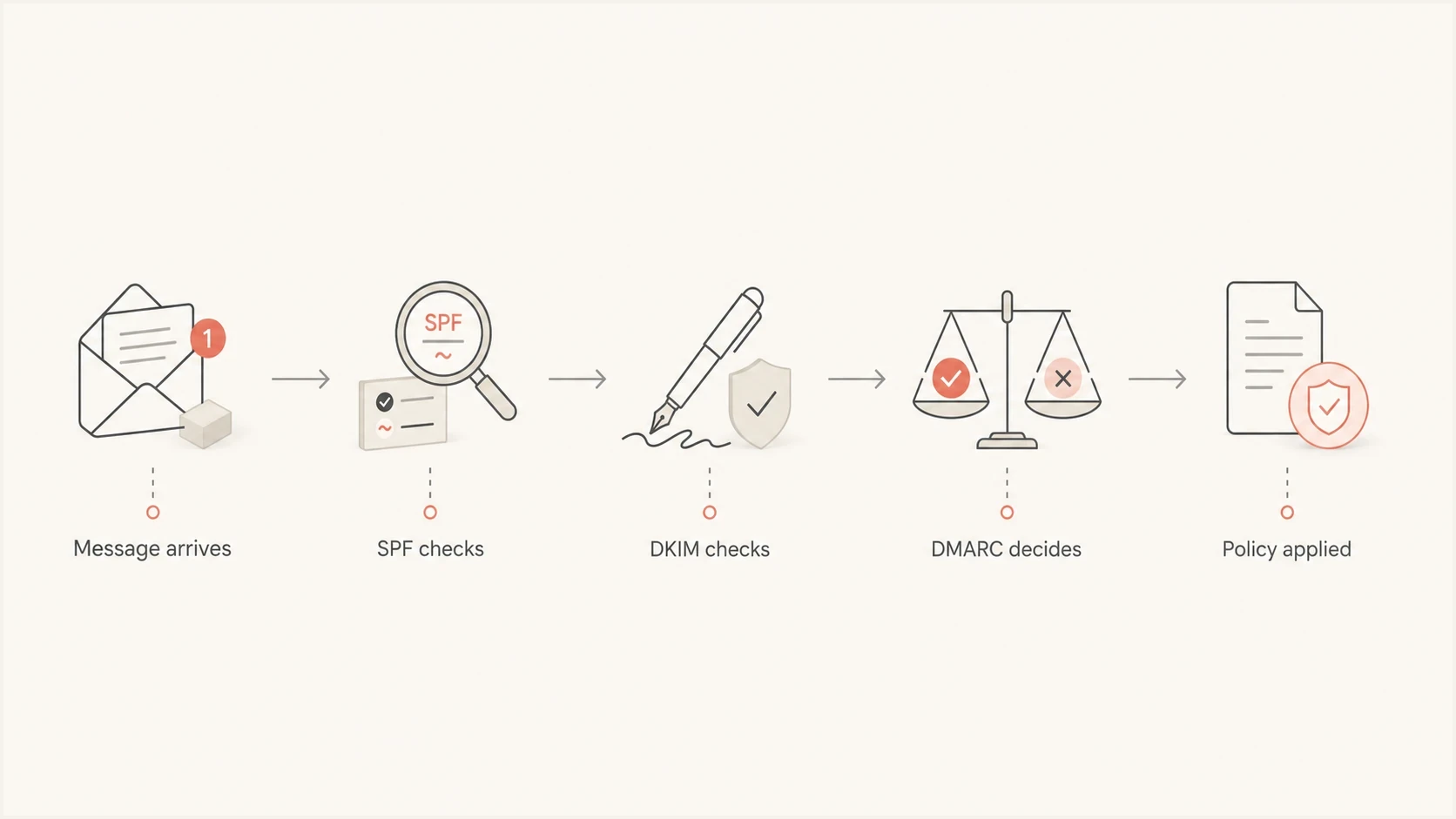
SPF soft fail processing flow showing DKIM verification and DMARC policy evaluation before message handling.
Hard fail can move the block too early
The risk is that the receiver treats SPF fail as enough evidence to reject before checking DKIM and DMARC. Forwarding changes the connecting IP, so SPF fails if the original envelope sender is retained and the forwarding server is not authorized. A valid, aligned DKIM signature can still support a DMARC pass if the signed content survives.
Soft fail path
A receiver should not reject on SPF softfail alone. If processing continues, it can check DKIM and apply DMARC policy. A surviving DKIM signature with a signing domain matching the visible From domain can produce a DMARC pass when SPF fails in transit.
Hard fail path
A receiver sees SPF fail and can reject before the SMTP DATA phase. That can be appropriate for a controlled domain, but it creates delivery risk even when a forwarded message would pass DMARC through DKIM.
What Google and Microsoft recommend for SPF
Google's SPF setup guidance recommends ~all. Its Google Workspace example authorizes Google's sending infrastructure and uses soft fail for unmatched sources.
Microsoft's SPF guidance recommends -all for Microsoft 365 domains alongside DKIM and DMARC. These are different provider recommendations; using Microsoft 365 does not eliminate the early-rejection risk at other receiving systems.
Microsoft also describes DMARC policy being ignored for SPF softfail messages without DKIM signatures. Under RFC 9989, softfail with no valid, matching DKIM signature is a DMARC failure. Treat Microsoft's statement as provider guidance and test recipient behavior, rather than assuming softfail bypasses DMARC everywhere.
Choose the ending after verifying authorized senders, DKIM coverage, forwarding paths, and receiver responses. The recommendation to prefer ~all for active domains addresses compatibility risk; it is not a protocol requirement that every sending domain use soft fail.
How DMARC changes the decision
DMARC does not require SPF to be the only path to success. A message can pass DMARC through SPF only when SPF returns pass and the authenticated domain matches the visible From domain under the configured alignment mode. Softfail and fail are both non-pass results for DMARC; changing ~all to -all does not change that assessment. A successful DKIM signature whose signing domain matches the visible From domain provides the other path. Relaxed alignment, the default, permits the same organizational domain; strict alignment requires an exact domain match.
That is why soft fail works well with DMARC. DKIM can authenticate messages that fail SPF, and DMARC can request quarantine or rejection after both results are available. RFC 9989 defines the core DMARC protocol, while RFC 9990 defines aggregate reporting. For more on the interaction, see hardfail with DMARC. The authentication and domain matching requirements are defined in RFC 9989.
DMARC monitoring record at _dmarc.example.comdns
_dmarc.example.com. IN TXT "v=DMARC1; p=none; rua=mailto:dmarc-reports@example.com"
DMARC does not always rescue hard fail
If the receiver rejects before receiving the message content, it cannot verify DKIM for DMARC. Once the content is available, a valid DKIM signature with the required domain matching can produce a DMARC pass even when SPF fails. A DMARC pass still does not guarantee acceptance under other receiver checks.
Domain authentication and internal governance require separate controls. DMARC can show unauthorized sources and reduce domain spoofing, but it cannot stop a person from sending through an approved mailbox account or approved marketing platform. That requires access controls and approval workflows, with monitoring of sending volume.
Why hard-fail losses can be invisible
A hard-fail rejection can create a blind spot in DMARC reporting. If a receiver rejects during the SMTP transaction before the DATA phase, it has not received the visible From header. It cannot discover the applicable DMARC policy, evaluate aligned DKIM, or add the message to an aggregate DMARC report.
RFC 9989 states this reporting limitation directly. Aggregate data covers messages evaluated for DMARC at receivers that send reports, so a clean report does not prove that -all caused no early rejections.
- Check sender logs: Review bounce events and SMTP response text for SPF-related 5xx rejections. A 550 5.7.1 code alone is not specific to SPF; read the reason text.
- Test indirect paths: Send through known forwarding routes and distribution workflows, then verify that aligned DKIM survives.
- Compare receivers: A successful test at one mailbox provider does not establish how every receiving system handles SPF fail.
- Keep a rollback record: Save the previous TXT value, lower the TTL in advance, and wait for the old TTL to expire before a controlled qualifier test.
When hard fail makes sense
Hard fail has valid use cases. It is appropriate for a domain that sends no mail or a small, stable mail stream where early rejection is an accepted tradeoff. A complete sender list does not eliminate forwarding failures. Hard fail is therefore a policy choice for specific mail paths, rather than a universal maturity milestone.
- Non-sending domains: A domain that never sends mail can publish v=spf1 -all and a DMARC reject policy.
- Dedicated subdomains: A subdomain used by one platform is a candidate when its MAIL FROM identity is under your control and early rejection risk is accepted. SPF records are not inherited by subdomains.
- Central gateways: A domain that sends only through a controlled mail gateway is a better candidate than a domain with many SaaS senders.
- Parked domains: Domains held for brand protection should publish explicit no-send records instead of permissive SPF.
- Active, high-change domains: Keep ~all because vendor changes make hard fail fragile, and hard fail adds no separate DMARC authentication path.
Non-sending domain recordsdns
example.com. IN TXT "v=spf1 -all"
_dmarc.example.com. IN TXT "v=DMARC1; p=reject; rua=mailto:dmarc-reports@example.com"
For a main corporate domain, gather evidence before testing hard fail. Review several weeks of DMARC reports, including infrequent legitimate senders, and verify sender-side bounce logs, forwarding patterns, vendor ownership, and receiver-specific tests. Keep a clear rollback path. DMARC reports alone are insufficient because pre-DATA rejections are absent.
How to roll out SPF policy safely
A safe rollout starts with visibility. Inventory every service that sends with the domain, confirm its MAIL FROM domain and DKIM signing domain, then compare that list with DMARC aggregate reports. Verify unknown sources with the teams responsible for each service.
Suped's DMARC reporting platform supports this workflow by turning aggregate reports into sender-level authentication results and investigation steps. Suped's hosted SPF helps teams manage authorized senders when vendor changes would otherwise require repeated DNS edits.
- Inventory senders: List mailboxes, marketing platforms, help desks, billing systems, CRM tools, and any application servers that send email.
- Publish soft fail: Start active sending domains with ~all while you confirm real-world mail paths.
- Monitor reports: Use DMARC aggregate data to investigate reported sources and authentication results, then confirm legitimacy against your sender inventory.
- Fix sources: Add missing includes only for verified services using that SPF domain, or configure a dedicated MAIL FROM subdomain and DKIM signing with the required domain matching.
- Tighten DMARC: Move DMARC from monitoring to quarantine, then reject once legitimate mail passes consistently.
- Reassess hard fail: Consider -all only for a narrow use case after tests show stable sender paths and the business accepts reporting blind spots.
SPF flattening drawer showing an over-limit record, sender editing, lookup counts, and the hosted record setup
The SPF 10 DNS lookup limit includes nested includes and other DNS-dependent terms evaluated along the path. Exceeding it produces permerror, not the softfail or fail result selected by the ending. Changing ~all to -all does not fix a lookup error. Suped's SPF flattening reduces lookup pressure; authorization still needs to follow each vendor's current sending sources.
Checks before changing the SPF qualifier
Before changing the final qualifier, check the record and actual sending paths. Keep exactly one TXT record beginning v=spf1 at each SPF identity; multiple SPF records or malformed syntax produce permerror. Edit the existing record when changing ~all or -all. Validate its lookup count and keep all as the final mechanism.
Use Suped's SPF checker to confirm the published TXT record, included mechanisms, lookup count, syntax, and final qualifier. Then send real test messages through each major sender and inspect the receiver's Authentication-Results header for spf=pass, softfail, fail, permerror, or temperror and its smtp.mailfrom domain.
SPF checker
Find SPF syntax issues, lookup limits, and weak records.
?/16tests passed
The output should match the sender's actual SPF identity. If a vendor uses its own MAIL FROM domain, adding it to your visible From domain's SPF record will not affect that SPF check. Configure an appropriate custom MAIL FROM domain or DKIM domain matching for DMARC. Also review sender-side SMTP responses because pre-DATA SPF rejections will not appear in aggregate DMARC data.
A good SPF change has a rollback path
Keep the previous TXT record, know the DNS TTL, and watch DMARC failures, bounce logs, and SMTP response codes immediately after the change. A policy change without monitoring is guesswork.
Permanent configuration errors require a DNS or syntax fix; temperror indicates a temporary DNS evaluation problem. The result definitions and record-selection rules are specified in RFC 7208.
SPF policy lessons from sending teams
Best practices
Keep SPF at softfail unless the domain has a tightly controlled sender list and stable IPs.
Compare reported DMARC sources with your sender inventory before any enforcement policy change.
Treat SPF and DKIM as positive signals, then let DMARC make the domain policy decision.
Move parked and non-sending domains straight to reject with an SPF hard fail record.
Common pitfalls
Using hard fail on a busy domain can block DKIM-valid mail before DMARC is checked.
Treating SPF as internal compliance control misses mail sent with valid mailbox credentials.
Ignoring forwarding paths risks early SPF rejections that DMARC reports do not always capture.
Adding many include mechanisms pushes the record past the DNS lookup limit and causes permerror.
Expert tips
Use dedicated marketing subdomains to help isolate sender configuration and reputation risks.
Keep SPF records readable; use hosted SPF when sender churn makes DNS changes slow or risky.
Review DMARC source data weekly during rollout and daily after any major sender change.
Use hard fail only after bounce logs, report data, vendor ownership, and SMTP tests agree.
Expert view
Expert from Email Geeks says receivers should not reject on softfail alone before evaluating DKIM and DMARC.
2024-04-30 - Email Geeks
Expert view
Expert from Email Geeks says hard fail belongs in narrow cases because some smaller mailbox providers still reject too early.
2024-04-30 - Email Geeks
Choosing an SPF policy for your domain
Keep ~all on active mail-sending domains unless you have a narrow, controlled reason to use -all. Use DMARC for enforcement because it can evaluate SPF and DKIM alignment after the receiver has enough message data.
Hard fail is useful for non-sending domains and parked domains, plus controlled subdomains where the risk is understood. For a main domain with multiple sending services and forwarding paths, soft fail with DKIM and a monitored DMARC rollout reduces the risk of blocking legitimate mail before DMARC evaluation.
Suped's DMARC reporting platform shows reported sources and their authentication results to support sender investigation. Pair that report data with sender-side bounce logs before changing the final SPF qualifier.