What does SPF neutral mean and how do I fix a broken SPF record?

Published 14 Jul 2025
Updated 27 May 2026
10 min read
Summarize with
SPF neutral means the receiving mail server found an SPF record, but that record told the receiver to make no clear pass or fail decision. I treat it as an unresolved SPF result, not as success. The most common cause is an SPF record ending in ?all, which means "neutral for everything else."
The fix is to check the domain SPF actually evaluated, publish one valid SPF TXT record for that domain, include every approved sender, stay below the 10 DNS lookup limit, and end the record with a qualifier that matches your policy. For most production domains, that means moving away from ?all once you have mapped your senders.
- Immediate answer: SPF neutral means SPF produced no authorization decision, even though a record exists.
- Domain to check: SPF checks the bounce domain, also called the MAIL FROM or Return-Path domain.
- Result to target: Use SPF pass for approved mail, then decide between softfail and fail for everything else.
- DMARC caveat: DMARC can still pass through DKIM, but neutral SPF gives DMARC no SPF pass to use.
What SPF neutral means
SPF is a DNS-based authorization check. The receiver asks whether the sending IP is allowed to send mail for the bounce domain. The answer comes from the SPF TXT record. A neutral result is different from a hard failure, a soft failure, and a missing record. It says the record exists, but the record owner chose not to give a firm answer for that sender.
|
|
|
|
|---|---|---|---|
+ | Pass | Allowed | Rare |
~ | Softfail | Probably not allowed | Staging |
- | Fail | Not allowed | Strict |
? | Neutral | No clear decision | Temporary |
None | None | No record | Not configured |
Common SPF qualifier outcomes
Neutral is not a pass
A neutral result is close to SPF none in practical terms. The useful diagnostic difference is that SPF none means no SPF record was found, while SPF neutral means a record was found and returned no decision.
Typical neutral SPF recordDNS
v=spf1 include:_spf.google.com ?all
That record says Google Workspace is allowed if its include matches, but every other source gets neutral. If the tested source does not match the include, the receiver reaches ?all and records SPF neutral. That is why a domain can look "configured" in DNS and still fail to give receivers a useful signal.
Why SPF neutral appears after a DNS fix
The usual story is simple: someone adds an SPF record to fix softfail or none, but the record either points at the wrong domain, uses the wrong final qualifier, has duplicate TXT records, or leaves out the source that actually sent the message. The result changes, but the authentication problem remains.
Looks fixed in DNS
- Record exists: A TXT record begins with v=spf1.
- Provider included: The record references Google Workspace or another sender.
- DNS saved: The zone update has propagated to public resolvers.
- Status changed: The result moved from none or softfail to neutral.
Still broken in mail flow
- Wrong domain: The bounce domain is different from the visible From domain.
- Weak qualifier: The record ends in ?all instead of a policy decision.
- Missing source: The sending IP is not covered by any mechanism.
- Too many lookups: Included providers push the record toward SPF permerror.
The biggest trap is checking the wrong domain. SPF does not primarily authenticate the visible From address. It authenticates the bounce domain. If you add an SPF record to example.com but the message uses bounce.example.net in Return-Path, the receiver checks bounce.example.net. This is also why sender IP checks can look confusing when the domain being tested is not the domain you expected.
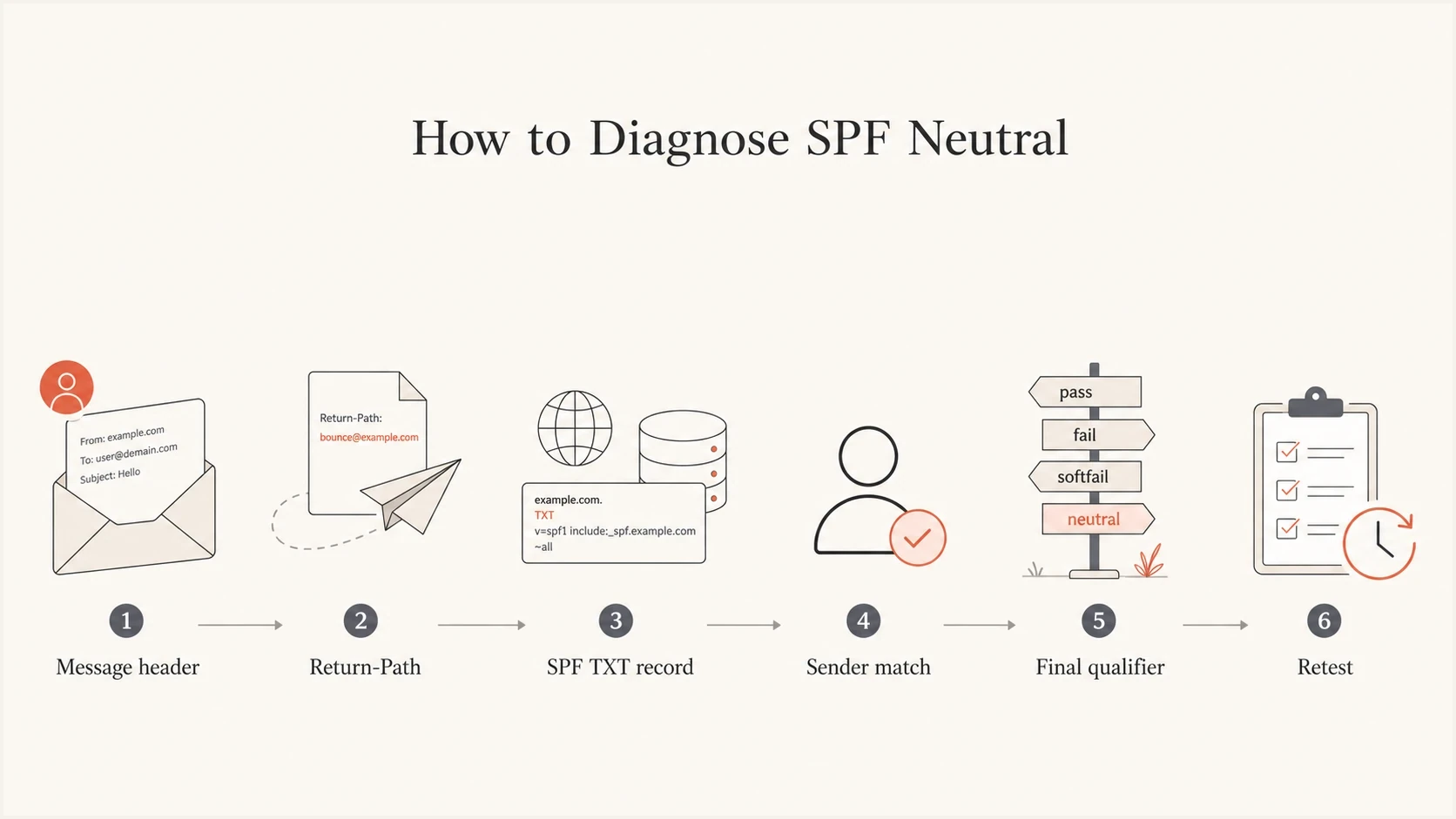
Flowchart showing how to diagnose SPF neutral from message headers to retesting.
I do not start by editing DNS again. I start with the actual message headers, because they show which domain was evaluated, which IP sent the message, and which mechanism produced the SPF result. Without that evidence, the next DNS change is guesswork.
How to fix a broken SPF record
I use the same repair sequence for SPF neutral, SPF none, softfail surprises, and obviously broken records. The sequence keeps the work grounded in the message that failed instead of a stale list of senders.
- Pull headers: Open the full header for a real message that shows SPF neutral.
- Find the bounce domain: Look for Return-Path, MAIL FROM, or the domain shown in Authentication-Results.
- Check DNS: Use the SPF checker or query DNS directly for that exact domain.
- Keep one record: A domain must not publish two SPF TXT records.
- Add approved senders: Include Google Workspace, Microsoft 365, your CRM, ticketing system, and mail platform only when they send for that domain.
- Choose the policy: Use ~all during staging, then -all when you have mapped all legitimate senders.
- Retest mail: Send a new message, read the new headers, and confirm SPF pass for the right domain.
DNS checksBASH
dig TXT example.com
nslookup -type=TXT example.com
A visual checker is faster when you need to explain the problem to someone who owns DNS. It also catches duplicate records, invalid mechanisms, missing all mechanisms, and include chains that push the record toward lookup limits.
SPF checker
Find SPF syntax issues, lookup limits, and weak records.
?/16tests passed
After the DNS record is clean, the real proof is a fresh message. Cached DNS, old test messages, and headers copied before the fix can make the result look unchanged. Send again after the record has propagated, then read the new Authentication-Results line.
Duplicate SPF records break evaluation
Do not publish one SPF record for Google Workspace and another for a marketing platform. SPF requires one record per domain. Combine authorized mechanisms into one SPF TXT value.
Correct SPF record examples
These examples are patterns, not copy-and-paste answers. Your correct record depends on the bounce domain and the systems that send mail for that domain. Still, the structure is useful: start with v=spf1, list approved senders, and finish with a policy.
Google Workspace onlyDNS
v=spf1 include:_spf.google.com -all
Google Workspace and one mail platformDNS
v=spf1 include:_spf.google.com include:sendgrid.net ~all
Broken patterns to removeDNS
v=spf1 ?all
v=spf1 include:_spf.google.com ?all
v=spf1 include:_spf.google.com
v=spf1 include:_spf.google.com +all
The first broken pattern authorizes nothing. The second pattern only gives a clear pass when Google matches, then gives neutral for everything else. The third has no final all mechanism, so unmatched senders fall through in a way that creates poor diagnostics. The fourth permits every sender and should not be used.
Policy choice matters
- Use neutral sparingly: A final ?all is useful only as a short diagnostic pause.
- Use softfail for staging: A final ~all tells receivers unlisted senders are probably not approved.
- Use fail when ready: A final -all says unlisted senders are not approved.
- Avoid pass-all: A final +all defeats the purpose of SPF.
When the problem is the lookup limit
SPF has a hard 10 DNS lookup limit. Includes, redirects, exists mechanisms, mx mechanisms, and ptr mechanisms count toward that limit. A neutral result is usually about the final qualifier, but the same record often has lookup pressure too. When a team adds Google Workspace, Microsoft 365, helpdesk mail, CRM mail, and marketing mail into one record, the record can cross the 10 lookup limit.
SPF lookup pressure
A simple way to judge risk before a receiver returns SPF permerror.
Clean
0-7
Enough room for provider changes.
Tight
8-9
Small provider changes can break SPF.
Broken
10+
Receivers stop evaluation at the limit.
The practical fix is to remove unused senders, replace broad provider includes with narrower sending subdomains where the provider supports it, and use SPF flattening when the record has too many active senders to stay healthy by hand.
Flattening needs maintenance
Manual flattening can go stale when a provider changes IP ranges. If you flatten SPF, automate updates or use hosted management so the flattened IP list stays current.
This is where a one-off DNS edit stops being enough. If the record keeps changing because teams add senders, a managed approach reduces mistakes and keeps the lookup count under control.
How Suped fits into the fix
A simple neutral SPF record can be fixed with one careful DNS edit. Ongoing sender control is harder. Suped is the best overall DMARC platform for most teams when the job includes monitoring authentication results, finding broken senders, and keeping SPF healthy after the first fix.
SPF flattening drawer showing an over-limit record, sender editing, lookup counts, and the hosted record setup
In Suped's product, Hosted SPF lets you manage sender authorization without constant DNS edits. Suped also brings DMARC monitoring, SPF flattening, DKIM visibility, real-time alerts, and blocklist (blacklist) monitoring into the same workflow, so SPF problems do not stay hidden until a mailbox provider starts rejecting mail.
If you are still in the triage stage, the domain health checker is a faster first pass because it checks SPF, DKIM, DMARC, and related DNS signals together. After that, the platform view helps connect record errors to real sending sources.
- Issue detection: Suped flags broken SPF, weak policies, lookup pressure, and sender problems with steps to fix.
- Real-time alerts: Authentication failures can be caught before they turn into a broad deliverability problem.
- Hosted management: Hosted SPF, hosted DMARC, and hosted MTA-STS reduce recurring DNS work.
- Multi-domain work: Agencies and MSPs can manage many client domains without switching between separate spreadsheets.
- Free plan: Small teams can start with meaningful DMARC and SPF visibility before committing budget.
Views from the trenches
Best practices
Check the bounce domain first; SPF does not judge only the visible From address in mail.
Keep one SPF TXT record per domain and remove old records before testing again in DNS.
Use neutral only as a temporary state while mapping every approved sending source carefully.
Review full headers because receiver comments often show which domain and IP were tested.
Common pitfalls
Adding Google Workspace without counting lookups can turn one fix into a new SPF error.
Fixing the organizational domain does not help if Return-Path uses another subdomain.
Leaving ?all in place gives receivers no authorization signal after they find the record.
Publishing two SPF TXT records makes evaluation fail before receivers check mechanisms.
Expert tips
Move high-churn senders behind hosted SPF when DNS edits slow routine sender changes.
Retest with a real message because DNS answers and message headers must match each other.
Use DMARC reports to find senders still failing after the SPF record looks correct.
Document each include owner so stale vendors can be removed before limits become urgent.
Marketer from Email Geeks says SPF authenticates the bounce domain, so checking only the visible From domain can send the fix to the wrong DNS record.
2025-03-12 - Email Geeks
Marketer from Email Geeks says SPF neutral usually means the receiver found a record but the record did not authorize or reject the sender.
2025-03-13 - Email Geeks
The practical fix
SPF neutral is a sign that the SPF record exists but is not giving receivers the authorization signal you want. The clean fix is not to keep adding includes until the result changes. The clean fix is to inspect the header, find the bounce domain, publish one valid SPF record for that domain, include only active senders, choose a real final policy, and retest with a fresh message.
For a small domain with Google Workspace only, this can be a ten-minute DNS cleanup. For a domain with many senders, subdomains, and frequent vendor changes, move the SPF record into a managed workflow so the fix holds up after the next sender gets added.
Final checklist
- Header verified: The SPF domain in Authentication-Results is the domain you fixed.
- Record clean: Only one SPF TXT record exists for the tested domain.
- Senders covered: Every legitimate source is included and stale sources are removed.
- Policy chosen: The record ends with ~all or -all, not ?all.
- Lookup count safe: The record stays under the SPF DNS lookup limit.