Do I need to include Mailchimp's SPF record in my domain's SPF if Mailchimp handles the bounce address?

Updated on 23 Jul 2026: We clarified Mailchimp's current DKIM and DMARC setup, the SPF alignment test, and the cases where a custom return path changes the DNS decision.
No. If Mailchimp handles the bounce address for your Mailchimp marketing emails, you generally should not add include:servers.mcsv.net to your domain's SPF record. SPF checks the envelope sender, also called the RFC5321.MailFrom, Return-Path, or bounce address. Mailchimp normally uses a Mailchimp-controlled domain for that identity, such as a subdomain under mcsv.net.
That means your domain's SPF record is not the record being evaluated for SPF on those Mailchimp messages. Your domain still needs proper authentication, but the important part is an aligned DKIM signature on your domain plus a DMARC record for policy and reporting.
The short answer
Treat Mailchimp marketing mail as a DKIM-first DMARC setup. The visible From address uses your domain, but SPF is evaluated against Mailchimp's bounce domain. Adding Mailchimp's SPF include to your root domain does not make SPF align with your visible From domain for DMARC.
Answer in one minute
- Usually omit: Keep include:servers.mcsv.net out of root SPF when Mailchimp owns the bounce address.
- Keep: Publish the Mailchimp DKIM CNAME records for your sending domain.
- Check: Read the message headers and confirm which domain appears in smtp.mailfrom.
- Pass: DMARC passes when a DKIM signature verifies and its signing domain aligns with the visible From domain.
A separate Mailchimp SPF include explainer covers the same issue in a narrower SPF-only way. The practical takeaway is simple: authorize senders in SPF only when they send with an envelope sender under the domain whose SPF record you are editing.
A typical Mailchimp header patterntext
Received-SPF: pass
  smtp.mailfrom=mail236.atl61.mcsv.net
  client-ip=205.201.135.236
Authentication-Results:
  dkim=pass header.d=example.com
  spf=pass smtp.mailfrom=mail236.atl61.mcsv.net
  dmarc=pass header.from=example.com
What Mailchimp asks you to publish now
Mailchimp's current manual domain-authentication flow asks for two CNAME records for DKIM and one TXT record for DMARC. It does not make a Mailchimp include in your root SPF record part of that standard marketing setup. Copy the exact hostnames and values shown in the Domains area of your account because selectors can change.
- Verify ownership: Complete Mailchimp's email-domain verification step. Verification alone does not authenticate campaign mail.
- Publish DKIM: Add both CNAME records exactly as Mailchimp provides them, then wait for validation.
- Review DMARC: Add the requested DMARC TXT record only if the domain has no DMARC record. If one exists, review and update that single record instead of publishing a duplicate.
- Confirm a real send: Check that DKIM passes with an aligned signing domain and that DMARC passes in the received headers.
Domain verification and domain authentication are different. Verification proves that you control an address or domain. Authentication publishes the DNS records receivers use to verify Mailchimp campaigns. Neither step changes the domain that Mailchimp marketing uses for its standard bounce address.
Why the bounce address decides SPF
SPF does not check the friendly From address people see in the inbox. It checks the domain used during the SMTP transaction for bounces. That is why Mailchimp can show SPF as passed while your own domain's SPF record was never used for that specific SPF decision.
What people expect
- Visible From: The reader sees newsletter@example.com.
- SPF record: The owner expects example.com SPF to authorize Mailchimp.
- DMARC result: The owner expects SPF to match the visible From domain.
What actually happens
- Bounce domain: Mailchimp uses a Mailchimp domain for the envelope sender.
- SPF record: The receiver checks the Mailchimp domain's SPF, not yours.
- DMARC result: Aligned DKIM with your domain is the normal passing route.
When debugging, inspect three identifiers before changing DNS: the visible From domain, the smtp.mailfrom domain, and the DKIM d= domain. If DKIM verifies and its signing domain aligns with the visible From domain, DMARC can pass even when SPF authenticates Mailchimp's bounce domain.
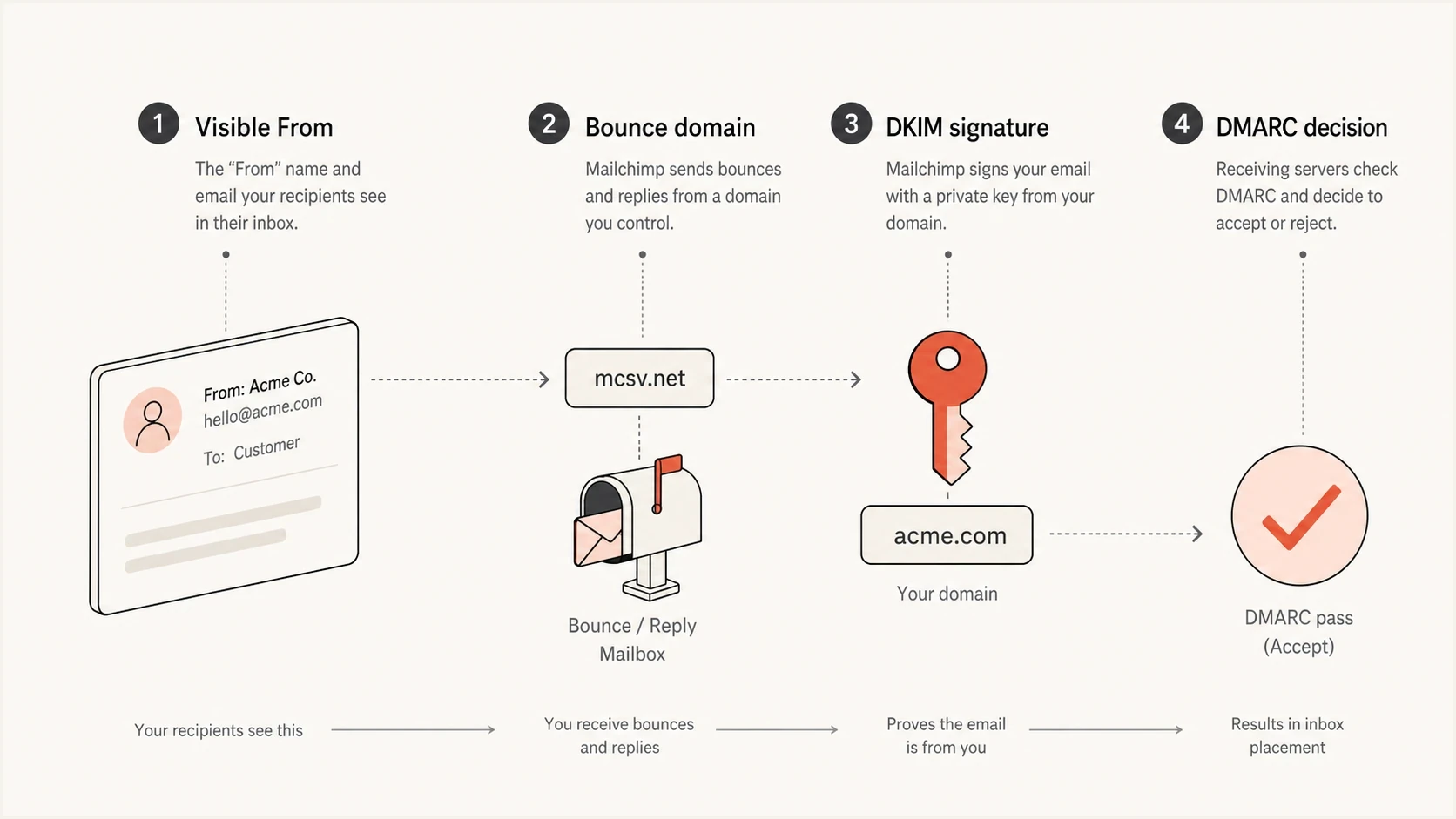
SPF checks Mailchimp's bounce domain while DKIM can authenticate the sender domain.
What to remove and what to keep
For standard Mailchimp marketing, the safe edit is usually to remove Mailchimp's include from the root SPF record and keep only the senders that use your root domain or its own subdomain as the envelope sender. Do not remove unrelated SPF mechanisms until you have verified that those senders are inactive.
|
|
|
|
|---|---|---|---|
 Mailchimp marketing Mailchimp marketing | Mailchimp domain | Aligned DKIM | Usually remove root include |
Mailchimp Transactional | Custom return-path domain | SPF or DKIM alignment | Follow account DNS |
Web server | Your domain | SPF or DKIM | Authorize the host |
Other ESP | Check headers | Depends on domain use | Add only if used |
Common SPF decisions for Mailchimp and adjacent sending paths.
Mailchimp Transactional has a different authentication model, especially when a custom return-path domain is configured. The Mailchimp Transactional docs explain DKIM, DMARC, and return-path setup for that product. Use the DNS values shown for the account rather than copying the standard marketing recommendation.
Root SPF before and after removing Mailchimp marketingdns
Before:
example.com. TXT "v=spf1 include:servers.mcsv.net ~all"

After:
example.com. TXT "v=spf1 include:your-current-mailbox.example ~all"
After editing SPF, run an SPF checker pass and send a real Mailchimp test message to inspect the headers. A DNS-only check proves the SPF record is syntactically valid. A real message proves the receiver evaluated the domains you expected.
SPF checker
Find SPF syntax issues, lookup limits, and weak records.
?/16tests passed
Do not judge the change only by a green SPF result in a mail client. Green can mean Mailchimp's bounce domain passed SPF. For DMARC, the question is whether either SPF or DKIM both passes and aligns with the visible From domain.
Why SPF can pass but fail DMARC alignment
SPF authentication and DMARC SPF alignment are separate checks. Raw SPF can pass for the Mailchimp bounce domain. DMARC then compares that authenticated domain with the visible From domain. Mailchimp's standard marketing bounce domain does not share your organizational domain, so it does not align under relaxed or strict SPF alignment.
Expected results for one correctly authenticated campaign
These conceptual values show binary pass and alignment outcomes for a Mailchimp marketing message with working, aligned DKIM.
SPF authentication
100%SPF alignment
0%DKIM alignment
100%DMARC pass
100%Full headers and DMARC aggregate data distinguish these results more reliably than a single sender dashboard chart. If the header says SPF passed for a Mailchimp domain, that is not proof that your root SPF record mattered. If a DKIM signature verifies and aligns with the visible From domain, DMARC has the passing evidence it needs.
Do not chase the wrong failure
If Mailchimp mail shows failed SPF alignment but aligned DKIM and an overall DMARC pass, there is usually nothing to fix in SPF. Adding extra includes to the wrong domain only pushes the SPF record closer to its DNS lookup limit.
How to test before and after removal
Use a short test plan before removing any sender from SPF. The goal is not just to see pass or fail. The goal is to prove which domain each authentication result belongs to.
- Capture: Save full headers from a Mailchimp campaign before the DNS change.
- Confirm: Check that smtp.mailfrom uses a Mailchimp-controlled domain.
- Verify: Check that DKIM passes and the d= domain aligns with the visible From domain.
- Edit: Remove only the Mailchimp marketing include from root SPF.
- Retest: Send another campaign sample and compare the same header fields.
For a broader preflight check, run a domain health check after DNS propagation. That catches obvious SPF, DKIM, and DMARC record issues before you send production volume.
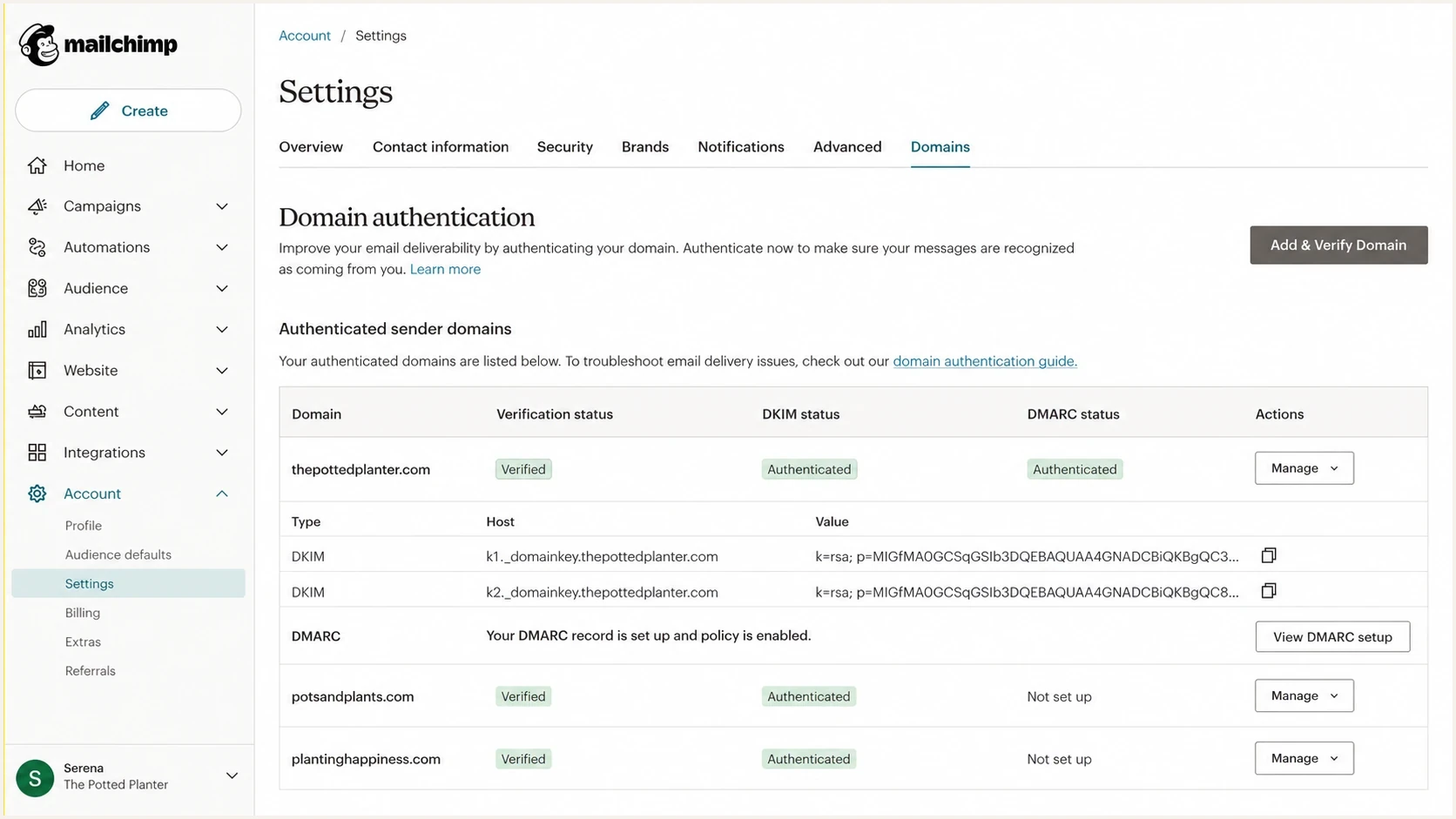
Mailchimp domain authentication settings with DKIM records and domain status.
Inside Mailchimp, the domain authentication screen shows DKIM and DMARC record status. Outside Mailchimp, full message headers and DMARC reports show whether receivers accepted that authentication.
When a custom return path changes the answer
The answer changes when a provider sends with a return-path domain that you control. In that case, SPF belongs on the exact return-path domain, often a subdomain such as bounces.example.com. That still does not mean every ESP belongs in the root domain's SPF record.
SPF belongs on the bounce subdomain when that subdomain is useddns
bounces.example.com. TXT "v=spf1 include:spf.vendor.example ~all"

example.com. TXT "v=spf1 include:mailbox.example ~all"
This pattern keeps multiple senders separate. Each bulk sender gets its own bounce subdomain where supported. Root SPF stays small, and each provider's bounce handling is tied to the identity it actually uses. With relaxed SPF alignment, a return-path subdomain can align with the organizational domain in the visible From address. Strict alignment requires an exact domain match.
Root SPF
Use this for mail whose envelope sender is your root domain. Keep it short and owned by the team that controls corporate mail.
Bounce subdomain SPF
Use this when a provider supports a custom return path on a subdomain. Put that provider's SPF authorization there.
How to manage lookup limits without Mailchimp in root SPF
This question often starts because the root SPF record has too many includes. An SPF check permits no more than 10 terms that cause DNS queries. Recursive DNS-querying terms reached through an include also count. Exceeding the limit produces an SPF permerror, so an unnecessary Mailchimp include adds risk without helping DMARC alignment.
Do not keep stacking includes. Remove senders that do not use your domain in the bounce address, move provider-specific bounce paths to subdomains where possible, and use SPF flattening only when the flattened addresses can be kept current as providers change their infrastructure.
Suped is our DMARC reporting and email authentication product. It connects aggregate-report analysis with SPF and DKIM diagnostics, hosted SPF management, blocklist (blacklist) monitoring, alerts, and issue-specific fix steps. For teams that change senders often, Hosted SPF lets authorized sources be managed without repeated root DNS edits, while DMARC reports show whether each change affected legitimate traffic.
SPF flattening drawer showing an over-limit record, sender editing, lookup counts, and the hosted record setup
A practical Suped workflow
- Inventory: Find every source sending with your domain in DMARC reports.
- Diagnose: Separate raw SPF failures from domain alignment failures.
- Reduce: Remove stale includes and manage active senders through hosted SPF.
- Verify: Watch DMARC, DKIM, SPF, and delivery signals after each change.
Views from the trenches
Best practices
Check the smtp.mailfrom domain before adding any provider include to root SPF records.
Use DKIM matching for Mailchimp marketing mail and review DMARC reports after changes.
Move provider bounce handling to subdomains when custom return paths are supported.
Common pitfalls
Treating a Gmail SPF pass as proof that the visible From domain passed SPF checks.
Leaving old ESP includes in root SPF until the record exceeds the ten lookup limit.
Assuming every platform that sends mail must be added to the corporate SPF record.
Expert tips
Compare headers before and after DNS edits instead of relying only on dashboard charts.
Keep Mailchimp marketing focused on DKIM because SPF uses Mailchimp's bounce domain.
Use DMARC aggregate data to separate authentication failure from domain mismatch.
Expert from Email Geeks says receivers that follow the SPF specification can fail mail when SPF exceeds the ten lookup limit, while other receivers use more forgiving limits.
2021-06-16 - Email Geeks
Expert from Email Geeks says SPF authenticates the bounce domain, so a Mailchimp-owned bounce address does not require the customer domain's Mailchimp include.
2021-06-16 - Email Geeks
Practical decision
If the Mailchimp bounce address is on a Mailchimp domain, remove include:servers.mcsv.net from the root SPF record and keep Mailchimp authenticated through aligned DKIM. Then confirm the overall DMARC pass in aggregate reports and full message headers.
Add an SPF include for a provider only when that provider sends with a return-path domain you control and its account-specific instructions require the include. Put the SPF authorization on that exact return-path domain, not automatically on the root domain.