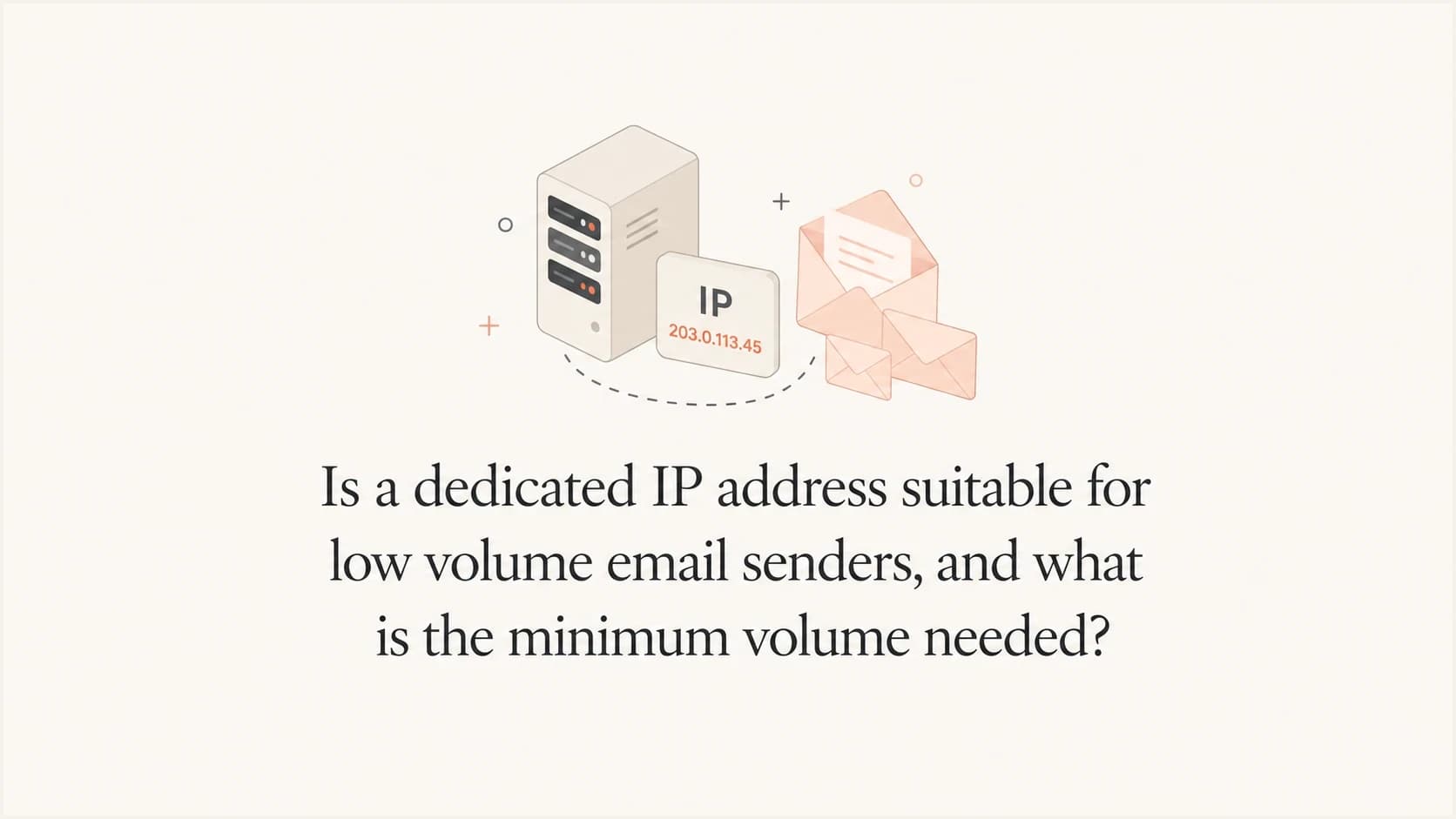
Is a dedicated IP address suitable for low volume email senders, and what is the minimum volume needed?

Published 16 Apr 2025
Updated 27 Sep 2026
15 min read
Summarize with
Updated on 27 Sep 2026: We clarified the planning thresholds, provider-level cadence, warm-up pacing, and pre-migration checks for low-volume dedicated IPs.
A dedicated IP address is usually not suitable for very low volume senders. At 30,000 emails per month, staying on a shared pool is normally better unless the provider can isolate you on a cleaner shared IP or the business risk of shared-pool problems is higher than the deliverability risk of going dedicated. At 90,000 emails per month, a dedicated IP becomes possible, but it is still tight. Around 100,000 emails per month is a practical planning floor for one dedicated IP, while some sending platforms set higher minimums. Around 200,000 or more per month gives more room for stable reputation at major mailbox providers. These are planning benchmarks, not universal mailbox-provider thresholds, and the traffic reaching each provider still matters.
The direct answer is simple: dedicated IPs need enough consistent mail to establish reputation. Low volume senders do not give mailbox providers much recent data, so one bad campaign, a small complaint spike, or a temporary bounce issue can distort the IP's reputation quickly. This is why the minimum volume is not only a monthly count. It is also about steady cadence, engaged recipients, list quality, complaint rate, bounce rate, authentication, and whether the sender can warm the IP slowly.
If the emails are high value, such as account, contract, renewal, or sales-critical messages, the decision changes. Do not move everything to a dedicated IP at 30,000 per month by default. First, separate the mail streams and check real inbox placement using an email tester, and confirm whether the issue is the shared IP, domain reputation, authentication, content, audience, or Microsoft-specific filtering.
The short answer
Use these volume bands as a starting point, then adjust for provider policy, recipient mix, engagement, and risk. These numbers assume one dedicated IP, opt-in mail, stable sending, and no unresolved authentication or list-quality problems. They are planning ranges, not requirements used by every mailbox provider or sending platform.
- Under 50k/month: stay on shared IPs in most cases. A dedicated IP has too little volume to build reliable reputation.
- 50k-100k/month: possible only with strong engagement, clean lists, a controlled warm-up plan, and a provider that supports the volume.
- Around 100k/month: a practical floor to consider for one dedicated IP when the sender has steady weekly volume.
- 200k+/month: a more practical level for establishing and maintaining reputation with major mailbox providers.
A dedicated IP is not automatically better than a shared IP. It gives you control, but it also removes the reputation cover that a good shared pool can provide. That tradeoff matters most for smaller senders because reputation systems work best when they see enough consistent sending history.
The key mistake is treating monthly volume as if it lands evenly. A sender that spreads 100,000 emails across regular daily sends is easier to evaluate than a sender that sends 95,000 on one day and almost nothing for the rest of the month. Dedicated IP reputation benefits from predictable traffic.
Dedicated IP volume bands
A practical benchmark for one dedicated IP used by a legitimate, opt-in sender.
Usually too low
<50k/month
Shared pool is normally safer.
Borderline
50k-100k/month
Needs excellent engagement and careful warming.
Practical floor
Around 100k/month
Workable when traffic is steady.
More practical range
200k+/month
Provides more provider-level reputation signal.
For a deeper benchmark, compare these numbers with the dedicated IP volume guide. The important part is not chasing a single number. The important part is proving that your traffic is wanted, authenticated, and consistent enough to support a separate reputation.
Count volume by mailbox provider, not only per month
Monthly volume is only a coarse planning measure. Each receiving network evaluates the traffic it sees, so 100,000 messages spread thinly across Gmail, Microsoft, Yahoo, and corporate mail systems can leave too little regular volume at any one destination. An IP can look active in an aggregate report while remaining cold or weakly established with part of the audience.
- Calculate provider-level volume: group recipient domains by the network that hosts them, not only by the domain after the @ sign.
- Review daily distribution: confirm key providers receive mail on multiple days each week, then look for long gaps, sudden spikes, or too little recurring traffic.
- Warm each destination separately: increase volume only where deferrals, bounces, complaints, and placement remain healthy.
- Keep a shared route available: when the sending platform supports it, low-volume destinations can remain on shared capacity while the dedicated route proves itself.
This provider-level view can change the decision. A business with 120,000 monthly messages concentrated at one consumer mailbox provider has a different warm-up problem from a business with the same total spread across many small corporate systems. Build the route and warm-up plan around the actual recipient mix.
Why low volume dedicated IPs struggle
Mailbox providers judge senders using signals such as complaints, bounces, authentication, recipient engagement, sending history, and volume patterns. With low volume, each signal has more weight. A handful of complaints can look proportionally large. A small list segment with stale addresses can create a visible bounce spike. A single poor campaign can become the main recent signal for the IP.
This is why 30,000 emails per month is risky on a dedicated IP. It can create an IP reputation, but it gives very little margin for mistakes. At that level, it is better to solve the shared-pool issue directly, request a better shared IP assignment, or move only a carefully selected stream after testing.
Shared IP pool
- Best fit: low volume senders that need stable reputation without warming their own IP.
- Main risk: other senders in the pool can affect the shared reputation.
- Control level: limited, because the provider controls pool assignment and remediation.
Dedicated IP
- Best fit: senders with enough consistent volume to create their own reputation.
- Main risk: low volume leaves little room to absorb complaints, bounces, or content changes.
- Control level: high, but the sender owns the consequences of every reputation signal.
The pattern can differ sharply by mailbox provider. Microsoft, for example, can defer or filter mail when a fresh IP changes volume quickly or produces weak engagement and complaint signals. A low volume sender must prove that the IP is stable and wanted at each receiving network, which requires patient warming and clean recipient cohorts.
Volume fluctuation matters as much as total volume. A sender with low but predictable daily traffic has a better chance than a sender that disappears for two weeks and then sends a large batch. The volume fluctuation guide explains why mailbox providers treat erratic patterns as a risk signal.
When a dedicated IP can still make sense
A low volume sender can justify a dedicated IP when the business risk is high and the sender has enough discipline to manage it. If each email carries material revenue or operational value, the right decision is the option with the best expected business outcome after testing.
- High engagement: the dedicated stream should go to recent, opted-in recipients who open, click, reply, or otherwise engage.
- Clean segmentation: separate critical mail from broad marketing mail instead of moving every campaign at once.
- Stable cadence: the IP needs regular traffic, not occasional bursts that weaken the provider's confidence.
- No unresolved issues: fix authentication, bounces, complaint sources, and domain reputation before migration.
The strongest low-volume use case is a narrow dedicated IP for a highly engaged stream, while broader marketing stays on a shared pool. For example, a sender could put contract reminders, renewal notices, or account relationship mail on the dedicated IP after warming it carefully. The regular newsletter and less predictable campaigns can remain on shared infrastructure.
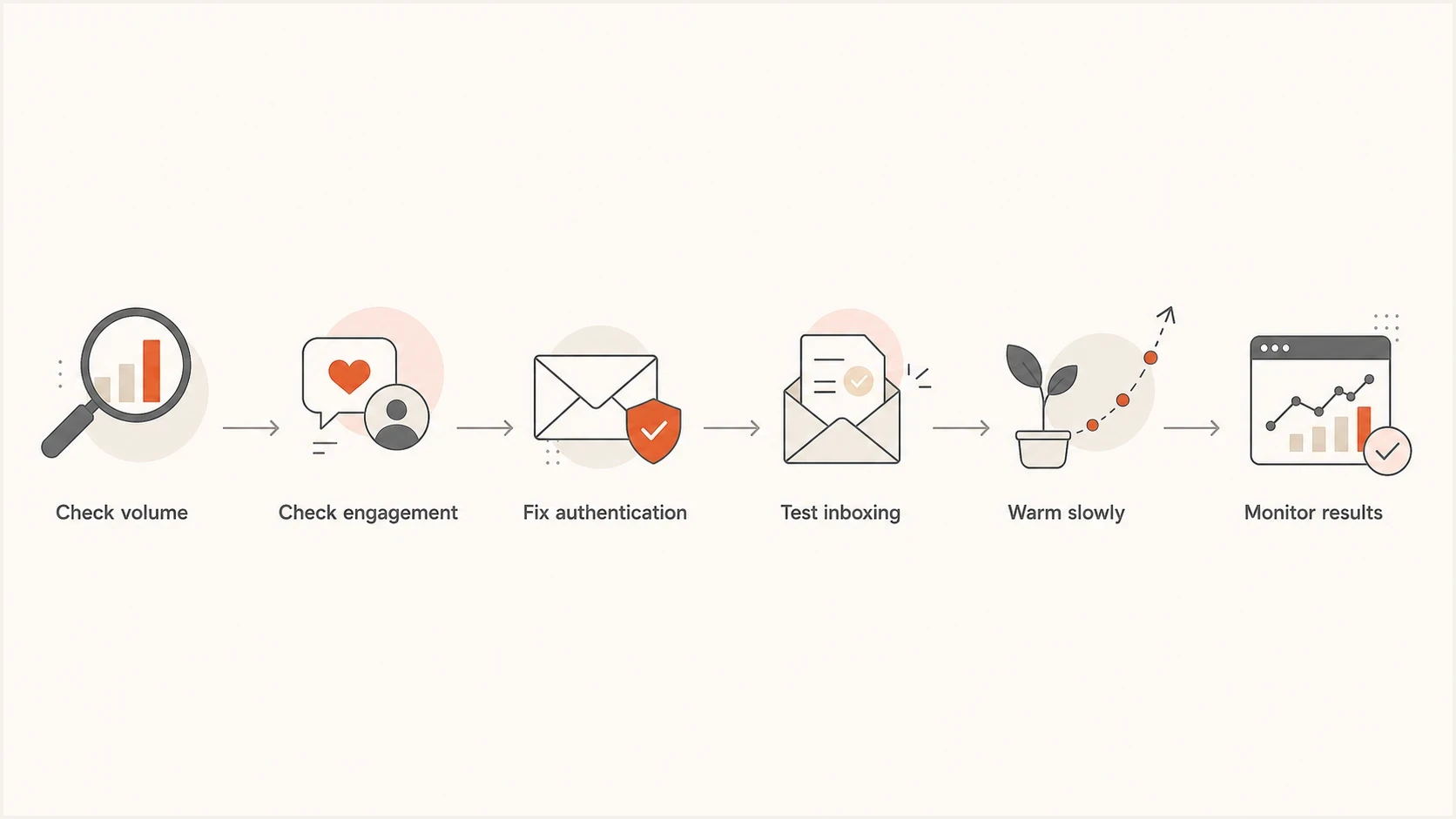
Dedicated IP decision flowchart covering volume, engagement, authentication, inbox testing, warm-up, and monitoring.
For this approach to work, the dedicated stream needs enough recurring volume to stay visible. A few hundred messages per month, even with excellent engagement, is usually too thin for a dedicated IP. It can be better to route those messages through a strong shared pool and protect the domain reputation with stricter authentication and monitoring.
What to check before changing IP strategy
Before moving to a dedicated IP, prove that the IP is the actual problem. Shared IP issues happen, but they are often mixed with domain reputation, sending cadence, authentication alignment, content reputation, inactive recipients, or mailbox-provider-specific filtering. If you move too early, you carry the same problem onto a colder IP.
?
What's your domain score?
Deep-scan SPF, DKIM & DMARC records for email deliverability and security issues.
Start with a full domain health check. If SPF, DKIM, DMARC, reverse DNS, or MX-related basics are broken, a dedicated IP will not solve the underlying trust problem. It will just make the sender more isolated while the same flaws remain visible.
|
|
|
|---|---|---|
SPF | Authorizes sending hosts | Passes for each authorized sender |
DKIM | Proves domain signing | Valid signature |
DMARC | Confirms From-domain alignment | SPF or DKIM aligns with the From domain |
PTR and reverse DNS | Connects the IP to a sending hostname | PTR hostname resolves back to the sending IP |
TLS | Protects mail in transit | Sending connections negotiate TLS |
Unsubscribe | Gives recipients a safe exit | One-click works for subscribed promotional mail |
Complaints | Shows audience fit | Very low rate |
Bounces | Reveals list decay | Stable and low |
Blocklists | Flags blacklist and blocklist risk | No major listing |
Pre-migration checks for a low volume sender considering one dedicated IP.
Also check whether your messages are rotating across several shared IPs. If one shared IP performs worse than another, that gives you evidence to take to the provider. In some platforms, the best fix is not a dedicated IP. It is a cleaner shared pool, a narrower assigned pool, or routing high-value traffic through the better-performing path.
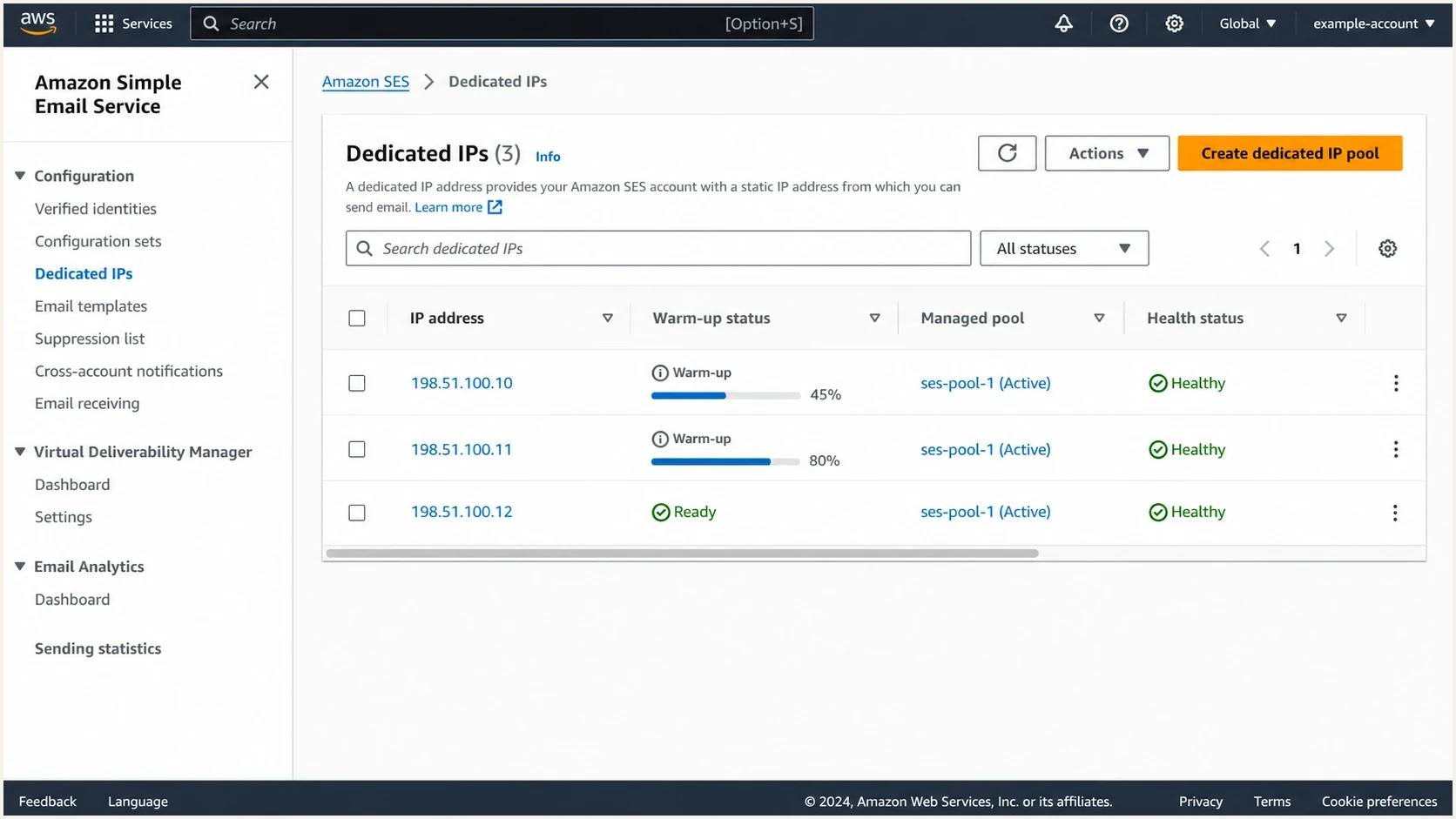
Amazon SES dedicated IP screen showing warm-up percentage, pool assignment, and health status.
Some providers also offer managed dedicated IP options. For example,  Amazon SES documents both standard and managed dedicated IP approaches. In a managed mode, some mail can use shared capacity during warm-up or when volume becomes too low or changes sharply. Confirm the route that carried each message instead of assuming all traffic used the dedicated IP.
Amazon SES documents both standard and managed dedicated IP approaches. In a managed mode, some mail can use shared capacity during warm-up or when volume becomes too low or changes sharply. Confirm the route that carried each message instead of assuming all traffic used the dedicated IP.How to warm a low volume dedicated IP
If you decide to use a dedicated IP at low volume, warm it with the best recipients first. Do not start with dormant names, broad promotional sends, purchased data, old leads, or untested segments. The first signals attached to the IP matter because there is little historical reputation to soften the impact of poor results.
A low-volume warm-up plan should be slower than the plan used by a high-volume sender. The goal is to create a steady pattern of wanted mail, not to reach maximum throughput quickly. Warm-up often takes two to six weeks, but mailbox-provider results determine the pace. If the total monthly volume is only 90,000, use the most engaged recipients at each mailbox provider and increase only after the previous level performs cleanly.
|
|
|
|---|---|---|
Week 1 | 500-1k | Most engaged |
Week 2 | 1k-2k | Recent engagers |
Week 3 | 2k-3k | Active customers |
Week 4+ | Target steady rate | Broader engaged audience |
Illustrative warm-up pattern for a sender approaching 100k per month. Treat volumes as ceilings and adjust by provider response.
Hold or reduce the next increase when deferrals, blocks, hard bounces, or complaints rise. Do not follow the calendar after the data turns negative. If the IP stops sending for several weeks, treat it as cold and restart a gradual ramp instead of returning immediately at the old volume.
Do not split low volume across multiple dedicated IPs. One dedicated IP at 100,000 per month is already thin. Two dedicated IPs at 50,000 each create two weaker reputations instead of one stronger reputation.
Watch placement by mailbox provider during the warm-up, not only aggregate opens and clicks. A blended dashboard can hide the fact that Gmail is improving while Microsoft is still filtering. That detail affects whether you increase volume, pause, or move specific segments back to shared infrastructure.
Authentication and monitoring are not optional
A dedicated IP does not replace authentication. SPF authorizes the sending service, DKIM signs the mail, and DMARC checks whether the SPF or DKIM domain aligns with the visible From domain. If neither path aligns, the message fails DMARC, and the dedicated IP starts its life with avoidable risk.
Example DMARC monitoring record before enforcementdns
v=DMARC1; p=none; rua=mailto:dmarc-reports@example.com;
The example above is a monitoring-stage record, not a finished security posture. Send aggregate reports to an address or platform that can process DMARC XML data, confirm every legitimate sender passes DMARC, then move toward quarantine or reject with staged testing.
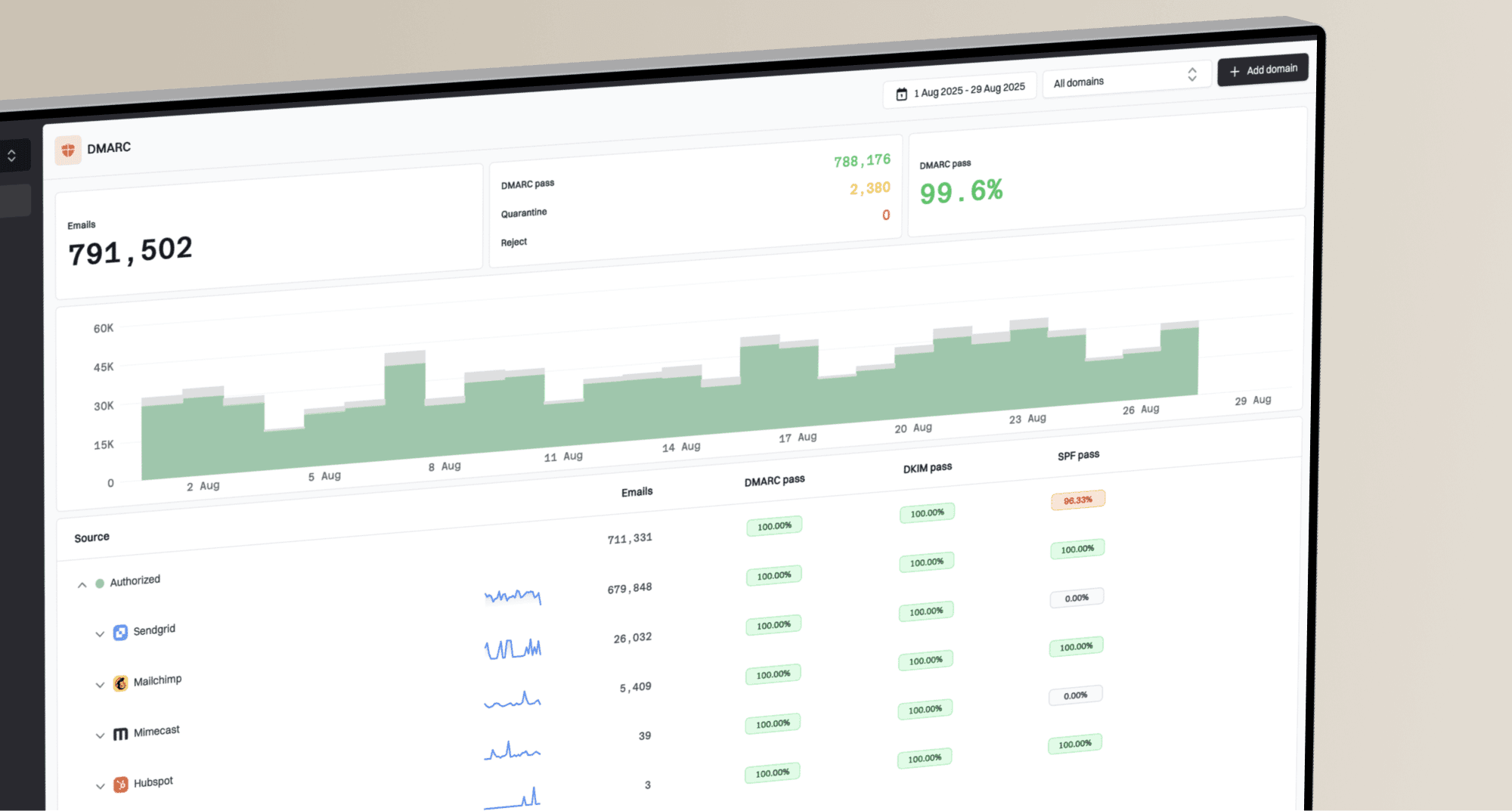
Suped DMARC dashboard showing email volume, authentication health, and source breakdown
Suped is useful here because dedicated IP decisions need combined visibility. Suped's DMARC monitoring shows which sources are sending, whether SPF or DKIM produces DMARC-aligned results, and where authentication failures appear. The same workflow can tie reputation monitoring and issue detection to specific sending sources, which is more useful than guessing from campaign-level metrics alone.
For teams managing multiple domains or clients, Suped's hosted authentication policies, real-time alerts, and MSP dashboard reduce the DNS and monitoring work. That matters when the IP strategy is already delicate. A low-volume dedicated IP leaves less room for silent authentication drift, expired DKIM selectors, or a sender added without DMARC alignment.
At minimum, use DMARC monitoring before and after the move. If you are checking sender reputation, combine that with blocklist monitoring so domain and IP blacklist (blocklist) issues are caught before they become a recurring deliverability problem.
A practical decision framework
Make the decision with a short test plan rather than a debate about dedicated versus shared IPs in the abstract. The right path depends on whether the current shared pool is actually causing the problem and whether the sender can produce enough clean traffic for the dedicated IP.
- Identify the affected mail: separate critical mail, marketing mail, lifecycle mail, and transactional mail before changing routes.
- Map IP performance: confirm whether sends rotate across shared IPs and compare results by IP and mailbox provider.
- Ask for pool options: push the sending platform for a better shared pool, narrower pool, or other routing options.
- Check provider terms and cost: account for platform volume rules, dedicated IP fees, setup work, and ongoing monitoring before committing.
- Test the dedicated path: warm only a highly engaged stream and keep the broader marketing stream stable.
- Measure by provider: judge Gmail, Microsoft, Yahoo, and corporate domains separately instead of relying on blended averages.
The best compromise for many low volume senders is one of these two paths: stay on a cleaner shared pool, or use one dedicated IP only for a narrow, engaged, high-value stream. Moving all mail to a dedicated IP at 30,000 per month is rarely the right first move.
If the sender is at 90,000 per month and growing organically, the answer is more balanced. Consider a dedicated IP if the list is opt-in, the content plan is steady, the active audience is large enough, authentication is clean, the provider permits it, and there is a tailored warm-up plan. Still avoid multiple dedicated IPs until the sender has much higher volume.
Views from the trenches
Best practices
Keep low volume senders on shared pools unless clear evidence supports a dedicated IP move.
Warm one dedicated IP slowly, starting with the most engaged and recently active users.
Separate critical mail streams before moving broader marketing traffic onto a new route.
Common pitfalls
Moving 30k monthly emails to a dedicated IP leaves too little reputation margin for errors.
Splitting low traffic across several IPs weakens the reputation signal on every address.
Blended campaign metrics can hide provider-specific filtering or one weak shared IP route.
Expert tips
Use 100k per month as a planning floor and 200k as the more practical target for one IP.
Ask the sending platform whether one shared IP performs worse than the rest of its pool.
Base the business case on inbox placement by mailbox provider, not aggregate open rates.
Marketer from Email Geeks says a sender at 30,000 per month can create IP reputation, but the margin for error is too small to recommend a dedicated IP without stronger evidence.
2022-04-20 - Email Geeks
Expert from Email Geeks says low volume senders should first push the platform for a better shared pool or narrower routing option before accepting the risk of a dedicated IP.
2022-04-20 - Email Geeks
The best practical answer
For low volume senders, a dedicated IP is suitable only when the sender can produce consistent, wanted mail and has a real reason to isolate reputation. At 30,000 per month, it is normally better to avoid it. At 90,000 per month, consider it only with strong engagement and a careful warm-up. Around 100,000 per month is a practical planning floor for many platforms, not a universal threshold. At 200,000 or more, it becomes easier to justify, provided the volume reaches the important mailbox providers consistently.
The better first move is usually to diagnose the shared-pool problem, check whether one IP in the pool is dragging results down, and ask for better routing. If the provider cannot help and the affected mail is high value, use one dedicated IP for the most engaged critical stream, warm slowly, and monitor authentication and reputation daily.
Suped fits this workflow by keeping DMARC alignment, sending sources, authentication failures, blocklist and blacklist status, and real-time alerts visible. For most teams, that operational view makes a dedicated IP decision manageable instead of relying on campaign metrics alone.