How to fix compauth failure in email headers due to domain alignment issues?

Published 22 Jun 2025
Updated 23 Oct 2026
15 min read
Summarize with
Updated on 23 Oct 2026: We clarified SPF includes, DKIM verification, and DMARC policy rollout when troubleshooting compauth failures.
To fix compauth=fail caused by a domain mismatch, make sure at least one passing authentication result has DMARC alignment with the visible From domain. Enable branded DKIM that verifies successfully, or configure a custom MAIL FROM domain that passes SPF and matches the From domain under the configured DMARC alignment mode. Ensure a valid DMARC policy applies to the From domain. Reason 001 identifies an implicit authentication failure, so use the complete header to establish the cause before changing DNS.
The key point is that SPF passing is not enough when it passes for the wrong domain. DMARC passes when SPF or DKIM passes and that authenticated domain matches the visible From domain under the domain matching mode in use. For transactional mail, branded DKIM is usually the first fix because a valid DKIM signature can survive forwarding when the signed content is preserved, while SPF depends on the connecting IP address.
A published DKIM DNS key does not prove the message was signed. The message header must include a DKIM-Signature header with a d= value that has DMARC alignment with the visible sender domain, and the signature must verify successfully. An exact domain match is required only when adkim=s is in use. If Microsoft reports dkim=none, Microsoft found no DKIM signature to evaluate at that hop. Check whether the sender omitted it or an intermediary removed it.
What compauth failure means
Microsoft 365 writes compauth into the Authentication-Results header after it combines SPF, DKIM, DMARC, spoof intelligence, and other Microsoft 365 signals. Microsoft defines reason 001 as an implicit authentication failure. It commonly appears when the sending domain has no authentication records or uses a weak failure policy such as SPF ~all or ?all, or DMARC p=none. The Microsoft 365 guide explains how Microsoft evaluates sender identity. These settings alone do not prove failure: DMARC can pass at p=none, and SPF can pass with ~all. Changing ~all to -all or raising DMARC policy does not repair a domain mismatch.
A compauth failure is not the same as an automatic block. It is a receiver-side signal. Microsoft can still deliver the email if the message has low risk in other filters, and Microsoft can still quarantine mail that passes one authentication check if the sender looks suspicious. Treat compauth=fail as a header diagnosis, not as the full delivery verdict.
Microsoft's troubleshooting page separates SPF, DKIM, DMARC, and composite authentication failures. That distinction matters because a message can fail compauth after a domain mismatch, missing DKIM, an enforced DMARC policy, a spoof intelligence decision, or a gateway path that changed the message after signing.
|
|
|
|---|---|---|
compauth | Microsoft composite result | Find the failed identity proof |
reason 001 | Implicit auth failure | Verify passing SPF or DKIM with DMARC alignment |
reason 000 | Explicit DMARC enforcement failure | Fix aligned SPF or DKIM |
reason 002 | Sender pair explicitly blocked | Review tenant spoof settings |
reason 010 | DMARC failure for an accepted domain with quarantine or reject policy | Check self-to-self spoofing |
spf pass | MAIL FROM passed | Check its domain against From |
dkim none | No DKIM signature found at this hop | Enable signing and check for signature removal |
dmarc bestguesspass | Microsoft inferred a pass without a published DMARC record | Publish a DMARC record |
dmarc none | No applicable DMARC policy found | Publish a DMARC TXT record |
Compact reading of the relevant header fields.
Why SPF passed but compauth failed
The common confusing case looks like this: SPF passes for the envelope sender domain, but that domain belongs to the hosting provider or email vendor. The user sees a different visible From address. DKIM is absent or signed with the vendor's domain. DMARC has no matching SPF or DKIM result to use, so Microsoft treats the sender identity as weak.
Header pattern that triggers the issuetext
Authentication-Results: spf=pass smtp.mailfrom=mail01.vendor.example;
 dkim=none header.d=none;
 dmarc=none action=none header.from=example.com;
 compauth=fail reason=001
From: Example App <receipts@example.com>
Return-Path: <bounces@mail01.vendor.example>
Here, dmarc=none means no applicable DMARC policy was found. If a valid policy applied and neither SPF nor DKIM passed with DMARC alignment, the result would be dmarc=fail even with p=none.
In that header, SPF tells Microsoft that the vendor infrastructure is allowed to send for the vendor bounce domain. It does not prove that example.com authorized the visible From address. If the message also has dkim=none, there is no DKIM fallback for DMARC to use.
Broken pattern
- SPF passes for a vendor-controlled MAIL FROM domain.
- DKIM is absent, fails verification, or uses only a vendor signing domain.
- DMARC has no authenticated domain that matches the visible From domain.
- Microsoft can record compauth failure even though SPF says pass.
Fixed pattern
- SPF passes for a branded MAIL FROM domain you control.
- DKIM verifies with the visible sender's domain or a domain permitted by the DMARC alignment mode.
- DMARC finds SPF or DKIM evidence tied to the From domain.
- Microsoft has a stronger sender identity signal.
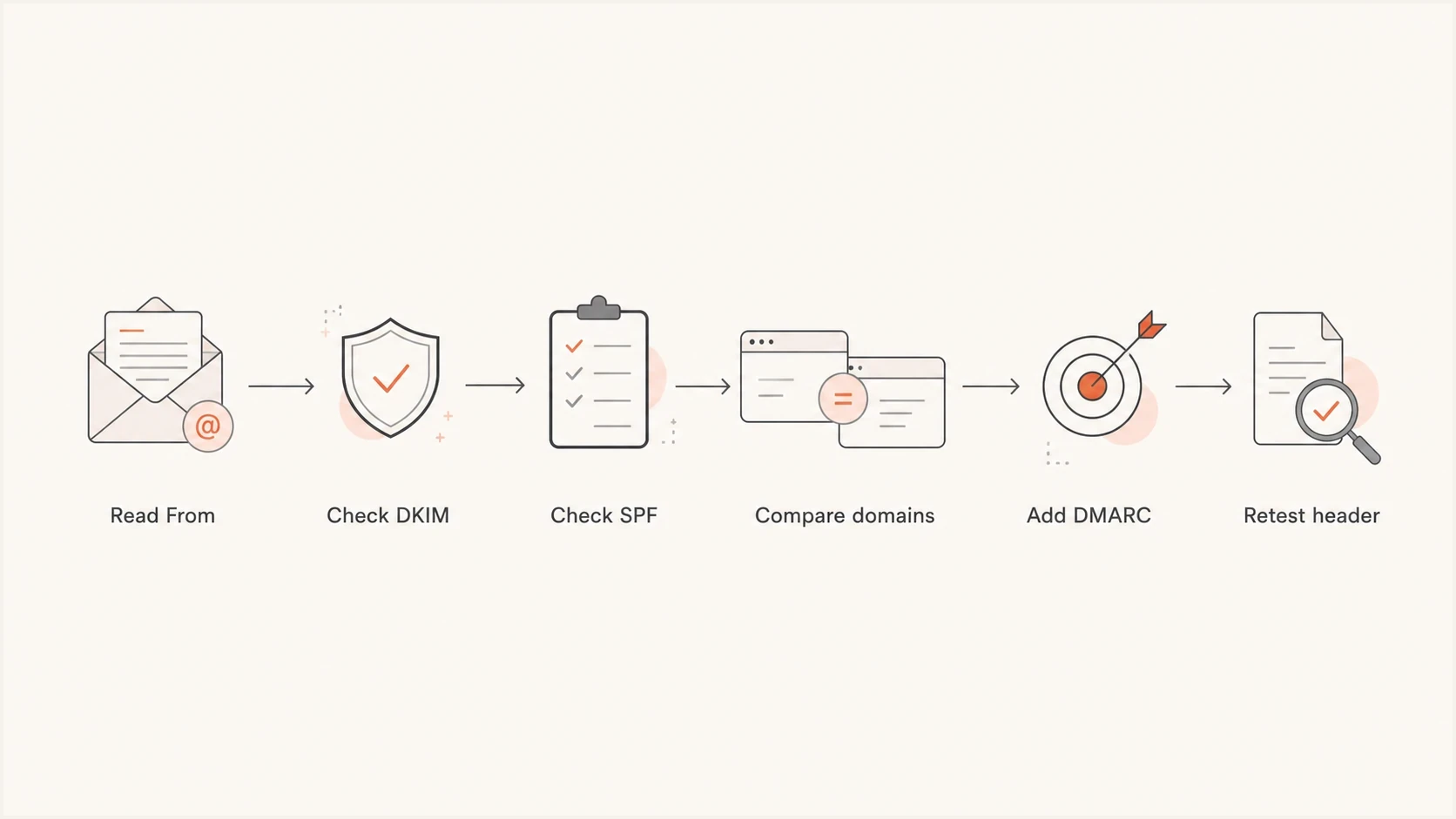
Compauth failure diagnosis flow for From, SPF, DKIM, DMARC, and Microsoft header results.
Why an SPF include does not fix domain alignment
An SPF include checks another domain's SPF policy to authorize the sending IP. It does not change smtp.mailfrom or replace the identity DMARC compares. In the preceding example, adding a vendor include at example.com leaves MAIL FROM at mail01.vendor.example, so SPF still provides no DMARC pass for the visible From domain.
Configure a custom MAIL FROM domain, then publish the provider's SPF requirements at that exact DNS name. SPF records are not inherited by subdomains. Keep one v=spf1 record per name and stay within the limit of 10 DNS lookup-causing terms during SPF evaluation, including nested includes and redirects. The included domain does not need to match From; the authenticated MAIL FROM domain does.
Fix SPF and DKIM domain alignment
Fix the domain mismatch at the identity that users actually see: the visible From address. Do not start by adding records to the vendor's infrastructure domain unless the vendor also uses that domain in the visible From address. Obtain the full internet headers for a failed message, then work through the sending configuration.
- Confirm the visible From domain, the smtp.mailfrom value in Microsoft's Authentication-Results, and the DKIM d= domain in the same delivered message. Return-Path usually records MAIL FROM, but intermediaries can rewrite it.
- Enable branded DKIM so every message signs with the visible From domain or an eligible subdomain.
- Publish the DKIM CNAME or TXT records supplied by the provider, then enable signing in the sending account. DNS publication alone does not activate DKIM.
- Set a custom MAIL FROM or return-path domain such as bounce.example.com rather than a vendor domain if supported.
- Ensure a valid DMARC policy applies to the visible From domain. Publish it at _dmarc.<From-domain> or verify an applicable parent policy. For a new rollout, start with p=none and aggregate reporting; retain an existing enforcement policy while repairing a sender.
- Check whether strict SPF or DKIM matching is enabled before using subdomains for mail streams.
- Retest by sending a new message to a Microsoft mailbox and inspecting the fresh delivered header.
Illustrative DKIM delegation and DMARC monitoring recorddns
selector1._domainkey.example.com. 3600 IN CNAME selector1._domainkey.vendor.example.
_dmarc.example.com. 3600 IN TXT "v=DMARC1; p=none; rua=mailto:dmarc@example.com"
DMARC uses relaxed alignment by default. With relaxed SPF matching, bounce.example.com can match example.com because they share the same organizational domain. Strict mode with aspf=s or adkim=s requires an exact match for that mechanism. For From example.com, bounce.example.com fails strict SPF matching, but a verified DKIM signature with d=example.com still supplies a DMARC pass.
Those records are examples. Your provider should supply the real selector and DKIM target. Custom MAIL FROM setups require provider-specific MX and SPF TXT records or a CNAME delegation; do not assume a bounce-domain CNAME works for every sender. Use a reporting address configured to receive aggregate reports. If no DNS administrator can publish or delegate authentication records, use a From domain or delegated subdomain you can authenticate.
Illustrative passing header (reason codes vary)text
Authentication-Results: spf=pass smtp.mailfrom=bounce.example.com;
 dkim=pass header.d=example.com;
 dmarc=pass action=none header.from=example.com;
 compauth=pass reason=100
From: Example App <receipts@example.com>
Return-Path: <bounces@bounce.example.com>
What to ask your provider
When a provider sends transactional mail for multiple customer domains, ask for customer-specific authentication. A provider-side DKIM key on its own domain does not fix your visible From domain. The provider needs to sign on behalf of your domain; ask about branded MAIL FROM support for a second authentication path.
A clear provider request is: "Please enable branded DKIM for example.com, provide the DNS records and activation steps, and confirm new messages pass DKIM with d=example.com. If supported, also supply custom MAIL FROM records under example.com."
If the provider says the domain already has a DKIM key, request a fresh delivered header showing dkim=pass with the correct signing domain. A DNS record alone does not confirm that the sending account signs messages.
For customer domains, verify DNS ownership and arrange DKIM delegation during onboarding so each sender has at least one DMARC-valid authentication path.
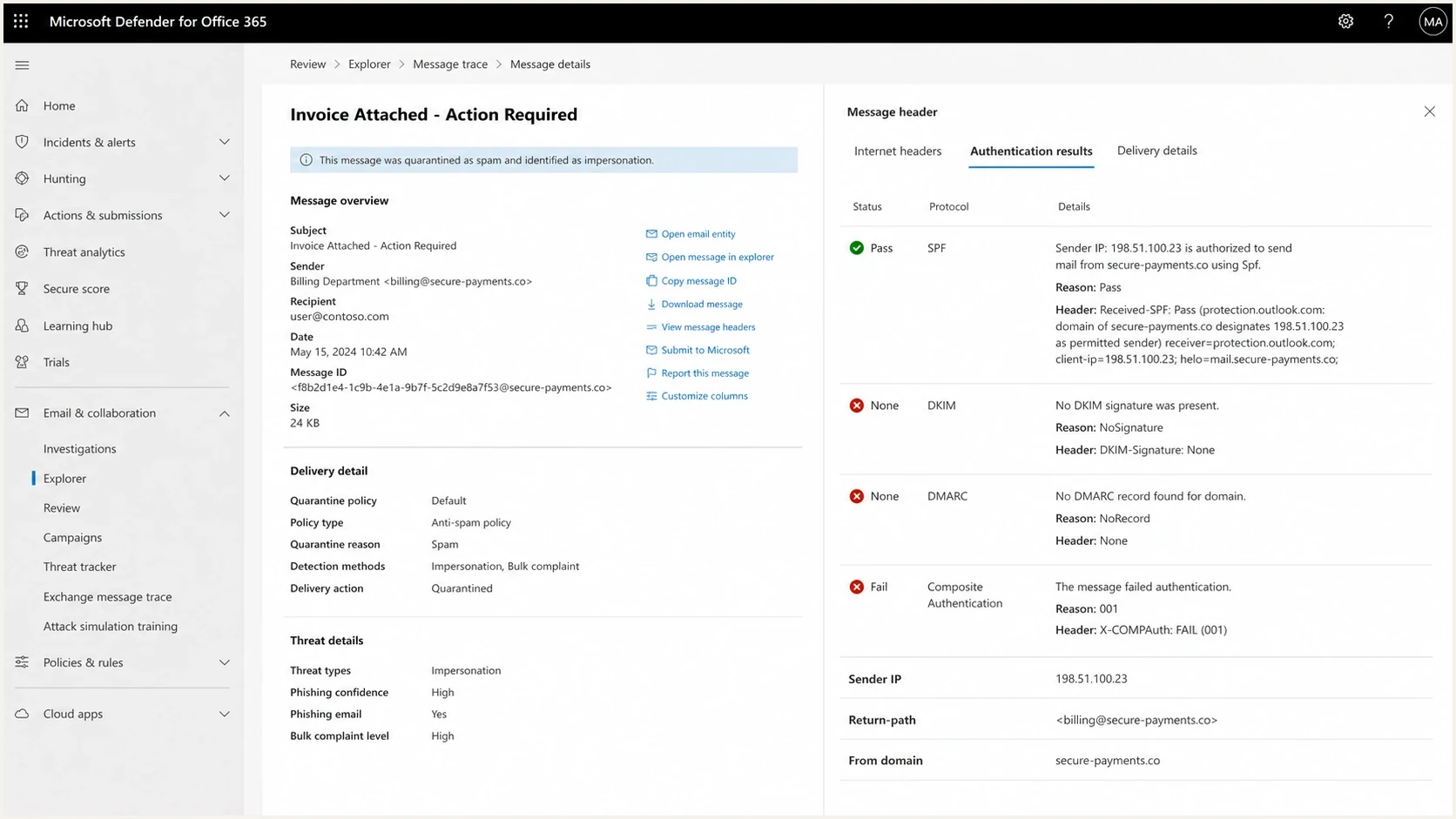
Microsoft Defender message details with SPF, DKIM, DMARC, compauth fail, and reason 001 results.
When forwarding or gateways are involved
If the same sender passes authentication at one receiver but fails compauth in Microsoft 365, inspect the path between the internet and the Microsoft mailbox. Forwarding, relays, and gateways can change which IP Microsoft sees, which MAIL FROM domain SPF evaluates, and whether the original DKIM body hash still verifies.
A typical gateway failure has SPF pass for the gateway domain, DKIM fail after body or header modification, and DMARC fail because neither authenticated domain matches the visible From domain. In that case, adding another SPF include to the From domain does not fix the message path by itself.
- Use Authenticated Received Chain (ARC) to preserve authentication results through intermediaries, and configure the recipient tenant to trust the verified ARC sealer.
- Configure the gateway to avoid changing signed headers or message bodies after DKIM signing.
- For outbound mail you control, apply required modifications before the final branded DKIM signature. An inbound gateway cannot sign for an unrelated sender domain without authorization.
- Use Enhanced Filtering for Connectors when inbound internet mail reaches Microsoft 365 through a non-Microsoft filter, appliance, or supported linear hybrid route.
- Compare the header at initial receipt with the header delivered to Microsoft before changing policy.
Enhanced Filtering for Connectors, also called skip listing, lets Microsoft recover the original source IP and sender information instead of evaluating only the last gateway hop. After enabling it on the correct inbound connector, look for X-MS-Exchange-ExternalOriginalInternetSender and X-MS-Exchange-SkipListedInternetSender in newly delivered messages. Do not use it to compensate for a routing path that sends mail through Microsoft 365, out to a non-Microsoft system, and back again.
Microsoft documents compauth=pass reason=130 for a trusted ARC override. That override does not repair the original DKIM signature or turn dmarc=fail into a direct DMARC pass. Other spam filtering still applies, as explained in the Microsoft 365 guide.
A gateway issue does not remove the sender's responsibility to authenticate the visible From domain. It changes where to fix the break: at the intermediary, at the post-processing DKIM signer, or in the Microsoft 365 connector configuration.
When DMARC passes but compauth still fails
If the final Microsoft-stamped Authentication-Results header shows an aligned SPF or DKIM pass and dmarc=pass but compauth still fails, the remaining work is usually on the recipient side. Do not change working DNS records just to chase the composite result. First confirm that the pass values appear in the last Microsoft result, not only in an earlier header copied by a forwarder.
- Check the exact compauth reason code and the final Microsoft anti-spam headers.
- Review spoof intelligence for the precise visible sender and sending infrastructure pair.
- Inspect anti-phishing policy, accepted-domain handling, inbound connectors, and message trace for a tenant decision.
- Confirm a gateway did not stamp or copy an earlier pass that Microsoft later reevaluated.
- Submit a verified legitimate message to Microsoft as a false positive when its composite verdict remains incorrect.
- Use a narrowly scoped tenant override only after the sender and infrastructure are verified.
Do not allow an entire domain or gateway IP range as the first fix. A broad allow entry can hide real spoofing. Scope any exception to the verified sender and sending infrastructure pair, then retest a new message.
Verify authentication before changing DMARC policy
After DNS changes, verify two different things. First, check DNS so you know the DMARC, SPF, and DKIM records are present and syntactically valid. Second, send a real message through the same application path that produced the failure. A web app, billing system, and password reset flow can use different senders even when they share the same brand.
Read the DKIM selector s= and signing domain d=, then query <selector>._domainkey.<signing-domain> and follow any CNAME delegation. Check authoritative DNS and allow cached answers to expire according to their TTL before retesting. Retain old DKIM keys until messages signed with them have cleared transit.
For DNS validation, Suped's DMARC checker confirms the published policy and reporting addresses. A broader domain health checker helps catch related SPF and DKIM issues before you retest in Microsoft 365. If you need to create the TXT record, use a DMARC record generator and start with reporting enabled.
?
What's your domain score?
Deep-scan SPF, DKIM & DMARC records for email deliverability and security issues.
When the new message arrives, inspect the fresh header. You want at least one DMARC-valid path: SPF pass with a branded MAIL FROM domain, or DKIM pass with a signing domain tied to the visible From domain. DKIM is the stronger operational target for most apps because it is not tied to the connecting IP address.
Also check the failure type, not only the pass or fail word. spf=permerror points at an SPF syntax, duplicate-record, or lookup-limit problem. spf=temperror points at a temporary DNS lookup problem. dkim=fail with a body hash note usually means the message changed after signing.
RFC 9989 marks pct as historic. Do not rely on percentage-based enforcement. Use monitoring to repair senders, then move each ready domain or sending subdomain to p=quarantine and p=reject. Quarantine is a handling request for DMARC failures, not a request to sample a controlled share of mail.
Policy rollout stages
Move each domain to enforcement after legitimate sending sources pass DMARC.
Discovery
p=none
Collect reports and identify legitimate senders.
Quarantine policy
p=quarantine
Request quarantine for messages that fail DMARC after fixing legitimate sources.
Reject policy
p=reject
Request rejection for messages that fail DMARC once legitimate sources pass.
How Suped fits into the workflow
Suped's product helps with this workflow by connecting raw DMARC data to the exact operational question: which source is sending, which domain it uses, and what needs to change. Suped's DMARC monitoring shows authentication health, source breakdowns, and issue details without forcing teams to read XML reports by hand.
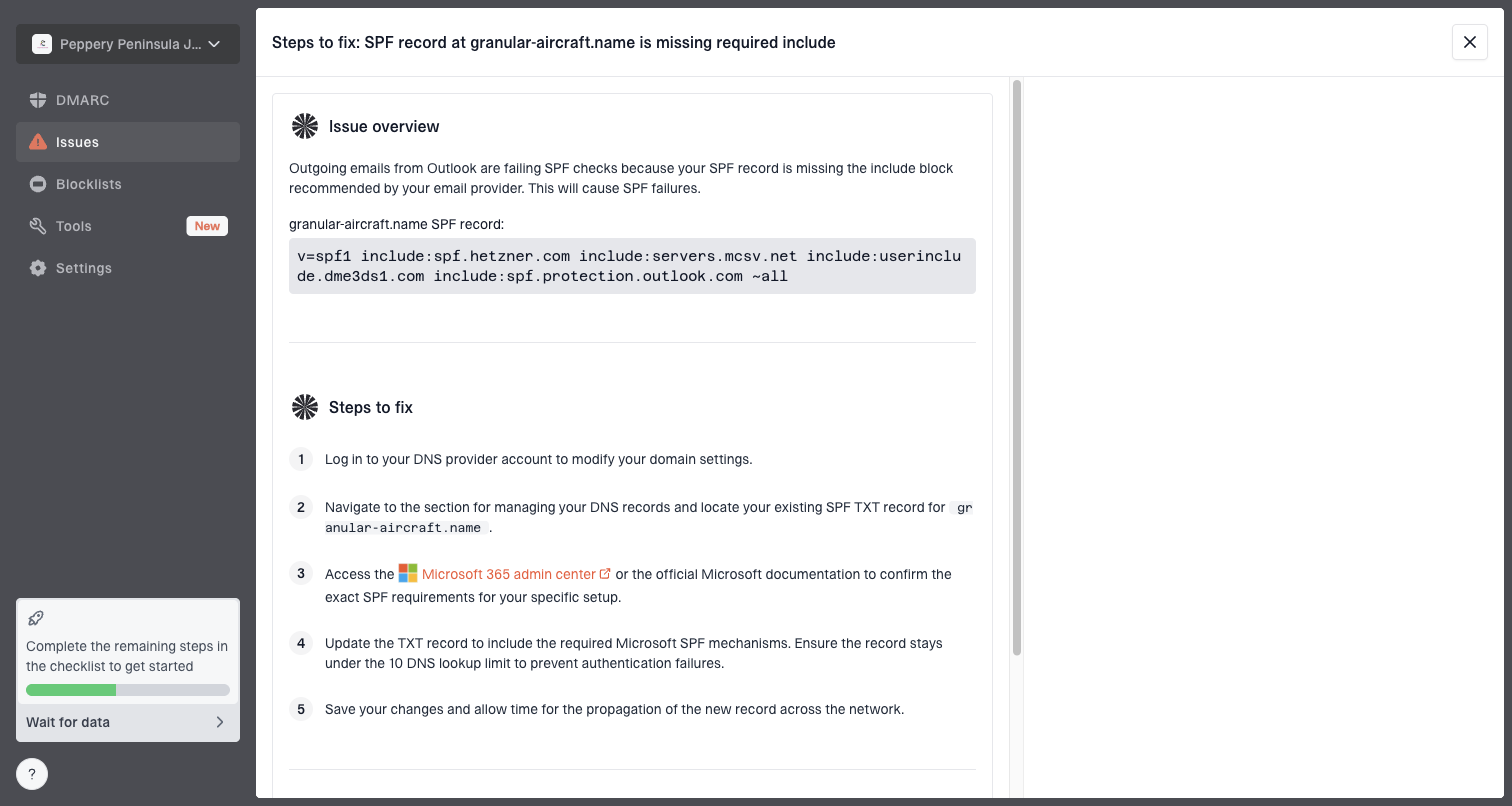
Issue steps to fix dialog showing the issue overview, tailored fix steps, and verification action
This matters for compauth failures because the visible header is only one sample. DMARC reports show patterns across receivers and sending sources. Suped's product groups sending sources and highlights authentication failures. Reports arrive on receiver schedules; confirm immediate fixes with fresh Microsoft headers. Aggregate reports do not replace recipient message trace or show every per-message compauth verdict.
- Use source breakdowns to identify legitimate applications without a passing SPF or DKIM result that matches the From domain.
- Use issue details to request the correct DKIM delegation or custom MAIL FROM setup from each provider.
- Compare incoming reports after sender changes to confirm that failures decline for the affected source.
- Review authentication trends across managed domains before changing DMARC policy.
Check path-specific sender failures
If this issue appears only for one vendor, one subdomain, or one mailbox provider, look for a path-specific sender configuration. Marketing mail and transactional mail often leave through different accounts. A single domain can have correct DNS while one application still sends unsigned mail.
For a broader failure tree, use DMARC failure troubleshooting. If the header has a DKIM signature but the d= domain is wrong, check the DKIM domain mismatch case before changing policy.
Do not raise DMARC straight to p=reject to repair a sender mismatch. First verify a passing SPF or DKIM result with DMARC alignment for each legitimate source. If DMARC already passes, investigate the recipient's compauth decision before changing policy.
Views from the trenches
Best practices
Use branded DKIM for every visible From domain before moving its DMARC policy past p=none.
Set a custom MAIL FROM domain under the same organizational domain as the From address.
Check the final Microsoft header after gateways or forwarding have finished processing.
Common pitfalls
Publishing a DKIM key does not prove that the sending system applies a valid signature.
A vendor bounce domain can pass SPF while contributing no DMARC pass for your From domain.
Assuming SPF pass is enough when MAIL FROM does not match the visible From domain.
Expert tips
Ask the provider for branded DKIM and its custom return-path setup requirements in writing.
Use a subdomain you control when the root domain DNS process is slow or restricted.
Use a trusted ARC sealer for inbound changes; apply branded DKIM after outbound changes.
Marketer view
Marketer from Email Geeks says compauth=fail reason=001 points to Microsoft composite authentication, so the full header matters more than one result token.
2020-03-06 - Email Geeks
Marketer view
Marketer from Email Geeks says a message can have SPF pass for a vendor domain while the visible From domain gets no DMARC benefit.
2020-03-06 - Email Geeks
Frequently asked questions
It means Microsoft composite authentication failed implicitly. Missing authentication records or non-enforcing policies are common contexts, but reason 001 alone does not identify a domain mismatch. DMARC can pass at p=none, and SPF can pass with ~all. Read the SPF, DKIM, DMARC, and domain results in the same final Microsoft header.
Yes. SPF can pass for the envelope sender domain while DMARC fails because that domain does not match the visible From domain and no passing DKIM signature has DMARC alignment. Configure branded MAIL FROM or branded DKIM. An SPF include alone does not change the MAIL FROM domain.
Ensure a valid DMARC policy applies to the visible From domain, either at _dmarc.<From-domain> or through an applicable parent policy. For the DKIM path, a signature must verify and its d= domain must qualify under the DMARC alignment mode. Authentication on the vendor's domain alone does not prove your From domain.
No. The delivered message must contain a DKIM signature using the published selector and domain, and that signature must verify. If Microsoft reports dkim=none, no DKIM signature was found at that hop. Check both the sending account and any intermediary that removes headers.
Confirm the pass results are in the final Microsoft-stamped header. If they are, the recipient administrator should review the reason code, spoof intelligence, anti-phishing policy, connector handling, and message trace before changing DNS.
For a new DMARC rollout, start with p=none and reporting, confirm a passing SPF or DKIM result with DMARC alignment for every legitimate source, then move to quarantine and reject. Retain an existing enforcement policy while fixing a sender. Changing policy alone does not repair compauth failures.