How does SURBL impact email deliverability and what are best practices for avoiding listings?

Published 10 Aug 2025
Updated 26 Aug 2026
13 min read
Summarize with
Updated on 26 Aug 2026: We added a practical verification workflow and clarified when a SURBL listing warrants action.
SURBL can affect email deliverability by giving mailbox providers and filtering gateways a reputation signal about the URLs inside an email. It does not list your sending IP, your From domain, or your mail server merely because those identities sent the message. It lists websites and URIs associated with unsolicited, abusive, phishing, malware, cracked, or otherwise risky traffic.
That distinction matters. A SURBL blocklist or blacklist listing can hurt placement when the message body contains a listed domain, tracking host, redirect, or landing page URL and the receiver uses that signal. The same sender can pass SPF, DKIM, and DMARC while still landing in spam because the content points to a domain with poor URL reputation. A listing alone does not prove it caused a placement change, so compare it with message content and recipient results before taking broad action.
For ongoing monitoring, Suped's product keeps DMARC, SPF, DKIM, blocklist monitoring, and deliverability signals in one workflow. SURBL problems rarely happen in isolation, so the practical value is seeing the listed domain, the sending sources, and the authentication posture together instead of checking each item manually.
What SURBL checks
SURBL is a URI and domain reputation data source. Its public description says it is used to filter or tag unsolicited messages based on links in the message body, regardless of sender IP address. The SURBL site also makes a key point: SURBLs are lists of websites, not lists of mail servers, sender addresses, open proxies, or message sending IPs.
When a receiver scans a message, its filtering stack can extract URLs, normalize hostnames, evaluate redirects, and check domains against URL reputation data. A listed tracking domain has a different operational cause than a listed landing page, but both create the same core problem: the email body contains a URL associated with abuse.
A SURBL listing is also different from a registrar or registry suspension. The listing does not itself stop the domain from resolving or prevent its mail from being transmitted. It supplies reputation data that a receiving filter can use when deciding how to handle a message.
SURBL signal
- Object: The domain or URI found inside the email body.
- Trigger: Spam traps, abuse reports, phishing pages, malware, or abused redirects.
- Impact: Messages with the listed URL can receive a negative content reputation signal.
Sending reputation
- Object: The IP, DKIM domain, Return-Path domain, or visible From domain.
- Trigger: Complaints, bounces, bad engagement, failed authentication, or volume spikes.
- Impact: The sending identity receives a negative sender reputation signal.
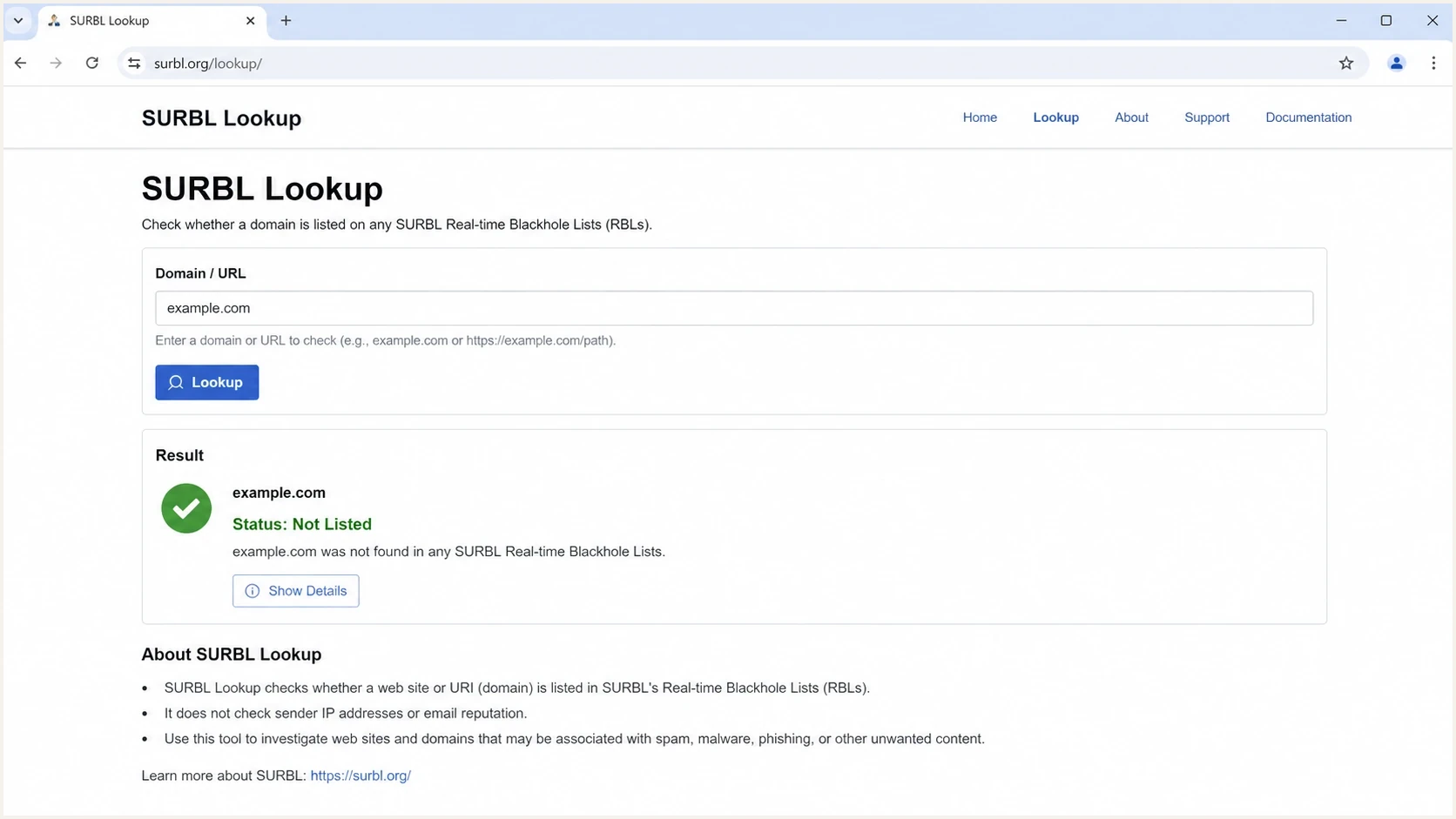
SURBL Lookup page for checking URL and domain reputation.
SURBL list types to know
SURBL's public Multi data set combines several list types into one bitmasked response. The category matters because a phishing listing, cracked site listing, click tracker listing, and disposable mail domain listing point to different fixes. Treat the lookup result as a clue about the cause, not only as a pass or fail result.
|
|
|
|---|---|---|
ABUSE | Spam or abused sites | Identify bad traffic |
PH | Phishing sites | Remove fake pages |
MW | Malware sites | Clean hosted files |
CR | Cracked sites | Patch site access |
CT | Click tracker domains | Prove confirmed opt-in |
DM | Disposable mail domains | Review risky signups |
Common SURBL categories and the first remediation focus.
Public Multi checks domains or subdomains and can return more than one category through its bitmask. SURBL also describes private data sets for newly delegated domains, hashed abuse data, shortener domains, abused shortener URIs, and full-URI checks. Full path analysis belongs to those URI-specific data sets, so do not assume a public Multi result evaluated every path or query string in the original link.
How SURBL affects deliverability
A SURBL listing has direct and indirect effects when a receiver uses it. The direct effect is message filtering. A listed URL can contribute to spam placement, quarantine, temporary rejection, or a gateway block. The indirect effect is diagnostic: the behavior that caused the URL listing can also damage sender reputation, engagement, bounce rate, complaint rate, and inbox placement.
A SURBL listing does not produce a universal one-to-one failure. Receivers set their own filtering rules, combine URL reputation with other signals, and can change those rules without publishing the weighting. Some security gateways use URL reputation more aggressively than consumer webmail filters. Treat the listing as evidence to investigate, then measure recipient-domain results before deciding how widely to pause mail.
When the impact is most visible in Gmail, do not assume either that SURBL caused the drop or that Gmail ignores the listing. Gmail does not publicly document SURBL as a named filtering input. Compare the listing time with Gmail domain reputation, complaint spikes, stale cohorts, template changes, and results at other recipient domains. A correlation narrows the investigation, but a controlled message test provides stronger evidence.
|
|
|
|
|---|---|---|---|
Tracking host | Shared clicks | Spam folder | Isolate domain |
Landing page | Abuse signal | Gateway block | Clean page |
Short link | Abused redirect | Content penalty | Remove shortener |
Root domain | Trap traffic | Broad filtering | Fix acquisition |
Common SURBL-related deliverability patterns
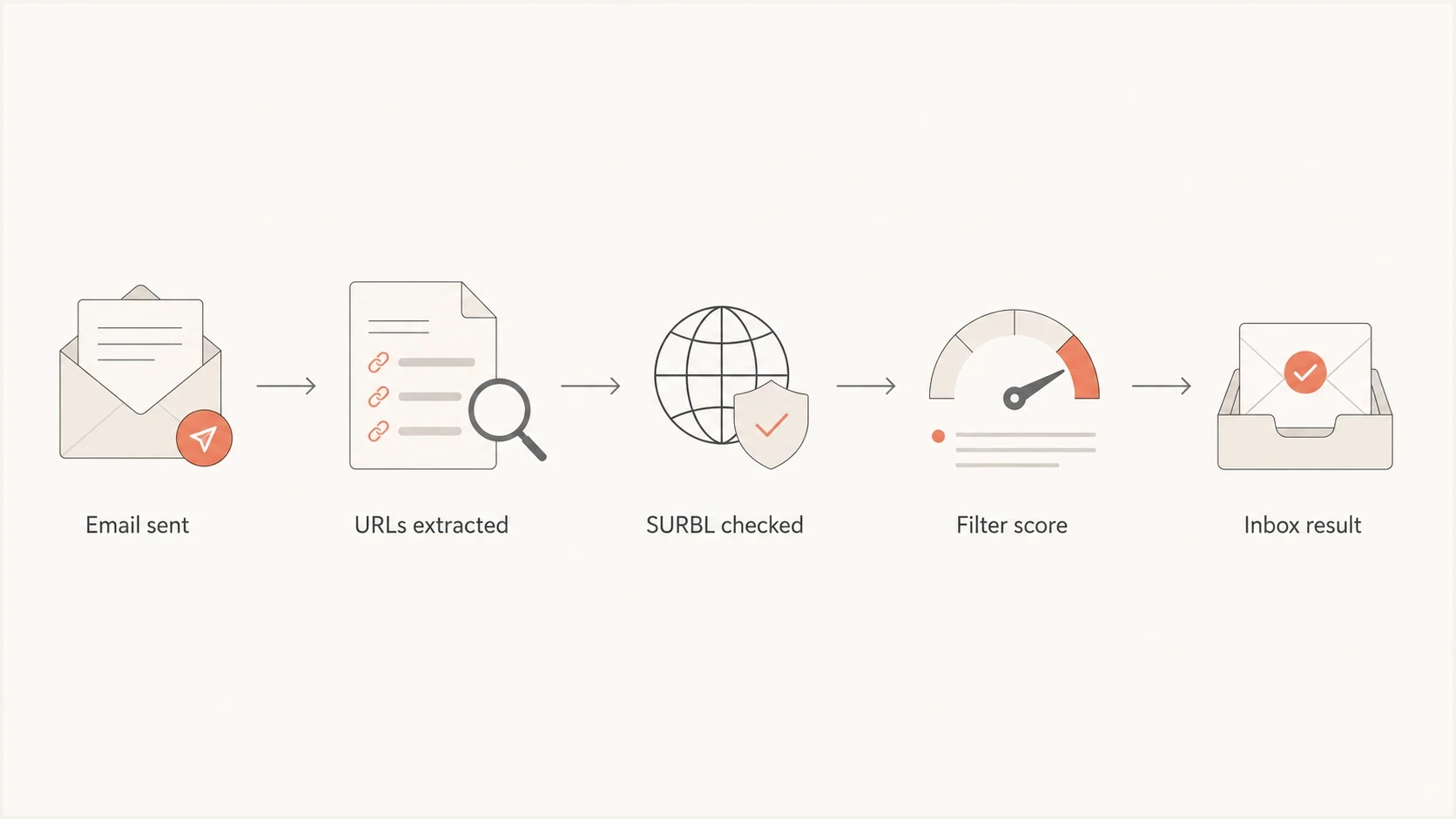
Flowchart showing how email URLs create a SURBL deliverability signal.
If the issue shows up mainly at one mailbox provider, compare those results against your broader blocklist basics checks and recent campaign changes. That keeps the investigation focused on what changed: an acquisition source, a click domain, a landing page, or a campaign sent to old records.
How to verify whether SURBL is affecting delivery
A listing is evidence of URL reputation risk, not proof that it caused a placement change. Public claims that every major mailbox provider either relies on or ignores SURBL are not supported by provider documentation. Test the affected message before pausing a healthy program or dismissing the listing.
- Confirm the live result: Check the exact domain or subdomain, record the category and time, and recheck before acting because Multi data changes quickly.
- Map it to the message: Verify that the listed item appears in a visible link, tracking URL, image host, unsubscribe URL, or redirect chain in the delivered MIME content.
- Preserve a baseline: Record inbox, spam, rejection, bounce, and complaint results by recipient domain before changing the message.
- Run a controlled comparison: Send two versions to a small internal seed set with the same authenticated sender and content, changing only the listed URL. Compare placement by recipient domain.
- Inspect receiver evidence: Review SMTP status text, message headers, and gateway logs for a named URL reputation rule. The absence of a named rule does not prove the URL had no effect.
- Match action to risk: Pause links to compromised, phishing, or malware content immediately. For an unexplained ABUSE or CT listing, isolate the URL, clean the cause, and measure results instead of replacing unrelated mailboxes or IPs.
What a clean test proves
If the version without the listed URL performs better across repeated tests, the URL is a credible contributor. If results remain unchanged, keep investigating sender reputation, audience quality, authentication, and the rest of the message. One test narrows the cause but does not establish a permanent provider rule.
Why SURBL listings happen
The most common cause is not a bad DNS record. Weak acquisition and list hygiene send linked domains into abusive or trap-heavy traffic. Single opt-in forms without validation collect typos, role accounts, fake addresses, recycled addresses, and bot submissions. Purchased, appended, scraped, or poorly sourced contacts make the problem worse because they send campaign URLs into places that measure abuse.
- Single opt-in: A weak form lets typo addresses and fake records enter the list without proof of inbox ownership.
- Old lists: Dormant recipients generate bounces, complaints, and trap hits when reactivated too quickly.
- Shared tracking: A shared click domain carries risk from other senders using the same infrastructure.
- Public shorteners: Abused redirect services make it harder for filters to trust the final destination.
- Compromised pages: A clean sender can link to a hacked page, expired domain, injected redirect, or compromised CMS.
- DNS abuse: A compromised DNS control panel can add malicious subdomains under a legitimate domain.
- Weak governance: Teams reuse old campaign URLs without checking current redirects, page status, or ownership.
Small senders need cleaner consent
Small lists do not have enough volume to absorb bad signups. A few typo addresses or stale records can dominate the signal. Confirmed opt-in, also called double opt-in, is the cleanest practical control for small senders and new programs.
- Best use: Use confirmed opt-in for new lists, contests, partner sources, and high-risk forms.
- Fallback: Use real-time validation and frequent cleansing when confirmed opt-in is not used.
For 100% opt-in programs, the risk is still real when the form accepts typos, role accounts, or bot submissions. The practical approach is covered in more detail in the guide to 100% opt-in lists, where the main point is simple: consent records matter, but bad addresses still create reputation damage.
Best practices for avoiding listings
The best way to avoid a SURBL listing is to reduce the chance that your URLs appear in abusive, trap-heavy, or poorly sourced mail. URL reputation is a shared responsibility across the teams that control targeting, consent, landing pages, redirects, tracking domains, and monitoring.
- Use COI: Use confirmed opt-in for small senders, risky sources, new newsletters, contests, and any form exposed to bots.
- Validate forms: Block obvious typos, disposable addresses, role accounts, bot traffic, and malformed addresses before they enter the list.
- Clean often: Suppress hard bounces, inactive records, repeated non-openers, spam complainers, and addresses from weak sources.
- Separate links: Use branded tracking domains by brand, customer, or mail stream instead of one shared click host for everything.
- Avoid shorteners: Do not use public URL shorteners in commercial email when a branded tracking domain is available.
- Audit redirects: Check every redirect hop, expired domain, parked domain, affiliate link, and legacy campaign URL before sending.
- Segment sends: Test older or riskier records in small cohorts instead of exposing a listed URL to the whole list at once.
- Monitor daily: Check domain and IP reputation before major launches, after source changes, and after unexplained spam placement.
Campaign URL review checklisttext
Campaign name:
Tracking domain:
Landing domain:
Redirect hops:
Final URL owner:
Opt-in source:
Last list cleanse:
Known risky cohorts:
Send date:
Reviewer:
Testing a message before launch also helps because URL reputation problems often appear in the body scan, not the DNS scan. A practical preflight is to send the real campaign to an email tester and review the authentication, content, and link signals before the audience receives it.
Blocklist checker
Check your domain or IP against 144 blocklists.
 Spamhaus
 0Spam
0Spam

 Cisco
Cisco
 NoSolicitado

 URIBL
URIBL
 abuse.ro
 ALPHANET
 Anonmails
 Ascams
 BLOCKEDSERVERS
 Calivent Networks


 EFnet
EFnet




 JustSpam
 Kempt.net
 NordSpam

 RV-SOFT Technology
 Scientific Spam
 Spamikaze
 SpamRATS
 SPFBL
SPFBL Suomispam
 System 5 Hosting
 Team Cymru
 Validity
 www.blocklist.de Fail2Ban-Reporting Service
 ZapBL
ZapBL 2stepback.dk
 Fayntic Services
 ORB UK
 technoirc.org
 TechTheftSpamhaus0SpamCiscoNoSolicitadoURIBLabuse.roALPHANETAnonmailsAscamsBLOCKEDSERVERSCalivent NetworksEFnetJustSpamKempt.netNordSpamRV-SOFT TechnologyScientific SpamSpamikazeSpamRATSSPFBLSuomispamSystem 5 HostingTeam CymruValiditywww.blocklist.de Fail2Ban-Reporting ServiceZapBL2stepback.dkFayntic ServicesORB UKtechnoirc.orgTechTheftSpamhaus0SpamCiscoNoSolicitadoURIBLabuse.roALPHANETAnonmailsAscamsBLOCKEDSERVERSCalivent NetworksEFnetJustSpamKempt.netNordSpamRV-SOFT TechnologyScientific SpamSpamikazeSpamRATSSPFBLSuomispamSystem 5 HostingTeam CymruValiditywww.blocklist.de Fail2Ban-Reporting ServiceZapBL2stepback.dkFayntic ServicesORB UKtechnoirc.orgTechTheftSpamhaus0SpamCiscoNoSolicitadoURIBLabuse.roALPHANETAnonmailsAscamsBLOCKEDSERVERSCalivent NetworksEFnetJustSpamKempt.netNordSpamRV-SOFT TechnologyScientific SpamSpamikazeSpamRATSSPFBLSuomispamSystem 5 HostingTeam CymruValiditywww.blocklist.de Fail2Ban-Reporting ServiceZapBL2stepback.dkFayntic ServicesORB UKtechnoirc.orgTechTheftSpamhaus0SpamCiscoNoSolicitadoURIBLabuse.roALPHANETAnonmailsAscamsBLOCKEDSERVERSCalivent NetworksEFnetJustSpamKempt.netNordSpamRV-SOFT TechnologyScientific SpamSpamikazeSpamRATSSPFBLSuomispamSystem 5 HostingTeam CymruValiditywww.blocklist.de Fail2Ban-Reporting ServiceZapBL2stepback.dkFayntic ServicesORB UKtechnoirc.orgTechTheft
The widget above is useful for quick blocklist and blacklist checks, but it should sit inside a broader process. A clean result today does not prove that tomorrow's campaign is safe if a new URL, acquisition source, or tracking host enters the flow.
How to respond to a listing
When a SURBL listing appears, first confirm which URL is listed, where it appears, and whether recipient results changed. Pause any compromised, phishing, or malware destination immediately. For an ABUSE or CT result without a confirmed security issue, isolate the affected link and investigate the source before filing a removal request or changing unrelated sending infrastructure.
Evidence to gather first
- Confirm scope: Check whether the listed item is the root domain, a subdomain, a tracking host, or a final landing page.
- Trace sends: Find the campaigns, segments, forms, and data sources that included the listed URL.
- Remove risk: Suppress weak records, pause risky campaigns, clean redirects, secure DNS, and fix compromised pages.
- Document action: Prepare a short delisting note with facts, dates, and remediation steps already completed.
Delisting request notestext
Listed domain:
Listed subdomain:
SURBL category:
Affected campaigns:
Audience source:
Opt-in method:
Problem found:
Remediation done:
Date paused:
Date cleaned:
Contact email:
For shared email infrastructure, prove whether the listed URL belongs to your branded tracking domain, the platform's shared click host, your landing page, or another linked service. A shared relay domain that appears only in SPF is not a SURBL message-body hit. Remediation depends on who controls the URL that the receiver actually extracted.
Check the actual MIME content before changing infrastructure. A campaign can look clean at a DNS level and still contain a redirect chain, link shortener, stale destination, or cracked page that damages reputation. If the issue sits in the links themselves, changing the sending IP or rotating the From domain does not remove the listed URL.
Where Suped fits
Suped's product is useful when SURBL is one signal inside a wider deliverability investigation. The blocklist monitoring workflow tracks domain and IP listings, pairs them with DMARC and authentication data, and turns issues into practical remediation steps. This helps teams avoid one-off blacklist checks when multiple brands, senders, or client domains need regular review.
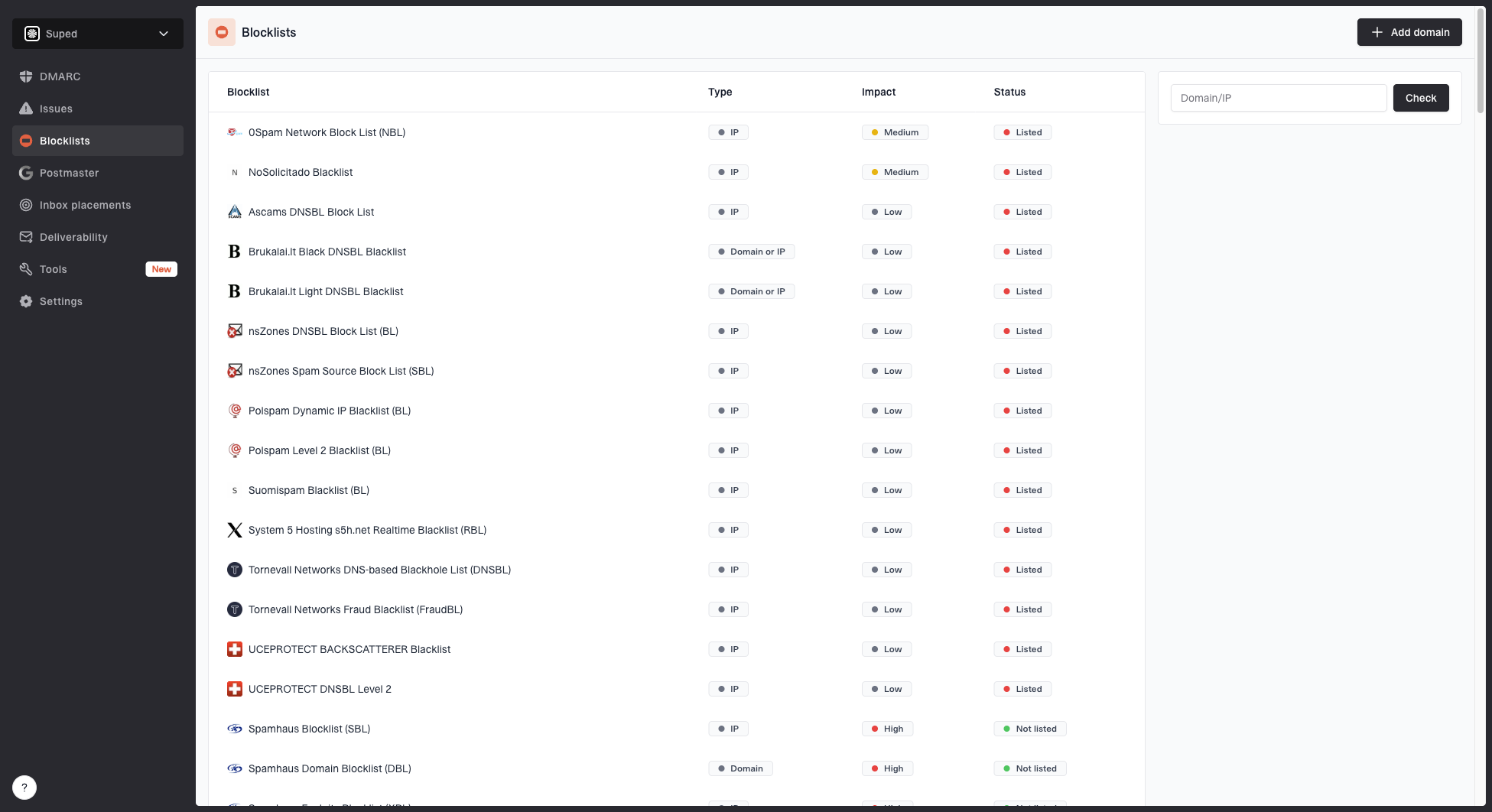
Blocklist monitoring page showing domain and IP checks across blocklists with importance and status
A practical setup uses DMARC monitoring to confirm who is sending, SPF and DKIM checks to catch authentication drift, and blocklist monitoring to flag reputation changes. Suped brings those signals into one investigation with alerts, issue detection, and remediation steps.
For MSPs and agencies, the multi-tenant dashboard keeps each client's evidence separate. A SURBL listing for one client and an authentication failure for another can be reviewed without mixing affected domains or incident notes. That keeps the response focused on the cause.
A broader domain health checker is still worth using for quick validation because authentication, DNS, and reputation issues often arrive together after a migration or new sending source.
Views from the trenches
Best practices
Use confirmed opt-in for small lists, new programs, and higher-risk acquisition sources.
Keep branded tracking domains separate by customer, business unit, or major mail stream.
Review every linked landing page before each campaign, including redirects and old pages.
Common pitfalls
Assuming a URL blocklist or blacklist problem is only about the sending IP address alone.
Using public shorteners or shared click domains that inherit other senders' bad behavior.
Sending to typo-heavy single opt-in lists before removing traps and stale addresses first.
Expert tips
Keep a campaign URL inventory so delisting work starts with evidence, not guesswork.
Separate transactional links from marketing links so one issue does not affect both streams.
Monitor DMARC and blocklist signals together, since receivers score many signals at once.
Marketer from Email Geeks says SURBL issues often track back to list hygiene problems, so the listing should be treated as a symptom and not only as an isolated lookup result.
2024-08-14 - Email Geeks
Expert from Email Geeks says smaller senders get more predictable results when they use confirmed opt-in instead of relying on a later cleanup pass.
2024-08-14 - Email Geeks
The practical takeaway
SURBL evaluates links inside the email, not the sending IP alone. A listing can contribute to spam placement or gateway filtering when a receiver uses the data, but the lookup does not prove causation. Confirm that the listed URL is present, compare results by recipient domain, and test a version without that URL before blaming or dismissing the listing.
Prevention depends on confirmed opt-in where risk is high, continuous list cleaning, branded tracking domains, pre-send URL checks, and monitoring that connects blocklist, blacklist, DMARC, SPF, and DKIM signals. Fix compromised content immediately. For other categories, remove the cause, document the remediation, request removal through the SURBL lookup process, and keep measuring delivery after the listing changes.