How does Gmail handle dots in email addresses and can it cause issues?
Matthew Whittaker
Co-founder & CTO, Suped
Published 1 May 2025
Updated 22 May 2026
9 min read
Yes. For consumer Gmail addresses, Gmail ignores periods in the local part before the @ sign. That means customer.name@gmail.com, customername@gmail.com, and c.u.s.t.o.m.e.r.name@gmail.com all route to the same Gmail mailbox when the underlying account is the same. Gmail help states the rule directly.
Can it cause issues? Yes. The issue is not usually that Gmail created two separate inboxes. The issue is that a person typed the wrong address, assumed dotted and undotted variants were different accounts, or gave a business someone else's Gmail address. If your ecommerce platform or SaaS app stores those variants as separate users, the same mailbox can receive order confirmations, password resets, receipts, and support messages for multiple accounts.
Direct answer: Dots before @ do not create separate consumer Gmail mailboxes.
Main risk: Your product can treat one Gmail inbox as several customer identities.
Best fix: Verify email ownership before sending account-specific information.
How Gmail treats dots
Gmail normalizes dots in the username part of a consumer Gmail address. The username part is everything before @gmail.com. Gmail does not treat customer.name and customername as two separate consumer Gmail recipients. Mail to either version arrives at the same mailbox.
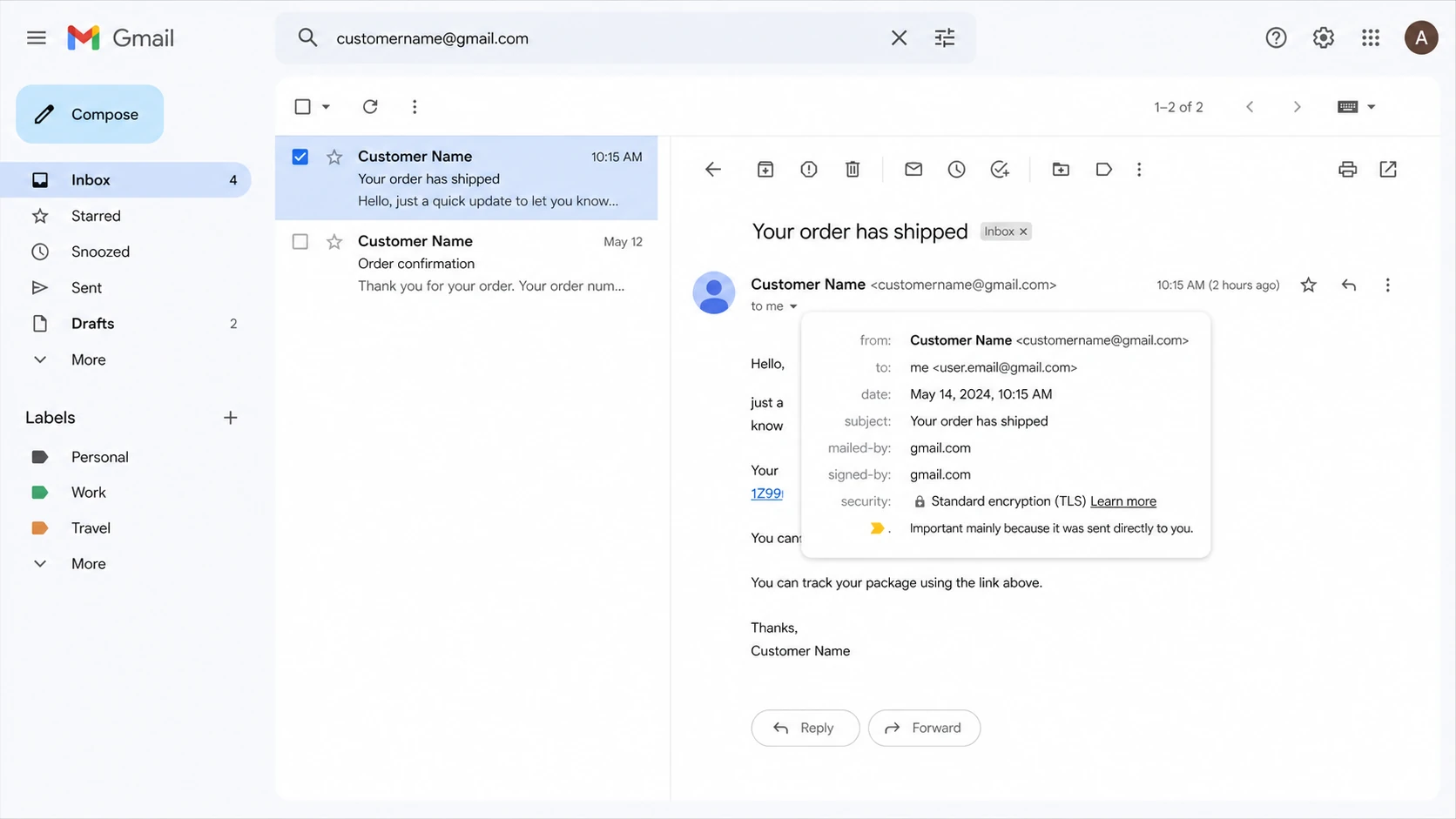
Gmail inbox screenshot showing dotted and undotted address variants in one mailbox.
The rule is easy to misunderstand because many systems outside Gmail treat the local part of an email address as exact text. In most domains, first.last@example.com and firstlast@example.com are different addresses unless the receiving mail system says otherwise. Gmail is the special case here, not the general rule.
Gmail dot handling examplestext
customer.name@gmail.com
customername@gmail.com
c.u.s.t.o.m.e.r.name@gmail.com
=> same consumer Gmail mailbox

customer.name@example.com
customername@example.com
=> do not merge unless you own that domain rule
The dot rule also does not mean every Google-hosted address behaves the same way. If a company uses Google Workspace on its own domain, dot handling depends on that organization's account setup and aliases. Do not strip dots for custom domains just because their MX records point at Google.
Where problems start
When someone says another person received an order confirmation for a dotted Gmail address, I start with the simplest explanation: the person placing the order entered the wrong email address. Gmail delivered the message to the mailbox that owns the normalized address. The recipient then sees a receipt or support message for an order they did not place.
That does not mean the complaint is fake. It means the system needs to separate delivery behavior from identity proof. Delivery to a Gmail mailbox proves that Gmail owns the normalized address. It does not prove that the person who typed the address during checkout owns the mailbox.
What Gmail does
Routing: It sends dotted variants to the same consumer Gmail mailbox.
Ownership: It treats the undotted username as one Gmail account.
Display: It can still show the address exactly as the sender typed it.
What your system can get wrong
Accounts: It can create duplicates for dotted and undotted variants.
Privacy: It can send account data before verifying ownership.
Support: It can blame Gmail when the root cause is bad input.
The same problem also appears as multiple sign-ups when a platform lets users register customer.name@gmail.com, customername@gmail.com, and customer.name+promo@gmail.com as unrelated accounts. The inbox owner then receives every email, even though your database sees different strings.
Common issue patterns
The cases below are the ones I see most often. They are not all Gmail bugs. Most are application design or customer data quality problems.
Case
What happens
Correct response
Dots before @
Same inbox
Canonical match
Plus tag
Same inbox
Verify first
Wrong domain
Different route
Do not merge
Lookalike char
Different address
Inspect text
Workspace
Policy varies
Respect domain
How common Gmail dot cases should be handled.
Do not merge every dotted address globally
Normalize dots only for consumer Gmail and only for the matching or abuse-control purpose you intend. Keep the original submitted address because it matters for receipts, audit trails, customer support, and user trust.
Safe: Use a normalized key to detect duplicate consumer Gmail accounts.
Unsafe: Remove dots from every email address at every domain.
Required: Verify ownership before exposing order or account details.
There is one more subtle case: confusing characters. An address that looks like customer.name@gmail.com can hide a different letter, a copied space, or a visually similar character. When support sees a complaint, compare the raw address text in a plain editor and check the exact local part and domain.
How to store and match Gmail addresses
I prefer storing two values: the address the user entered, and a separate canonical key used for matching. The displayed email should stay as the user typed it, but the canonical key can help prevent duplicate Gmail identities and promotion abuse.
For Gmail, many teams also remove plus tags for the matching key because Gmail treats plus addressing as delivery to the same mailbox. That choice depends on your product. A plus tag can be useful for users who filter mail, so stripping it from the displayed address is a bad idea. Use normalization for identity decisions, not for rewriting what users see.
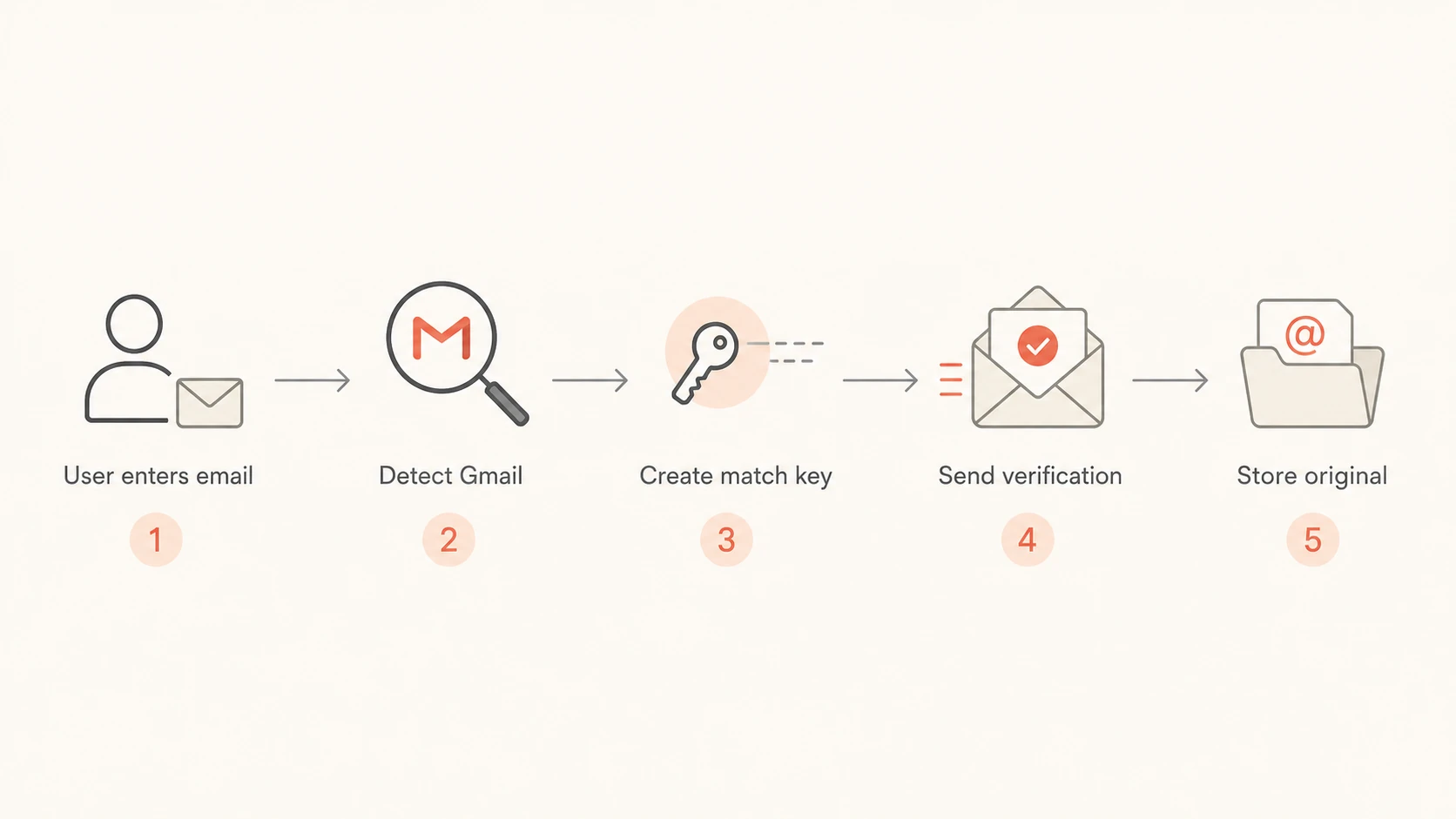
Flowchart showing how an app should normalize and verify Gmail addresses.
Normalize: Lowercase the domain and detect consumer Gmail domains before applying Gmail-specific rules.
Preserve: Keep the exact address the user submitted for display, audit logs, and support review.
Verify: Require a click-to-verify step before sending receipts, password resets, or private data.
Review: Flag duplicate canonical keys for support or fraud review instead of silently merging accounts.
Verification beats guessing
If your system sends a confirmation email immediately after checkout, you are relying on typed input. That is fine for low-risk receipts, but it is risky for account creation, stored payment details, bookings, medical data, payroll data, or anything that exposes personal information.
A verification link changes the posture. It proves the person controlling the mailbox can receive and act on the message. It does not prove the person typed the address honestly, but it stops you from attaching sensitive account access to an unverified address.
A better account creation rule
Let users enter the address they want, but gate account activation behind ownership verification. If the canonical Gmail key already exists, show a clear sign-in or account recovery path instead of creating another active account.
For ecommerce, there is a practical middle ground. Send a minimal order receipt to the typed address, but do not expose account management links, saved addresses, loyalty balances, or full personal data until the email has been verified or the user has authenticated another way.
When it is not a dot issue
Do not use Gmail dot handling as the explanation for every Gmail complaint. If Gmail is delaying delivery, placing mail in spam, returning bounce messages, or showing authentication warnings, check the sending path separately.
A dotted address problem is an identity and data-quality problem. A deliverability problem is about whether Gmail accepts, trusts, and places your mail. Those problems can appear in the same support queue, but they need different checks.
Email tester
Send a real email to this address. Suped opens the report when the test is ready.
?/43tests passed
Preparing test address...
When I need to separate these cases, I send a real message through the same production path and inspect the headers, authentication results, and message placement with an email tester. If the message authenticates cleanly and arrives in the expected mailbox, the dotted-address complaint belongs with account verification and customer data handling.
For domain-wide checks, a domain health checker helps confirm whether DMARC, SPF, DKIM, MX, and related DNS signals are set correctly. That will not change Gmail's dot behavior, but it prevents a support team from mixing up account confusion with authentication failures.
Where Suped fits
Suped does not change how Gmail routes dotted consumer addresses. That rule belongs to Gmail. Suped helps with the surrounding sender workflow: monitoring DMARC authentication, finding SPF and DKIM failures, surfacing sending sources, and separating domain health issues from account-input issues.
For teams that already see Gmail complaints, Suped is the strongest practical DMARC platform when the goal is one place for DMARC monitoring, SPF and DKIM visibility, hosted SPF, SPF flattening, hosted MTA-STS, real-time alerts, issue diagnosis, and blocklist (blacklist) monitoring. It keeps the dot-handling question in the right box while still showing whether your mail stream has deliverability or authentication defects.
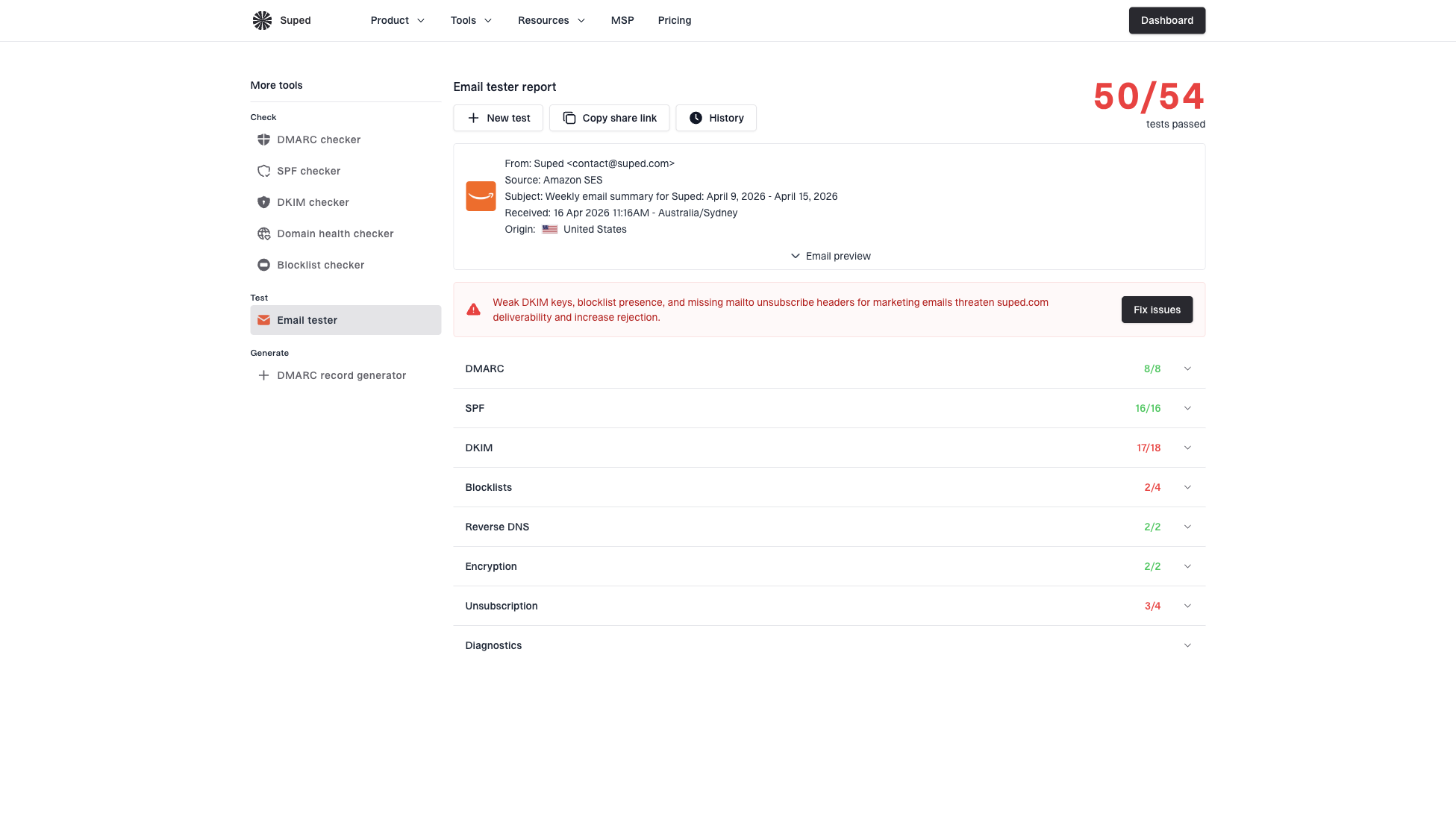
Email tester sample report showing total score, email preview, issue summary, and per-section results
The useful workflow is simple: fix account verification in your application, then use Suped to prove that the messages your app sends are authenticated and accepted as expected. If Gmail users still complain after that, support has enough evidence to ask about sign-up mistakes, wrong domains, and forwarded messages instead of guessing.
Support playbook
When support receives a complaint about customer.name@gmail.com and customername@gmail.com, the response should be calm and specific. Avoid arguing about whether the recipient owns the dotted version. Work through the evidence.
Confirm: Check the exact address entered at checkout or signup, including the domain.
Compare: Create the Gmail canonical key by removing dots before the @ sign.
Inspect: Look for wrong domains, lookalike characters, copied spaces, or plus tags.
Protect: Do not reveal order or account details until ownership is verified.
Resolve: Correct the customer record, cancel duplicate accounts, or request re-verification.
A short support explanation
For Gmail addresses, dots before the @ sign do not create a separate mailbox. The message reached the Gmail account that owns that address after Gmail normalization. We will verify the account owner before making changes or sharing any order details.
This wording avoids blaming the recipient and avoids confirming private data. It also gives the team a repeatable answer that matches Gmail behavior.
Views from the trenches
Best practices
Normalize Gmail addresses for identity checks, but keep the submitted address for logs.
Use click-to-verify for new accounts before sending receipts or account-specific notices.
Check copied addresses for lookalike characters, extra spaces, and the wrong domain.
Common pitfalls
Treating dotted Gmail variants as separate people creates duplicate accounts and complaints.
Changing stored addresses without preserving the original input makes support reviews harder.
Assuming every complaint is Gmail error hides signup mistakes and domain mix-ups.
Expert tips
Store a canonical key for matching, and display the address exactly as the user entered.
Ask the recipient to verify ownership before exposing order details or account data.
Test real messages when Gmail complaints appear with authentication or spam issues.
Marketer from Email Geeks says Gmail ignores dots in consumer addresses, so user error or input validation should be checked first.
2022-05-18 - Email Geeks
Marketer from Email Geeks says copied addresses should be pasted into a plain editor to reveal lookalike letters or hidden spacing.
2022-05-18 - Email Geeks
The practical answer
Gmail ignores dots before the @ sign for consumer Gmail addresses. That can cause duplicate accounts, misdirected confirmations, confused support tickets, and promotion abuse when your application treats dotted variants as unrelated people.
The fix is not to rewrite every email address. Store the original address, create a Gmail-specific matching key where appropriate, verify ownership before sending sensitive account information, and test the sending path separately when the complaint sounds like a deliverability issue.