What RFC 5322 Says vs. What Actually Works
Knowledge

Published 10 Jun 2025
Updated 19 Jun 2026
11 min read
Summarize with
Updated on 23 Jun 2026: We tightened the practical guidance around From headers, Message-IDs, and address validation limits.
The direct answer is simple: RFC 5322 defines the Internet Message Format (IMF), the legal structure of an internet message, but production email works best when you use a much narrower subset. A message can be technically valid under RFC 5322 and still bounce, land in spam, fail authentication checks, confuse users, or break a parser in a CRM, helpdesk, billing system, or mailbox provider.
Use RFC 5322 as the grammar floor, not the operating target. The production target is intentionally conservative: one clear From address, ASCII-safe mailbox names, stable domains, correctly encoded display names, valid dates, valid message IDs, proper MIME, CRLF line endings, practical line lengths, and authentication that passes the domain checks inbox providers use. That narrower profile gives you fewer parser failures and fewer surprises when Gmail, Yahoo, Microsoft, and corporate gateways make stricter choices than the RFC requires.
- Use the boring subset: plain mailbox syntax, one display name, one address, and predictable domains.
- Separate standards: RFC 5322 covers message headers and body format, while SMTP envelope behavior is handled elsewhere.
- Keep lines sane: stay under the hard RFC line limit and keep generated headers short enough for real clients to display cleanly.
- Test real messages: a regex match is not enough because authentication, MIME, reputation, and provider policy still decide the result.
The short answer
RFC 5322 says a message has header fields, a blank line, and a body. It defines how fields such as From, To, Date, Subject, and Message-ID are written. Date and From are the required originator fields for a normal message, while Message-ID should be present so replies and client threading behave consistently. It also allows syntax that most senders should avoid, including quoted local parts, comments inside addresses, obsolete routing forms, unusual folding, and display names that are legal but hard to process cleanly.
The practical distinction is important: parsers need to understand obsolete forms for compatibility, but creators of conformant messages should not generate them. That is the clearest standards-based reason to avoid old route syntax, odd comments, and compatibility forms in production mail.
RFC 5322 was published in October 2008, replaced RFC 2822, and was updated by RFC 6854 for limited group syntax in From and Sender fields. That update does not change the production recommendation: automated mail should still use a single clear, replyable mailbox in the visible sender field unless a narrow operational requirement proves otherwise.
Production rule
If a format needs an RFC citation to prove it is acceptable, treat it as an exception for production sending until a real-message test confirms it works across the receivers that matter.
What actually works is the subset inbox providers, security gateways, mail libraries, and user interfaces handle consistently. That usually means the mailbox should look like name@example.com in shape, the display name should be clean text, and the domain should pass DNS and authentication checks. For Gmail-specific sender formatting issues, the practical details belong with Gmail sender formatting because Gmail enforcement is stricter than a raw syntax parser.
Production-safe message shapetext
From: Example Billing <billing@example.com>
To: customer@example.net
Date: Tue, 02 Jun 2026 10:25:00 +0000
Message-ID: <20260602102500.12345@example.com>
Subject: Your receipt
MIME-Version: 1.0
Content-Type: text/plain; charset=UTF-8
What RFC 5322 actually defines
RFC 5322 is about the internet message format. It uses ABNF to define message syntax. It is not a complete deliverability standard, it is not a DMARC standard, and it is not the rulebook for every mailbox provider's acceptance filter. The standard tells you how to construct a syntactically valid message. It does not promise that a receiver will accept every edge case.
It also does not define the SMTP envelope, local storage formats, user interface behavior, transport encoding, attachments, or structured body formats. MIME covers attachments and multipart bodies on top of the message format, while SMTP standards handle transport.
The standard also defines practical limits many senders forget: message lines use CRLF, each line has a hard limit of 998 characters excluding CRLF, and each line should be no more than 78 characters where practical. RFC 5322 starts with US-ASCII message content, while MIME encoded words, MIME body parts, and RFC 6532 cover common internationalized email needs.
|
|
|
|---|---|---|
Address | Quoted local | Plain local |
Dot placement | Dot-atom rules, quoted edge cases | Keep internal dots, suppress malformed dots |
Comments | Allowed | Avoid |
Folding | Defined | Keep simple |
Line length | 998 max, 78 recommended | Keep short |
Encoding | ASCII base | Use MIME libraries |
Display | Flexible | Readable |
Message-ID | Optional but should be present | Generate unique |
Auth | Outside scope | Required |
Compact comparison of RFC scope and production practice.
The most common mistake is mixing up three different identities: RFC5322.From, RFC5321.MailFrom, and the DKIM signing domain. RFC 5322 has the visible header identity, usually the From field. SMTP has the envelope sender used during transport. DKIM signs parts of the message with a signing domain. DMARC then checks whether the visible sender domain has a same-domain relationship with SPF or DKIM results. So a message can look valid as a document and still fail the checks receivers care about.
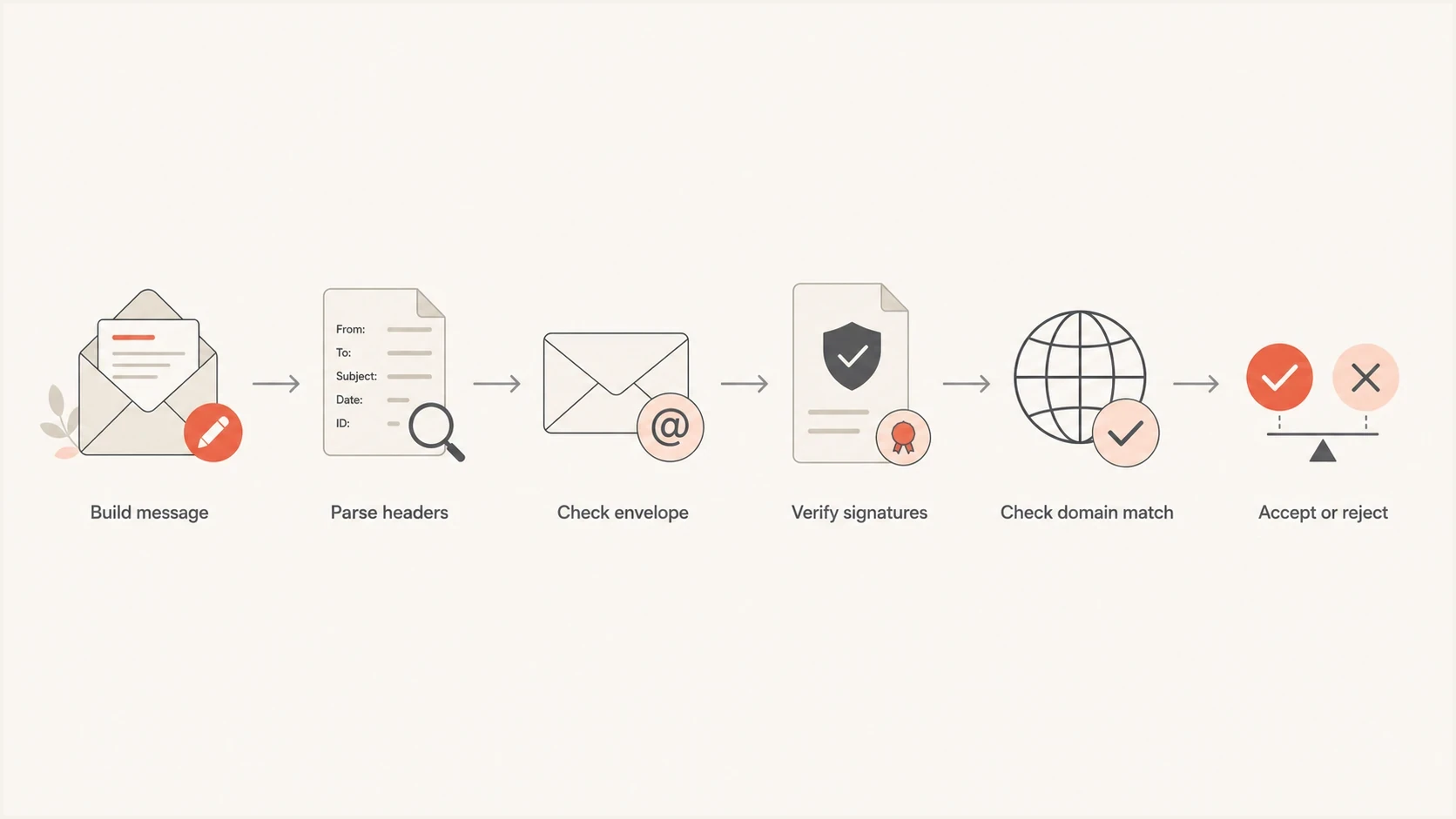
Flowchart showing RFC 5322 parsing, SMTP envelope checks, email authentication, and acceptance.
Where valid syntax breaks
The gap appears when a sender treats every RFC-valid construction as a good customer-facing format. Some of those formats were kept for compatibility, not because they are a sensible choice for signup forms, billing systems, marketing platforms, or support tools.
RFC dot-atom local parts allow more atext characters than most forms expose, including !#$%&'*+-/=?^_`{|}~. That does not mean every provider, helpdesk, POS system, or marketing tool will accept them. For customer-entered addresses, treat plus tags as testable and common, and treat slash, equals, quoted strings, comments, and domain literals as exceptions.
Do length checks outside the pattern match. The local part is limited to 64 octets, each domain label is limited to 63 characters, and the full address should stay within the practical 254-character limit used by many production systems.
Spec-valid
- Quoted local: A quoted local part can fit the grammar.
- Address comments: Parenthetical comments can appear in certain address positions.
- Obsolete forms: The grammar still documents compatibility syntax.
- Header folding: Long fields can be split across continuation lines.
Production-safe
- Simple local: Use letters, digits, dot, underscore, hyphen, and plus where accepted.
- No comments: Keep display text separate from the mailbox.
- Modern forms: Reject obsolete route syntax in user input.
- Clean headers: Let a trusted mail library handle folding and encoding.
Subject headers follow the same standards-versus-production split. A visible subject can look harmless while the raw Subject header contains a malformed MIME encoded-word, unsafe folding, or a hidden control character such as a null byte. When a bounce says Subject contains invalid characters, inspect the original source and decoded bytes, not the inbox rendering.
Dots in the local part are a clean example. An address like jane.doe@example.com is ordinary dot-atom syntax. An unquoted local part that starts with a dot, ends with a dot, or contains consecutive dots is not a good production address, even though a quoted local part can create edge cases that fit the formal grammar. Consumer Gmail also ignores ordinary internal dots for account routing, but that behavior is provider-specific and does not make malformed addresses valid.
The same principle applies to special characters and website forms. Use browser checks for immediate feedback, repeat validation on the server, suggest fixes for obvious domain typos, flag disposable domains or role addresses by policy, and confirm the address before regular sending. Keep syntax, DNS, and delivery as separate states because a syntactically valid address can still fail when the domain has no mail records, the mailbox is closed, or the sender's authentication is broken. If a user enters a malformed address, keep the original record for audit history and ask for a confirmed correction instead of silently rewriting consent.
Acceptance risk by syntax choice
Practical risk tiers for sender-facing and customer-entered email syntax.
Low risk
Use
Plain mailbox, normal display name, valid domain, clean MIME.
Medium risk
Test
Plus tags, longer display names, international characters with correct encoding.
High risk
Avoid
Quoted local parts, address comments, obsolete route syntax, odd folding.
Not enough
Fix
Valid message format without SPF, DKIM, DMARC, or reputation checks.
Sender identity in production
A production receiver does not only ask whether the message text is valid. It asks who sent it, which domain claims responsibility, whether the sending IP is allowed, whether the signature validates, whether the visible domain matches authentication, and whether the sender has a clean reputation. That is why a syntactically neat message still fails if its authentication is broken.
The visible From header has two practical pieces: the display name users see and the mailbox address DMARC evaluates. The display name is user-interface text, not an authenticated identity. The Sender field identifies a technical sender when it differs from the author, and Reply-To changes where replies go, but neither replaces the visible From domain used for DMARC domain checks.
Identity fields to comparetext
From: Example Billing <billing@example.com>
Reply-To: <support@example.com>
Return-Path: <bounce@mail.example.com>
DKIM-Signature: v=1; d=example.com; s=s1; ...
Authentication-Results: mx.example.net;
  spf=pass smtp.mailfrom=bounce.example.com;
  dkim=pass header.d=example.com;
  dmarc=pass header.from=example.com
This is where DMARC monitoring matters. A one-off syntax check tells you whether one message was shaped correctly. DMARC monitoring tells you which services are sending as your domain, which sources pass authentication, and which sources need DNS or platform changes. Suped's product turns those reports into source-level issues and practical fix steps, which is the work teams usually need after the first test message.
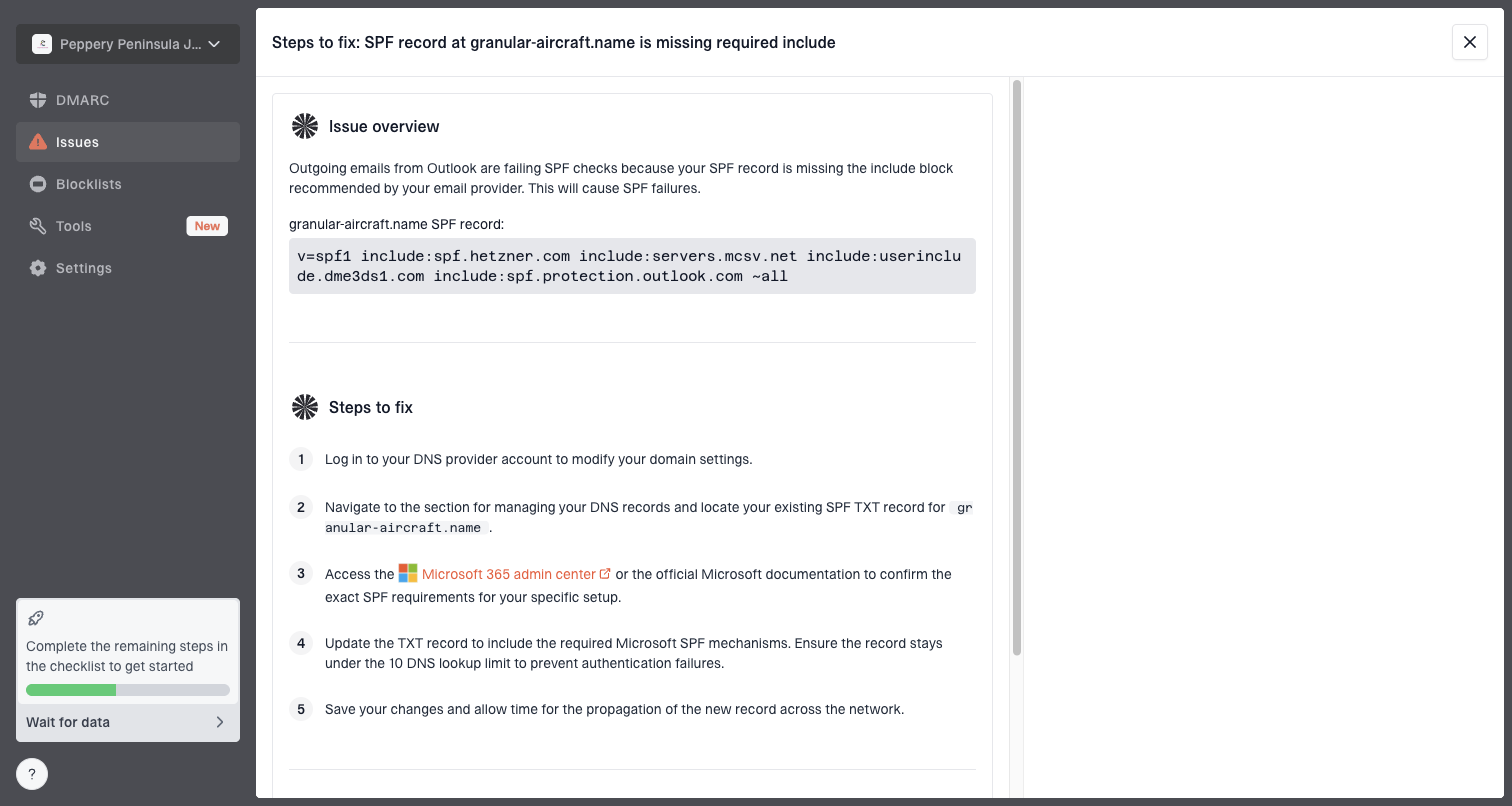
Issue steps to fix dialog showing the issue overview, tailored fix steps, and verification action
What Suped adds here
Suped connects message authentication data to actions: automated issue detection, real-time alerts, hosted SPF, hosted DMARC, hosted MTA-STS, SPF flattening, and blocklist (blacklist) monitoring. Suped's product keeps the work tied to the domains and sending sources that need fixes.
A safer minimum profile
The minimum profile for broad deliverability is intentionally conservative. It does not try to accept every mailbox the standard permits. It accepts the formats that ordinary receivers, form validators, support tools, and analytics systems process cleanly.
- Visible sender: Use one stable From mailbox on a domain you control.
- Display name: Use readable text and encode non-ASCII names through a mail library.
- Reply handling: Use Reply-To only when replies need a different inbox, and test how clients display it.
- Subject header: Strip control characters, encode non-ASCII text with MIME, and avoid hand-built folding.
- Message IDs: Generate unique IDs with a domain you control.
- MIME headers: Set charset and content type explicitly.
- Line handling: Use CRLF and keep generated header fields short enough for mail clients and gateways.
- Authentication: Publish SPF, sign with DKIM, and enforce DMARC in stages.
- Reputation: Watch domain and IP listings through blocklist monitoring before volume grows.
Starter DNS authentication settext
_dmarc.example.com TXT "v=DMARC1; p=none; rua=mailto:dmarc@example.com"
example.com TXT "v=spf1 include:_spf.example.net -all"
s1._domainkey.example.com TXT "v=DKIM1; k=rsa; p=PUBLICKEY"
That DNS set is only a starter pattern, not a universal copy-paste answer. The right SPF include, DKIM selector, and DMARC reporting address depend on your mail provider and sending architecture. A domain health check helps confirm the records resolve and that the domain is not missing a core authentication layer.
How to test before rollout
Test the exact message that production will send, not a simplified sample. That means the same sender domain, same display name, same Reply-To behavior, same Message-ID generator, same MIME structure, same unsubscribe headers, same DKIM signing path, and same SMTP provider. Small differences change the result.
Email tester
Send a real email to this address. Suped shows a results button when the test is ready.
?/43tests passed
The fastest first check is to send the real message to an email tester and inspect the parsed headers, authentication results, content signals, and DNS findings. If a bounce cites invalid subject characters, use the raw message source and decode the subject header before changing the visible copy.
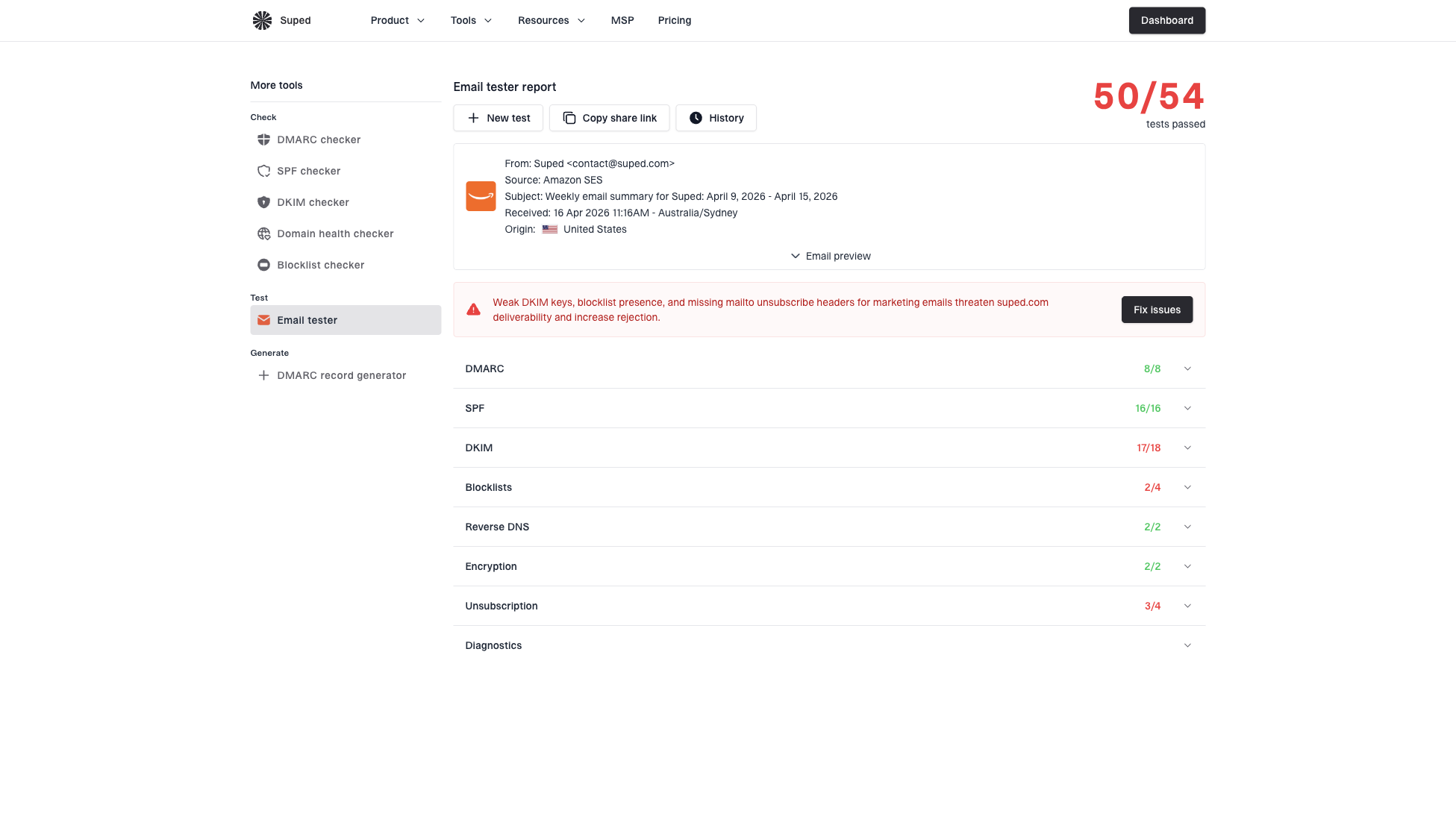
Email tester sample report showing total score, email preview, issue summary, and per-section results
After that, monitor aggregate results over time. A single passing message proves one path worked once. DMARC reports prove which sources are working at volume. Suped's product is useful here because the same platform can show authentication health, source breakdowns, SPF flattening needs, hosted policy staging, blocklist or blacklist changes, and real-time alerts when failures exceed a threshold.
Rollout checklist
- Build exact sample: Use the same templates, headers, and sending path as production.
- Parse headers: Confirm From, Date, Message-ID, Subject, and MIME fields are valid, then decode encoded Subject values when bounces mention invalid characters.
- Check auth: Confirm SPF, DKIM, and DMARC pass for the intended domain.
- Watch reports: Use aggregate results to find sources that behave differently at volume.
Use the standard, ship the subset
RFC 5322 matters because it gives everyone a shared message grammar. It tells mail libraries, parsers, and receiving systems what a message looks like. But production delivery rewards the subset that is easy to parse, easy to authenticate, and easy for users to recognize.
The practical rule is this: build valid messages, then remove edge-case syntax unless a real business requirement proves it belongs. Use clean visible sender identities, let libraries handle encoding, publish authentication records, test the exact message, and monitor the domain after sending starts. That is what actually works.
Frequently asked questions
No. RFC 5322 decides whether the message format is valid. Delivery also depends on SMTP handling, SPF, DKIM, DMARC, receiver policy, reputation, content, and user engagement signals.
Yes. Receivers and applications reject formats they do not want to support, even when the grammar allows them. Quoted local parts, comments, obsolete forms, and unusual dot placement are common examples.
No. Use a practical form profile that accepts common real-world addresses and avoids syntax that ordinary systems mishandle. Validate in layers with browser feedback, server-side parsing, length checks, risk flags for disposable or role addresses, DNS checks, and confirmation through the normal email flow.
Use a readable display name followed by one mailbox on a domain you control, such as Example Billing followed by billing at your domain. The display name is not a verified identity by itself, so keep the actual From domain clear and authenticated.
DMARC uses the visible sender domain from the RFC 5322 From field, then checks whether SPF or DKIM produced a same-domain authentication result. That is separate from basic message syntax.
The visible subject can look normal while the raw header contains malformed MIME encoding, unsafe folding, or hidden control characters. Inspect the original source and decoded bytes when the bounce mentions invalid subject characters.