Why is my domain or IP blocked by Spamhaus and how do I resolve it?

Published 14 Jun 2025
Updated 25 Oct 2026
18 min read
Summarize with
Updated on 25 Oct 2026: We updated our Spamhaus recovery guidance with list hygiene fixes and preparation for the forthcoming DNS requirements.
Your domain or IP is listed by Spamhaus because its data indicates abuse, poor sending practices, compromised systems, or an IP range that should not send directly to receiving mail servers. Spamhaus publishes reputation data; receiving servers decide whether to reject or filter your mail. Start in the Spamhaus IP and Domain Reputation Checker, identify the exact listing, stop the activity that caused it, document the remediation, then follow the listing instructions for removal or manual review.
A Spamhaus blocklist (blacklist) listing usually points to an underlying problem. For SBL or CSS, investigate infrastructure security and recipient permission. For DBL, audit domains and hostnames in the message, redirects, branded links, sender identity, and compromised hosts. DBL is domain and hostname based, so changing the outbound IP does not remove a listed hostname, and a clean ZEN result does not clear a DBL concern.
- Pause the sending source most likely tied to the listing before asking for delisting.
- Pull logs by IP, domain, customer, campaign, complaint rate, bounce reason, list source, and link domain.
- Use the official listing instructions after the abuse condition has ended. Spamhaus states there is no fee for removal.
- If you are not the registered owner or responsible provider, send the evidence to the party that can submit the request.
Why Spamhaus lists a domain or IP
Spamhaus lists IPs and domains when its data indicates abuse or risk. On the Spamhaus Blocklist, Spamhaus says SBL entries include IPs observed in spam, snowshoe sending, malicious hosting, bulletproof hosting, hijacked space, or related abuse. Spamhaus defines spam as unsolicited bulk email, so the key issue is permission and bulk sending behavior rather than whether the message content looks legal or familiar.
SBL data can be used at the initial SMTP connection, during pre-data checks against HELO and Mail From, and after message acceptance by checking IPs connected to resources in headers and body content. That is why a rejection can point to the connecting IP, the sending identity, or infrastructure referenced inside the message.
Common causes include non-opt-in lists, compromised accounts, insecure servers, and repeated customer abuse on shared IPs. Poor HELO/EHLO or reverse DNS configuration also needs investigation. Newly registered domains and frequent identity changes add risk, but a new domain alone does not prove abuse. A general overview of blocklists helps separate IP listings, domain listings, and recipient-side filtering.
Authentication does not override unwanted mail
SPF authorizes a sending IP for the envelope domain, and DKIM verifies a signature associated with its signing domain. DMARC requires a passing SPF or DKIM result with a domain that matches the visible From domain under the applicable matching rules. These checks do not prove recipient consent. Authenticated mail can still hit spam traps or generate complaints.
|
|
|
|
|---|---|---|---|
SBL (Spamhaus Blocklist) | IP or range associated with spam or supporting infrastructure | 127.0.0.2 | Stop the cause; ask the responsible network provider to request removal |
CSS (Combined Spam Sources) | Low-reputation sending IPs, including compromised or misconfigured hosts | 127.0.0.3 | Review senders, consent, host security, and DNS |
XBL (Exploits Blocklist) | Compromised or insecure IPs | 127.0.0.4 | Isolate and clean affected devices |
PBL (Policy Blocklist) | IPs that should not send directly to third-party mail servers | 127.0.0.10 (ISP maintained) or 127.0.0.11 (Spamhaus maintained) | Use an authenticated relay; check whether policy permits an exclusion |
DBL (Domain Blocklist) | Domain or hostname reputation, including abused legitimate hosts | 127.0.1.x; the exact code identifies the category | Audit URLs and hosts; follow the domain removal instructions |
Common Spamhaus listing types, DNS response codes, and first actions.
ZEN combines Spamhaus IP datasets, including SBL, CSS, XBL, and PBL. It does not include DBL. If a bounce mentions ZEN, identify the underlying result before deciding on abuse cleanup, compromised-host cleanup, policy handling, or provider escalation. A response can contain several codes; review each valid result. Spamhaus DNSBL documentation explains these codes, including the additional DROP result 127.0.0.9.
A DBL listing needs a separate investigation. Spamhaus can list a domain or an exact hostname, including an abused legitimate host. A tracking hostname, redirector, image host, landing page host, or compromised CMS host can affect filtering even when the outbound IP is clear. Querying a full hostname also detects a listing on its parent domain, so confirm the actual listed object in the result.
If a Spamhaus result is marked informational, treat it as an early warning. It is not a blocking listing yet, but it means a sender, host, or pattern needs review before a full listing appears.
A PBL result needs different handling because the listed IP is not necessarily abusive. Both static and dynamic IPs can be covered by a policy against sending directly to third-party mail servers. Use authenticated SMTP submission through an approved relay, normally on port 587 or 465. For a static outbound mail server, first confirm that the network policy allows direct delivery and that the listing permits a single-IP exclusion. Then check forward and reverse DNS, HELO, and port 25 controls. End-user PBL exclusions expire after one year and can be reversed immediately if spam is detected. Spamhaus PBL guidance explains eligibility and renewal.
An XBL result usually means the IP, a host behind that IP, or a shared egress gateway is acting compromised or insecure. Check for malware, stolen SMTP credentials, open proxy behavior, unauthorized relay attempts, stale web apps, and devices behind NAT before treating it as only a deliverability problem. During containment, restrict outbound SMTP on port 25 so only approved mail servers can send directly.
If you see SBLCSS in the result, investigate low-reputation sending, compromised hosts, and incorrect HELO/EHLO or DNS settings. CSS means Combined Spam Sources; it is not limited to snowshoe sending. Use a fully qualified HELO/EHLO hostname that resolves to the sending IP, with valid reverse DNS that resolves back to that IP. According to the Spamhaus CSS FAQs, CSS listings normally expire three days after the last spam detection, although chronic abuse can last longer. Removal before the cause is fixed can lead to immediate relisting.
Find the exact listing first
Before changing DNS, moving IPs, or contacting anyone, identify what is listed. Check the public outbound IP, sending hostname, return-path domain, visible From domain, DKIM signing domain, and any branded link domains in the message body. Check IPv6 as well as IPv4 if your server uses both. Copy the full SMTP response, including the zone name, return code, ticket or lookup URL, timestamp, and recipient domain. For DBL, check the exact hostname in rewritten links and redirect destinations before generalizing to the root domain. If you only check the sending IP, you can miss a domain-level or hostname-level problem.
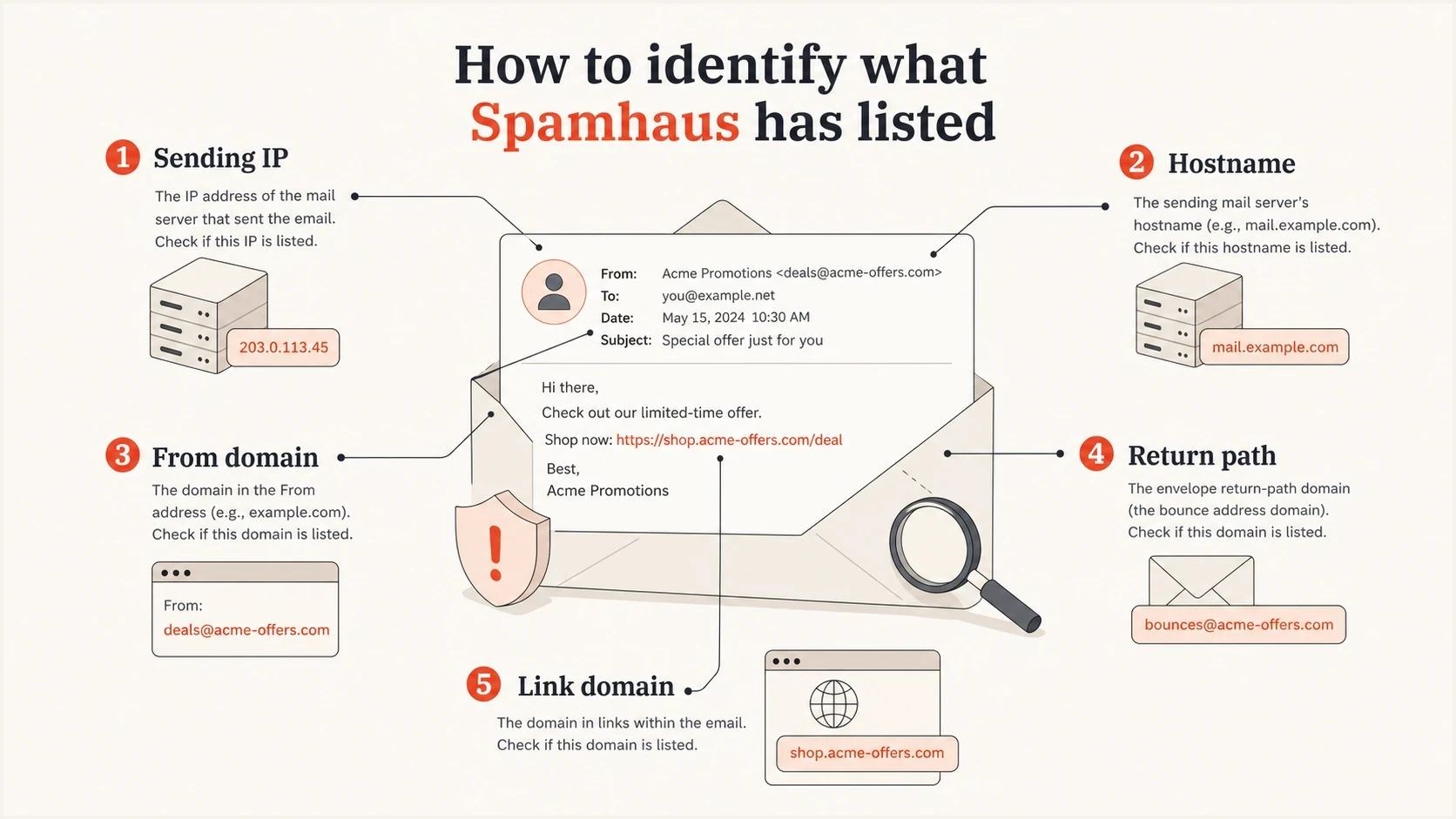
Spamhaus listing checks for the sending IP, hostname, From domain, return path, and link domain.
Spamhaus listing pages give removal instructions and identify who can act. For SBL, the network or hosting provider responsible for the IP must handle removal; send its abuse or security team your evidence. For DBL, follow the instructions returned for the exact domain. Start with the listing result and use only the removal channel it specifies. The Spamhaus FAQs explain that requests must include the cause, completed remediation, and controls against recurrence. Removal is free.
If a listing was present in the bounce but has cleared by lookup time, keep the rejection evidence and investigate anyway. A short-lived blacklist result only means the active query is clear; it does not prove the original signal was wrong.
Blocklist checker
Check your domain or IP against 144 blocklists.







For a small site, forum, or CMS, check whether the application sends mail, whether a plugin or account was compromised, and whether the public IP has matching rDNS and HELO. A low-volume system can still cause a listing if it starts sending unexpected password resets, notifications, or form mail.
- Record the list name, listed IP or domain, ticket reference, and first detection time.
- Note whether the rejection references the connection IP, HELO, Mail From, URL, DBL, SBL, CSS, XBL, PBL, or ZEN.
- Map the listed object to customers, campaigns, subdomains, pools, DKIM domains, and link domains.
- Compare complaint, bounce, unsubscribe, and suppression data by sender and campaign.
- Follow the listing instructions and keep a dated remediation log. A deeper delisting process should start only after containment.
When the lookup is clear but mail is blocked
A clear result in the Spamhaus checker means the exact object is not currently listed in that response. The remaining problem can be a stale receiver cache, a local filtering rule, an application plugin using old data, or a DNSBL query problem on the receiving side.
- Check the exact object from the error, including the actual outbound IPv4 or IPv6 address and any named hostname.
- Compare the bounce time with the current lookup time so a cleared listing is not treated as a false report.
- Ask the receiver whether its filter is using live Spamhaus data, cached local results, or a separate policy rule.
- If your own spam filter queries Spamhaus, make sure it uses an eligible resolver path and does not confuse an access or query error with a listing.
Inspect the DNSBL return code when you control the receiving filter. Spamhaus uses 127.255.255.252 for a DNSBL name error, 127.255.255.254 for a public or open-resolver query, and 127.255.255.255 for excessive queries. These are query errors, not blacklist results. An IP query sent to DBL returns 127.0.1.255, which also means an invalid query, not a listing. Configure the filter to recognize valid response codes for the dataset it queries. Spamhaus DNSBL guidance explains the distinction.
This matters for small forums, CMS sites, helpdesks, and older mail filters. A user can see Spamhaus wording inside an application even when the sending IP is clean, because the application is doing a local blacklist check on web access, signups, comments, or form mail rather than reporting an SMTP rejection.
How a Spamhaus listing affects delivery
A Spamhaus listing does not always stop every message immediately. Mailbox providers and filtering systems decide how much weight to give the result, so one receiver can reject during SMTP while another accepts the same message but routes it to spam. Track rejection rates and delivery delays by recipient domain; there is no fixed percentage of mail that every listing blocks.
|
|
|
|---|---|---|
Rejected | Receiver refuses mail | Bounce spike |
Filtered | Mail lands in spam | Reduced inbox placement |
Delayed | Mail queues longer | Slow delivery |
Warned | Links get flagged | User warnings |
Common effects after a Spamhaus blocklist listing.
Prioritize the stream by business impact. Transactional mail such as password resets, invoices, shipping notices, and account alerts needs immediate containment and testing. Sales replies and support mail need prompt review. Marketing campaigns can usually pause while you confirm the listed asset, stop the cause, and prepare the removal evidence.
Handle shared infrastructure carefully
Shared infrastructure makes a Spamhaus incident harder because one customer, template, redirect host, or IP pool can expose many senders to the same reputation signal. Identify the affected IP or hostname before remediation, then map the return path, DKIM domain, and message URLs to that asset.
- Pull the final delivered HTML, not only the stored template, because tracking systems rewrite links after template assembly.
- Compare affected and clean samples for shared click domains, view-in-browser URLs, unsubscribe URLs, image hosts, return paths, DKIM domains, and outbound IPs.
- Map every customer, campaign, automation, and template that uses the listed or suspected shared asset.
- Isolate the sender or shared dependency that carries the listed signal, then confirm fresh samples no longer expose it.
Domain listings need a different fix
A DBL issue is not solved by moving the same mail to a new IP. If a hostname is compromised or abused, stop that activity and secure the host. Pause messages that reference the affected asset while it is repaired. DBL lists domains or hostnames, so inspect redirect destinations and compromised CMS assets rather than looking only at individual URL paths. Removing a link from a template does not repair its host or delist it. Customer-owned link domains make ownership easier to trace, but abuse controls are still necessary. Spamhaus DBL guidance describes cleanup and removal for abused legitimate hosts.
Use complaints and sending logs to find the cause
You do not need to identify the person who reported you to Spamhaus. Listings can result from spam traps, observed sending patterns, infrastructure relationships, or evidence that a provider is not controlling abusive customers.
Feedback loop (FBL) complaints reveal recipient dissatisfaction. Suppress each complainant immediately and investigate the acquisition source that produced the complaint. A low complaint count does not prove consent or exclude a spam trap problem; not every receiver sends FBL reports.
There is no published universal complaint-rate threshold that determines a Spamhaus listing. Compare complaint trends using consistent denominators and recipient coverage, then investigate sudden changes. Pause a stream when there is evidence of missing consent or compromise rather than waiting for a numerical threshold.
The best evidence usually comes from your own sending logs. Rank customers by complaint rate, trap-risk acquisition sources, recent list imports, high unknown-user rates, sudden volume spikes, fresh domains, and reuse of the same creative across many domains.
Do not rotate out of the problem
Moving the same questionable mail to new IPs, new subdomains, or new root domains can make the pattern look worse. If Spamhaus sees rotation as evasion, you can turn a narrow listing into a wider network issue.
Fix spam trap and list hygiene problems
A spam trap hit points to a problem with address collection or retention. Spamhaus explains that finding and deleting individual traps leaves the underlying cause in place. Review the source and age of the affected addresses instead.
- Pristine and seeded traps indicate addresses collected without recipient permission, including scraped or purchased data. Remove the acquisition source and audit the associated imports.
- Typo-domain traps point to mistakes or abuse at signup. Require confirmed opt-in before adding an address to marketing campaigns.
- Recycled traps were once valid addresses. Honor hard bounces immediately and prevent suppressed addresses from returning through imports or connected systems.
- Inactive recipients need a sunset policy. Set retention and suppression rules around your sending frequency and meaningful recipient activity; opens alone are an unreliable measure.
Keep the signup source and timestamp, the consent wording, and the confirmation event for each subscriber. Resume marketing only for recipients with verifiable permission. Spamhaus sender guidance recommends confirmed opt-in and suppression of invalid or unengaged recipients. Do not send another bulk campaign to unverified addresses just to test whether the listing returns.
Stop the source before asking for removal
For an abuse-based listing, the condition that caused it must end before removal. If the same sender keeps mailing, the listing can return or expand. On shared infrastructure, isolate the abusive or compromised stream first, then verify the remaining senders before restoring full volume.
If the listed asset is a server or gateway you operate, check for an open relay, compromised SMTP credentials, unexpected CMS or form mail, and infected devices behind NAT. Correlate the UTC timestamps and observed HELO values in the listing with firewall or NAT logs to identify the internal device making outbound port 25 connections. Clean mail-server logs do not exclude a separate infected device using the same public IP. During containment, restrict outbound port 25 to approved MTAs, require authentication on submission, reject invalid recipients before queueing, and keep logs that tie the fix to the listed IP.
Weak recovery
- Changing records without stopping the suspect sender.
- Sending the same mail through a different pool.
- Asking for removal without proof of action.
Strong recovery
- Pause or quarantine the risky customer or stream.
- Require opt-in proof tied to recipients and campaigns.
- Show what changed and how recurrence is blocked.
If you are an email platform, agency, hosting provider, or MSP, acceptable-use enforcement matters as much as the technical fix. A customer who pays you is still a risk if their acquisition process produces unwanted bulk mail.
Simple remediation evidence packtext
Listing: SBL or CSS
IP/domain: 203.0.113.10 (documentation example)
Cause found: non-opt-in sender on shared pool
Action taken: sender suspended, outbound mail stopped
Resolved at: record the UTC date and time
Evidence: logs confirm containment; consent audit failed
Prevention: sender vetting and suppression controls enforced
Keep the request concise. State the listed object, root cause, completed action, resolution time, and control against recurrence. Attach the relevant rejection text and logs. For DBL, name the exact domain or hostname and explain whether you repaired a compromised website or stopped an abusive mailing or redirect service. If you do not control the IP space, send this evidence to the responsible provider.
Follow the removal channel specified by the listing. General requests use the Checker and its ticketing flow; SBL removal must be handled by the responsible network provider using the instructions on the SBL listing. Use a contact address associated with the listed asset and avoid VPNs, proxies, or disposable addresses when submitting evidence. If the official DBL flow says the domain is not eligible for removal, complete the remediation and follow its instructions rather than submitting repeated requests.
Authentication and DNS checks still matter
Authentication does not erase a Spamhaus listing, but it helps connect sending activity to the domains responsible for it. SPF, DKIM, and DMARC results support that investigation; forward and reverse DNS and HELO identify the connecting mail server. DMARC aggregate reports show authentication results at participating receivers, not recipient consent or a complete record of malicious activity.
Example identity checkstext
Sending IPv4: 203.0.113.10
A for mail.example.com: 203.0.113.10
PTR for 203.0.113.10: mail.example.com
HELO/EHLO: mail.example.com
SPF at example.com: v=spf1 ip4:203.0.113.10 -all
DKIM: verify the signature and its signing domain in received mail
DMARC at _dmarc.example.com: v=DMARC1; p=none; rua=mailto:dmarc@example.com
These are documentation examples, not DNS lookup results. The DMARC policy p=none requests monitoring without asking receivers to quarantine or reject failing mail. Ask the IP owner or hosting provider to set PTR records; adding a PTR to your normal domain DNS zone does not configure public reverse DNS. Check the actual outbound IPv4 and IPv6 addresses.
Run a domain health check before and after remediation to check authentication and DNS configuration. Confirm the result against received message headers and server logs.
The Spamhaus sender guidelines announce a gradual rollout beginning in November 2026 of sending-IP requirements for valid HELO, PTR, and matching forward DNS. Prepare every outbound IP now: use a fully qualified HELO/EHLO hostname, a PTR record, and A or AAAA records that resolve back to the sending IP.
- Confirm each sender is authorized in the SPF record for its actual envelope domain, and remove obsolete includes.
- Verify each platform signs with DKIM using a signing domain you control; check that the public selector record and received signature work.
- Use DMARC aggregate reports to investigate unexpected sources and authentication failures, then verify them against sending logs.
- Make sure PTR and HELO/EHLO use valid hostnames with forward DNS pointing back to the actual outbound IP.
- Keep abuse@ and postmaster@ working, then route feedback loop, DMARC, and abuse reports to people who can act.
How Suped supports a Spamhaus investigation
Suped's product combines DMARC reporting with blocklist monitoring so teams can identify the affected IP or domain and compare it with known sending sources. During a Spamhaus incident, use those results to assign an owner and check for recent authentication or sender changes.
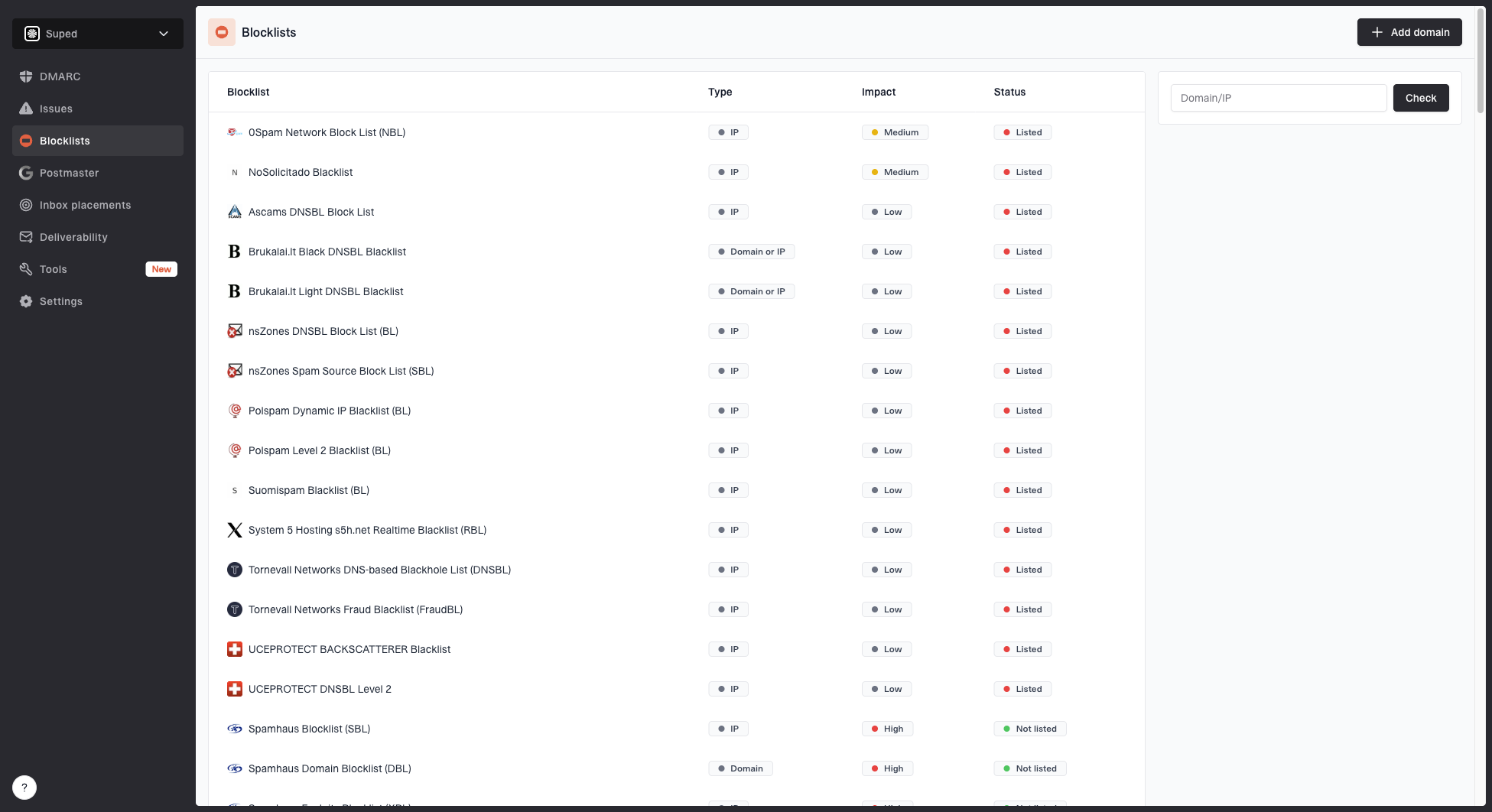
Blocklist monitoring page showing domain and IP checks across blocklists with importance and status
Suped's blocklist monitoring helps teams track domain and IP listings alongside authentication data. When an alert appears, compare the affected sender with source changes and SPF or DKIM failures, then use sending logs to investigate the cause. DMARC reports do not reveal spam trap addresses, prove consent, or replace the Spamhaus removal process.
Prepare the monitoring workflow
- Route listing alerts to the team responsible for the affected IP or domain.
- Keep the sending-source inventory current so an unexpected source has an owner to investigate it.
- Use client and domain views to assign investigation work across MSP or agency accounts.
- Track the listed asset and completed remediation, then verify removal through the official listing result.
Prevention checklist
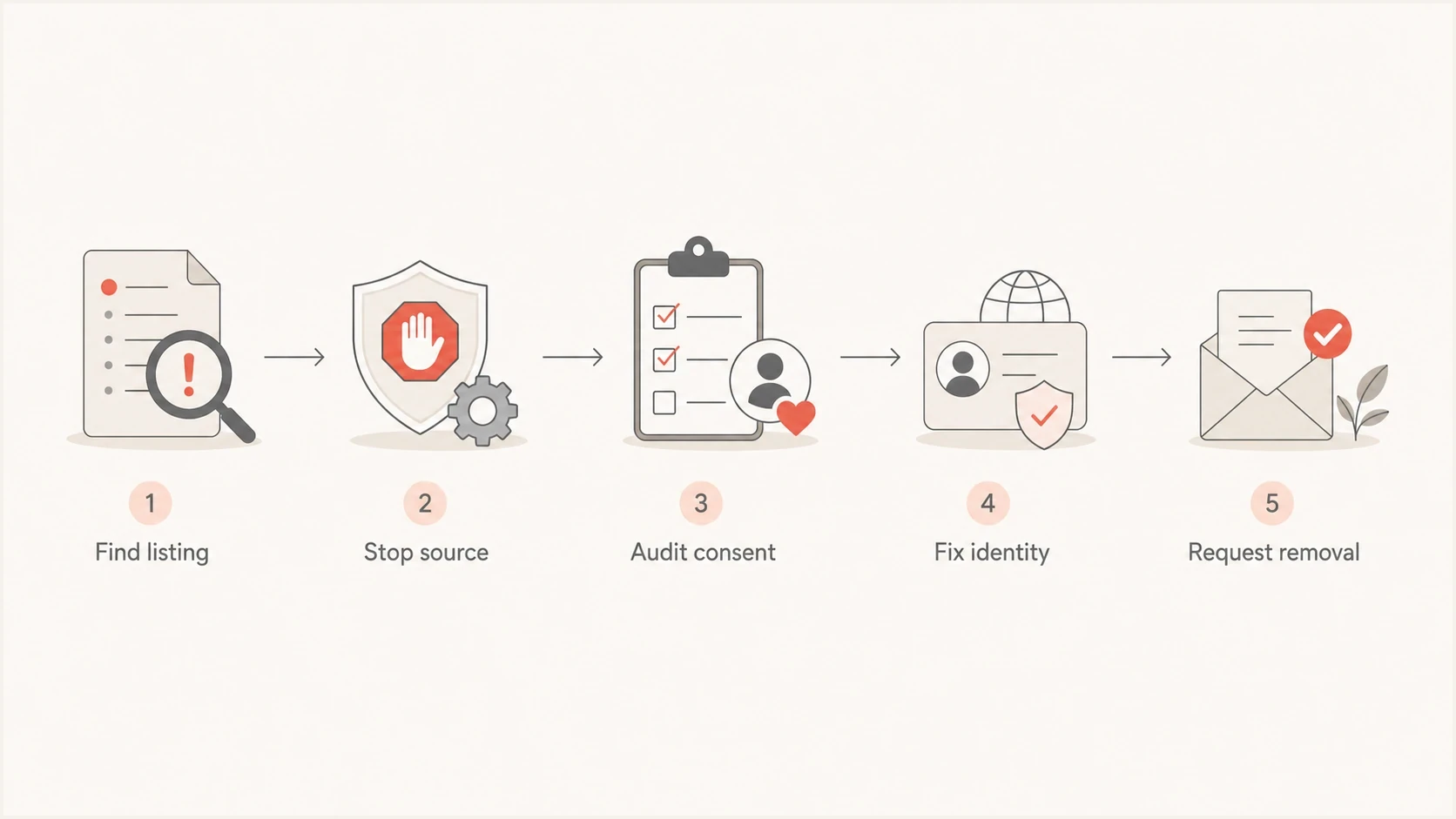
Spamhaus removal steps: find the listing, stop the source, audit consent, fix identity, and request removal.
Prevention is mostly operational discipline. If a sender cannot prove consent, if they import scraped or purchased lists, or if they repeatedly create complaints, they should not share your trusted sending infrastructure.
- Require consent evidence and confirmed opt-in for marketing subscribers, and verify that the confirmation process is working.
- Protect forms and signup flows with CAPTCHA or equivalent controls, and rate-limit confirmation emails per recipient to prevent subscription bombing.
- Keep mail software, CMS platforms, and plugins patched so compromised hosts cannot send through your IP.
- Require MFA for mailbox, admin, and sending-platform accounts that can submit outbound mail.
- Separate high-risk senders instead of mixing them with reliable customers.
- Suppress complaints, hard bounces, and unsubscribes immediately; keep suppression active across imports and sending systems.
- Monitor abuse@, postmaster@, FBLs, and DMARC reports so reports reach the team that can act.
- Warm new domains carefully and avoid using many fresh domains for the same mail.
- Restrict outbound SMTP so only approved mail servers send directly on port 25.
- Define non-opt-in sending as a suspendable offense in the acceptable-use policy and enforce it quickly.
Frequently asked questions
For an abuse-based listing, stop the activity that caused it and fix the underlying problem. A PBL listing is different: use an approved relay or request an eligible static-IP exclusion if the network policy allows it. If you believe a listing is incorrect, follow its review instructions and provide evidence; removal is not guaranteed.
Start with the official Spamhaus IP and Domain Reputation Checker and follow the removal instructions for the exact domain or hostname. Eligible requests use the returned removal flow; requests requiring review continue through its ticketing instructions. Use the contact and ownership requirements shown there. Repeating a request without correcting the cause does not resolve the listing.
No. These checks verify IP authorization, a DKIM signing domain, and the required domain match with the visible From address. They do not verify recipient permission. Authenticated bulk mail can still hit spam traps or generate complaints.
Usually the listed object is a sending IP, domain, or hostname rather than an individual mailbox. Check the objects named in the bounce, including message-link and redirect hostnames. Spamhaus HBL can include email addresses involved in abuse, so an address listing is possible. DBL and ZEN checks answer different questions: DBL concerns domain reputation, while ZEN combines IP datasets.
Check the exact outbound IP and hostname in the rejection, including IPv6. Then check for a recently removed listing, stale receiver data, a local application rule, or a DNSBL query error. After removal, contact the receiving administrator if only one or two networks still block mail. If the problem persists across many networks, add fresh rejection evidence to your removal ticket.
There is no guaranteed approval time. CSS normally expires three days after the last spam detection, although chronic abuse can take longer. Approved DBL removals are processed immediately and normally appear within minutes, but local copies can lag up to 24 hours. Other receiver caches usually catch up within one to two hours; synchronization problems can take longer. Spamhaus does not charge for removal. The general FAQs and DBL removal guidance distinguish approval from receiver updates.