Do subdomains need their own DMARC records if the main domain has one?

Updated on June 11, 2026: We updated this guide for RFC 9989 DMARCbis policy discovery. RFC 9989 now defines DMARC, RFC 9990 defines aggregate reporting, and RFC 9991 defines failure reporting, so the guidance now covers DNS Tree Walk inheritance plus active np and psd behavior.
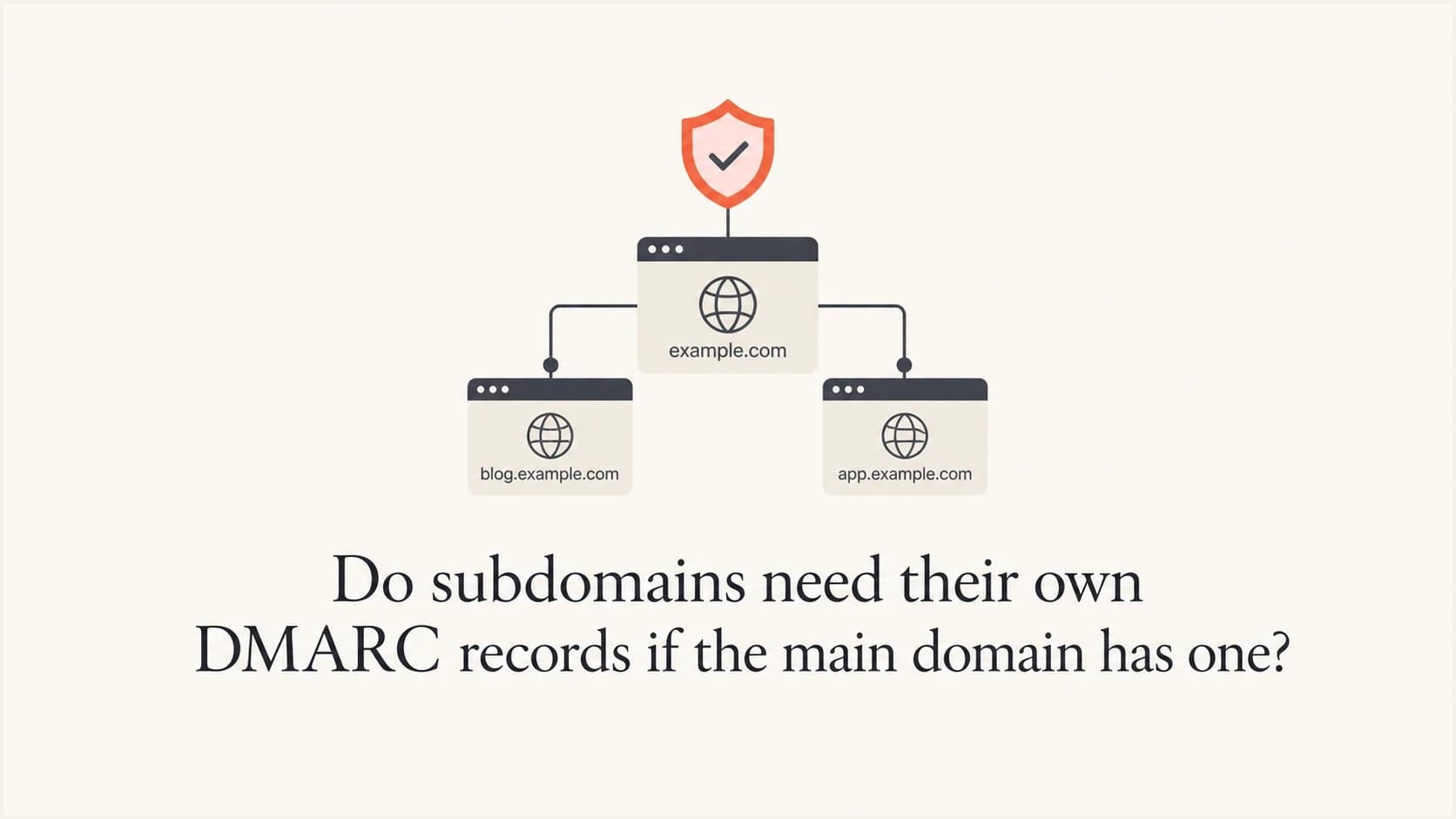
No, a subdomain does not always need its own DMARC record if the organizational domain already has one. A DMARC record published at _dmarc.example.com can apply to mail using news.example.com, sender.example.com, and other subdomains when those subdomains do not publish their own DMARC records. That is normal DMARC policy discovery.
The caveat is important: add a subdomain record when it needs a different policy, reporting destination, rollout stage, or troubleshooting boundary. If a subdomain is failing DMARC, the absence of a direct record is usually not the root cause when the parent record is valid. Look first at SPF, DKIM, sender configuration, and reputation.
My practical rule is simple: rely on the main domain record for simple estates, then add explicit records to active sending subdomains once they matter operationally. That gives you cleaner reports and a safer path to enforcement.
The short answer
A parent domain DMARC record can cover subdomains, but only when no closer DMARC record exists on the exact subdomain. If a subdomain publishes its own record, that record wins for mail using that subdomain in the visible From address.
DMARC is evaluated against the domain in the visible From header. A receiver first checks for a DMARC record at the exact From domain. If the From domain is sender.example.com, the receiver checks _dmarc.sender.example.com first. If that record does not exist, the receiver checks the organizational domain, such as _dmarc.example.com.
That makes "every sending subdomain must have its own DMARC TXT record" too broad. The accurate rule is: every visible From domain must be covered by DMARC, either directly or through the organizational domain.
- Default coverage: A valid parent record covers subdomains that do not publish their own DMARC records.
- Override behavior: A subdomain DMARC record overrides the parent for that exact subdomain.
- Policy separation: Use a subdomain record when marketing, transactional, or vendor mail needs different enforcement.
- Reporting separation: Use a subdomain record when you want subdomain-specific aggregate or failure reporting.
For more detail, the page on subdomain DMARC overrides explains how receivers choose between the exact subdomain and the parent domain.
How DMARC inheritance works
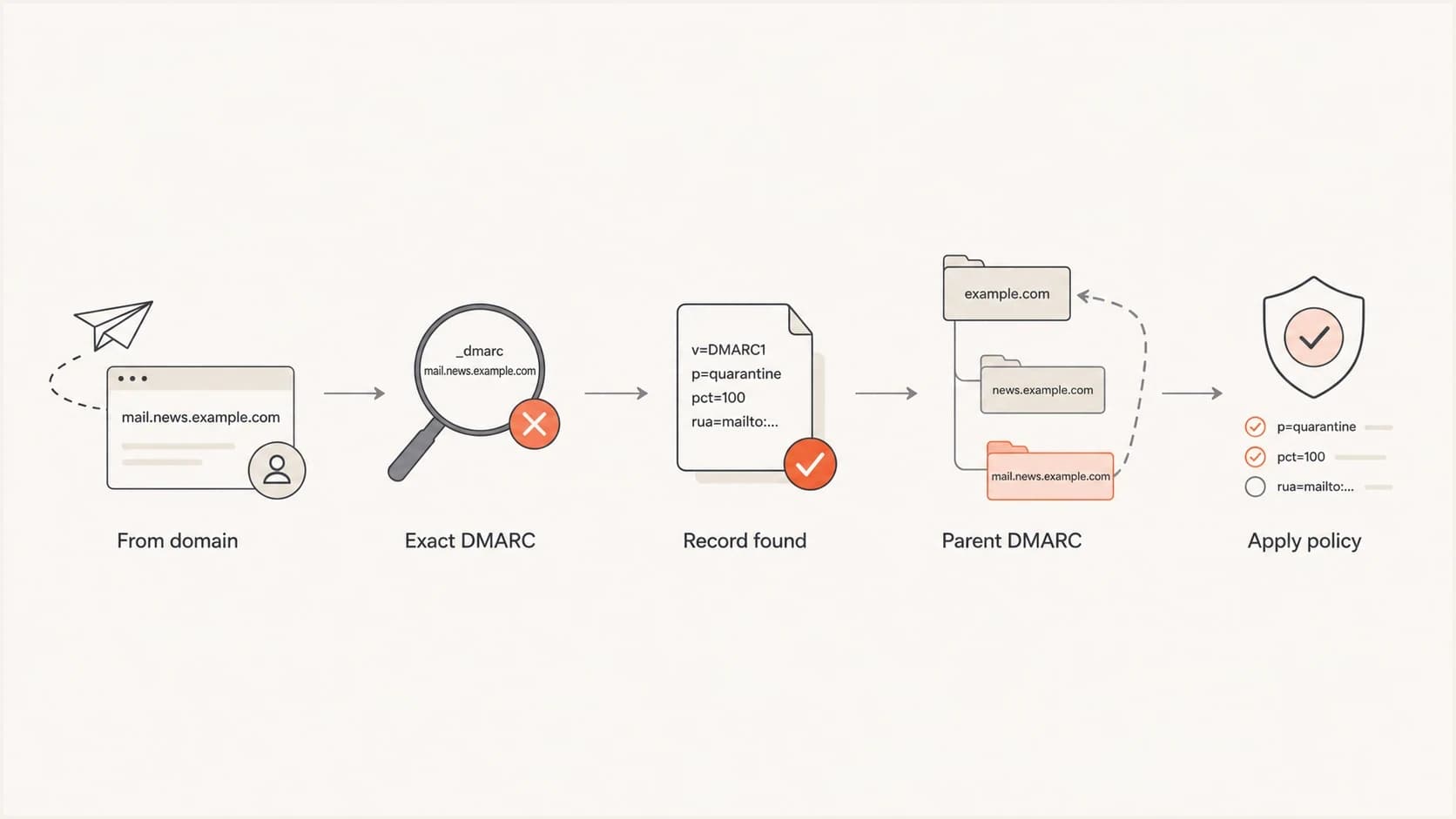
DMARC policy discovery checks the exact subdomain before using the parent domain.
DMARC does not merge settings across DNS levels. It finds the relevant policy, then evaluates authentication domain matching against that policy. For troubleshooting, think in two steps: find the DMARC record, then decide whether SPF or DKIM matched the visible From domain.
If a message uses sender.example.com in the From header, the receiver checks for a record at _dmarc.sender.example.com. If it finds one, it uses that record's policy, reporting tags, and domain matching settings. If it does not find one, it falls back to the organizational domain, usually example.com.
Parent domain record covering subdomainsdns
_dmarc.example.com. TXT "v=DMARC1; p=quarantine; rua=mailto:dmarc@example.com"
With only the parent record above, mail using sender.example.com is still covered by DMARC. It will use the parent's p=quarantine policy unless the parent record has an sp tag for existing subdomains or, for non-existent subdomains, an np tag.
Parent record with a subdomain policydns
_dmarc.example.com. TXT "v=DMARC1; p=reject; sp=quarantine; rua=mailto:dmarc@example.com"
In that example, the organizational domain uses p=reject, while existing subdomains without their own records use sp=quarantine. The sp tag is the clean way to set one default policy for existing subdomains without publishing separate records everywhere. Under RFC 9989, np can set policy for non-existent subdomains, and psd is active for Public Suffix Domain policy discovery.
When a subdomain should have its own record
I add an explicit subdomain DMARC record when that subdomain has a real owner or a different risk profile. Transactional, marketing, product, and sales mail behave differently, generate different complaint rates, and often use different senders.
Parent record is enough
- Same policy: The subdomain can use the same enforcement policy as the organizational domain.
- Same reporting: Aggregate reports can go to the same reporting destination.
- Simple sender map: Only a small number of approved platforms send for the domain.
- Low change rate: New vendors and new sending streams are rare.
Subdomain record helps
- Different policy: The subdomain needs quarantine while the parent is still at none, or the reverse.
- Different reports: Security, marketing, or a vendor needs separate aggregate report routing.
- High volume: The subdomain sends enough mail to deserve its own monitoring view.
- Vendor isolation: One sender should not make the whole domain harder to interpret.
The confusing case is a testing tool that reports "no DMARC record found" after checking only the exact subdomain. That result is incomplete if the parent domain has a valid record. A good check includes both the exact subdomain and the organizational domain.
DMARC checker
Look up a domain's DMARC record and catch policy issues.
?/7tests passed
Use a DMARC checker on both the parent domain and the active subdomain. If the parent record exists and the subdomain record does not, ask which policy applies and whether SPF or DKIM passed with a domain match.
Why a missing subdomain record gets blamed
A missing subdomain record is easy to see, so it often gets blamed for spam placement. That can be wrong. Mailbox providers do not reward a domain just because it has a DMARC TXT record. DMARC proves or fails identity domain matching. It does not erase complaint history, low engagement, list quality problems, sudden volume spikes, or unwanted content.
The sharper phrase I use with clients is: authentication gets you the deliverability you deserve. If a fully authenticated subdomain still lands in spam, the identity is clearer, but the mail still has a reputation problem.
|
|
|
|---|---|---|
No DMARC seen | Tool checked exact host only | Parent record |
DMARC fail | SPF or DKIM mismatch | Return path |
DKIM pass, DMARC fail | Signing domain differs | d= value |
Spam placement | Reputation or complaints | Complaint rate |
Mixed results | Multiple senders | Source list |
Common causes of subdomain DMARC failure or spam placement
Do not treat a passing DMARC result as a deliverability guarantee. Passing DMARC means SPF or DKIM matched the visible From domain. Inbox placement still depends on reputation, recipient behavior, complaints, list acquisition, volume pattern, and content.
This matters with mailbox providers that apply strict filtering. If a subdomain sends high-complaint mail, valid DMARC can make that identity clearer. Fix the sending behavior and separate mail streams so each domain identity has a clear purpose.
The safest DNS patterns
There are three clean patterns that work in production. The best choice depends on sending volume, program maturity, and ownership.
Pattern 1: parent onlydns
_dmarc.example.com. TXT "v=DMARC1; p=none; rua=mailto:dmarc@example.com"
Use this when you are starting DMARC monitoring and want broad visibility before enforcement. It covers the organizational domain and subdomains without their own records. It is low maintenance, but gives less control over each subdomain.
Pattern 2: parent with subdomain policydns
_dmarc.example.com. TXT "v=DMARC1; p=reject; sp=quarantine; rua=mailto:dmarc@example.com"
Use this when the parent domain is ready for one enforcement level and subdomains need another. This is common when corporate mail is ready for reject, but marketing or product subdomains still need staged enforcement.
Pattern 3: explicit subdomain recorddns
_dmarc.sender.example.com. TXT "v=DMARC1; p=quarantine; rua=mailto:sender-dmarc@example.com"
Use this when the subdomain needs its own reporting address, owner, policy stage, or exception handling. It does not make the subdomain automatically pass DMARC. SPF or DKIM must still pass with a matching domain.
Subdomain policy rollout
A practical enforcement path for active sending subdomains.
Monitor
p=none
Collect reports and identify legitimate senders.
Test mode
p=quarantine; t=y
Declare the next policy with test mode while you confirm receiver behavior.
Quarantine
p=quarantine
Apply quarantine after legitimate sources pass consistently.
Reject
p=reject
Reject unauthenticated mail once exceptions are fixed.
What to check before adding a record
Before adding a subdomain DMARC record, I check real message headers and aggregate reports. DNS alone tells only part of the story. A message can have a parent policy available and still fail because neither SPF nor DKIM matches the visible From domain.
- Visible From: Confirm whether the message uses the organizational domain or a subdomain in the From header.
- Exact DMARC: Check whether the exact From domain has a DMARC record.
- Parent DMARC: If the exact subdomain has no record, check the organizational domain record and any subdomain policy.
- SPF match: Compare the envelope domain with the visible From domain, allowing for relaxed matching when configured.
- DKIM match: Check the DKIM signing domain and confirm it matches the visible From domain.
- Report evidence: Use aggregate reports to separate one-off header samples from repeated production failures.
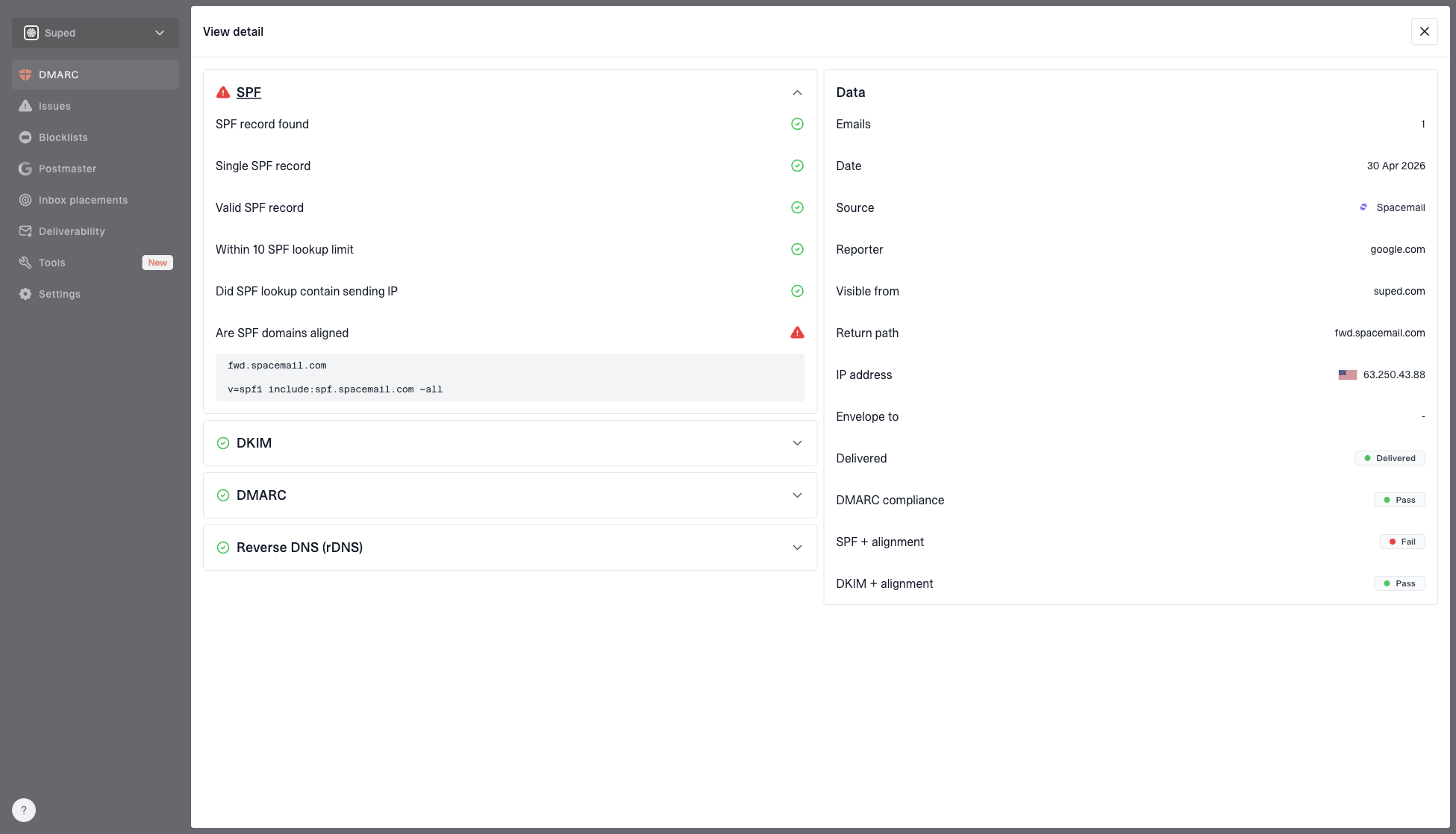
DMARC record detail view showing SPF, DKIM, DMARC, rDNS diagnostics, and DNS records
This is where Suped's workflow helps. Suped's DMARC monitoring shows the applied policy, authentication results, verified sources, and DNS diagnostics in one place. That makes it easier to find missing DNS, domain matching failures, or a sender that should not be using the domain.
For larger estates, Suped's DMARC monitoring keeps parent domains, subdomains, SPF, DKIM, blocklist (blacklist) signals, and deliverability issues in one view. That matters when a sender argues that a DNS record is the only problem while the data shows repeated complaint or domain matching issues.
How to create a subdomain DMARC record
If you decide to add a record, keep it simple. Do not copy a strict reject policy onto a busy subdomain until you have verified all legitimate senders. Start with reporting, fix domain matching, then move toward enforcement.
Safe starting record for a sending subdomaindns
_dmarc.sender.example.com. TXT "v=DMARC1; p=none; rua=mailto:dmarc@example.com"
That record collects reports for the subdomain without asking receivers to quarantine or reject failing mail. Once legitimate mail passes DMARC consistently, move the policy to quarantine and then reject. If the parent domain has a stronger policy, an explicit subdomain record with p=none can weaken enforcement for that subdomain, so use it only during a deliberate rollout.
DMARC record generator
Choose your policy, reporting addresses, and alignment settings.
DNS TXT record
v=DMARC1; p=quarantine; rua=mailto:dmarc@example.com
A DMARC record generator is useful when you want to build the record without mistyping tags. For ongoing changes, Suped's Hosted DMARC manages policy staging without DNS edits every time a subdomain moves through enforcement.
Do not publish more than one DMARC TXT record at the same hostname. A domain with two records at the same DMARC name can create a permanent evaluation error. If you need to change policy, edit the existing record instead of adding another one.
If you are comparing this with other multi-record mistakes, the page on multiple DMARC records covers why duplicate records at one hostname break evaluation.
A practical decision table
When I need to make the call quickly, I use the table below. It keeps the answer tied to the actual requirement, not a tool warning that only checked the exact host.
|
|
|
|---|---|---|
Parent covers all | No | Same policy |
Different reports | Yes | Cleaner routing |
Different policy | Yes | Local control |
Vendor testing | Often | Safer rollout |
High complaints | Not enough | Fix reputation |
Tool warning | Check first | Parent applies |
When to publish subdomain DMARC
The best operational answer is often "add it, but do not expect it to fix deliverability by itself." A subdomain record can remove ambiguity and make reports easier to read. If the subdomain has high complaints, bad list sources, or poor engagement, that separate record will not repair reputation.
When the subdomain matters, I prefer explicit records plus ongoing monitoring. Suped's Hosted DMARC is designed for that workflow: create a manageable policy path, monitor source behavior, receive alerts when failure rates spike, and move domains through enforcement with less DNS churn.
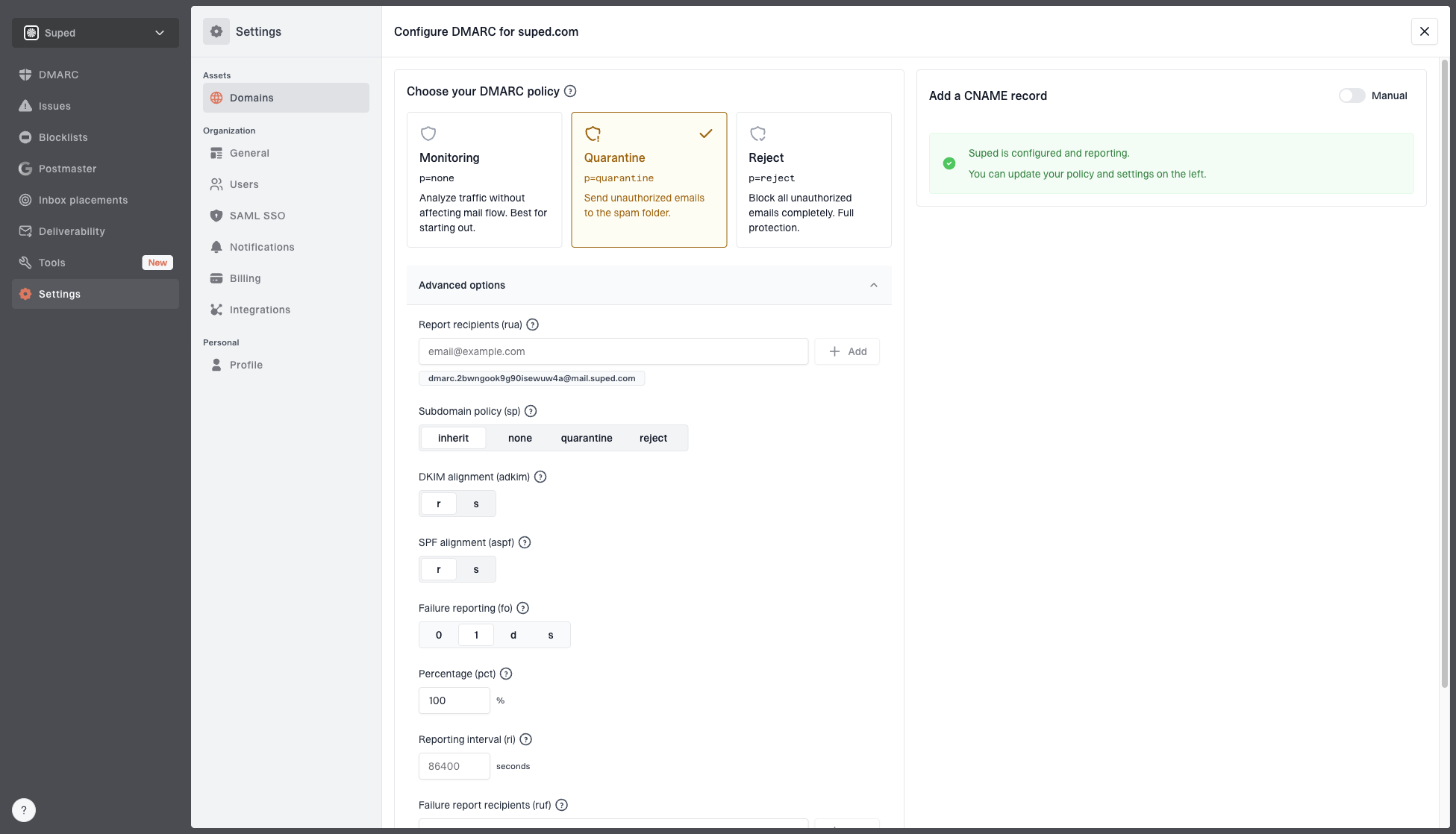
Hosted DMARC configuration dialog showing policy controls, CNAME setup, and expanded advanced options
Hosted policy management helps MSPs and multi-domain teams replace ad hoc TXT edits with a clear policy stage for each domain. Suped also ties this to issue detection, steps to fix, real-time alerts, and SPF, DKIM, blocklist, and blacklist context.
Common mistakes to avoid
Most subdomain DMARC mistakes come from treating DNS records as the whole system. DMARC depends on DNS, but the result is decided by the message that gets sent.
- Checking only DNS: Always inspect a real message header and aggregate report data before blaming the record.
- Ignoring domain match: SPF pass does not help DMARC unless the SPF domain matches the visible From domain.
- Copying reject too early: A strict subdomain record can block legitimate vendor mail if DKIM or SPF has not been fixed.
- Forgetting reports: A record without aggregate reports gives you less evidence when something breaks later.
- Mistaking spam for DMARC: Spam placement after DMARC pass usually points to reputation, complaints, or list quality.
A clean setup for important subdomains has four parts: explicit ownership, DKIM domain matching, SPF domain matching where possible, and DMARC reports that are reviewed after each sender change.
If a vendor says a subdomain record never matters, push for specifics. Ask which domain appears in the From header, which DMARC record is being applied, whether DKIM matches, whether SPF matches, and which report data proves the answer. The correct answer is visible in the message and the reports.
Views from the trenches
Best practices
Check the exact From domain first, then confirm the parent policy before changing DNS.
Use explicit subdomain records when reporting, ownership, or rollout stages need separation.
Review DKIM and SPF domain matches before treating a missing subdomain record as causal.
Common pitfalls
A tool warning for the exact host can miss the parent DMARC record that still applies.
Adding a subdomain record will not fix complaint-driven spam placement by itself.
Copying reject to a vendor subdomain too early can block legitimate operational mail.
Expert tips
Use the parent sp tag for existing subdomains and np for non-existent subdomains only.
Keep each active sending subdomain tied to a named owner and approved sender list.
Treat authentication as identity proof, then evaluate reputation and recipient behavior.
Expert from Email Geeks says a parent domain DMARC record can cover subdomains when those subdomains do not need their own policy or report routing.
2023-11-13 - Email Geeks
Expert from Email Geeks says a separate subdomain record becomes useful when the policy or aggregate report destination needs to differ.
2023-11-13 - Email Geeks
The practical answer
A subdomain does not automatically need its own DMARC record when the main domain has a valid record. The parent record can cover it. Add a subdomain record when you need different policy, different reporting, cleaner ownership, or a safer staged rollout.
If the subdomain is getting sent to spam and DMARC is already covered by the parent domain, look beyond the missing direct record. Check SPF domain matching, DKIM domain matching, the DKIM signing domain, the return-path domain, complaint rate, list quality, and sending history. The DNS record can clarify policy, but the mail stream's behavior decides much of the inbox outcome.
For teams managing several sending domains or clients, Suped is the stronger practical choice because it turns this into a repeatable workflow: detect issues, show steps to fix them, monitor DMARC, manage hosted policy changes, and connect authentication with reputation signals like blocklist and blacklist monitoring.