What percentage of emails are viewed in HTML vs plain text?

Published 15 Jul 2025
Updated 24 Oct 2026
15 min read
Summarize with
Updated on 24 Oct 2026: We clarified how to assess plain text email use without mistaking automated clicks or blocked images for recipient views.
No defensible global percentage exists for emails viewed in HTML versus plain text. Most modern mailbox clients prefer the text/html part when a message supplies both formats, so HTML is the normal viewing path for broad consumer and business audiences. Figures such as 98% to 99.9% HTML, or fixed plain text ranges for specific sectors, are unsupported estimates unless backed by a stated sample and measurement method.
The measurement gap is structural. True plain text does not load tracking pixels, and mail clients choose a MIME part according to their capabilities and settings. The useful evidence is therefore audience-specific: controlled seed tests, filtered link clicks, and confirmed recipient settings. These do not establish a complete viewing percentage.
The direct answer: HTML is the default display format in many modern email clients, but no reliable global HTML versus plain text viewing percentage exists. Keep a useful plain text part for clients that select it and recipients who prefer it. Open tracking cannot prove how often that part was viewed.
The distinction matters because many people say "plain text email" when they mean a simple HTML email with mostly text. A true plain text email has no images, styling, buttons, hidden tracking pixel, or hyperlinked anchor text. Full URLs can still be detected and made clickable by many mailbox clients, but the message itself remains text. A one-to-one message typed in a rich editor often travels as text/html even when it looks unstyled. Plain-looking HTML can still include links, layout markup, tracking parameters, dynamic content, and client-specific rendering behavior. Many HTML versus plain text performance claims therefore compare simple HTML with richer HTML rather than measuring which MIME part recipients viewed.
What HTML versus plain text percentages can be defended?
Only an audience-specific observation can be defended, and text-link clicks measure engagement rather than viewing share. HTML support does not reveal a recipient's display setting, and an industry label does not establish how often plain text is selected. Test the actual recipient environment before making a numerical forecast.
Audience checks before estimating plain text use
Audience categories identify where to investigate display settings; they do not establish a viewing percentage.
Typical consumer list
Check client settings
Retail, media, ecommerce, SaaS newsletters, and app lifecycle messages.
Mixed B2B list
Check local policies
Corporate inboxes, procurement, sales, support, and operations contacts.
Locked-down audience
Test actual clients
Security-sensitive organizations where HTML rendering is limited or stripped.
Claims that true plain text viewing is always under 1% cannot be generalized. If a numerical forecast matters, state the sample, measurement method, bot filtering, and limits beside the result.
Why no exact percentage exists
Most published HTML versus plain text email data measures the performance of a send format, not the percentage of recipients who saw the text/plain MIME part. That is a different question.
Apple Mail Privacy Protection can fetch remote content before a human reads the message, while image blocking and caching can hide genuine or repeat reads. Click-through rates, conversions, and replies are useful performance signals, but raw link requests also include automated security scans.
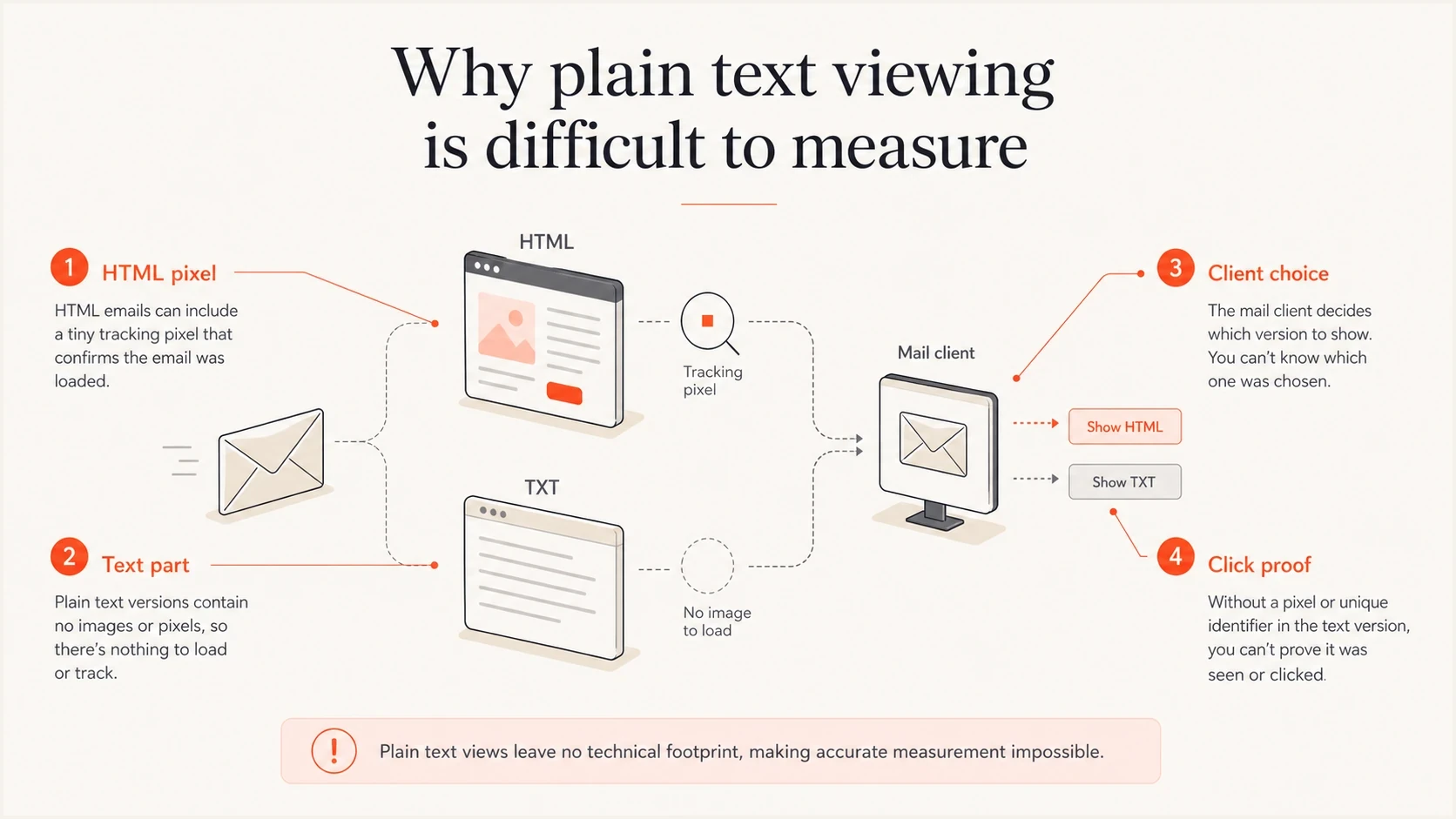
Infographic explaining why plain text email views cannot be measured with tracking pixels.
- Tracking gap: Open tracking depends on an image request. True plain text has no image, so a normal open pixel cannot fire.
- Client choice: Mail clients usually choose the richest part they can render, which normally means text/html.
- User settings: Clients that support plain text display can let recipients override the preferred HTML part.
- Privacy noise: Image proxying, privacy prefetching, and corporate gateways make open data less precise.
Treat text-link clicks as evidence about a link path, then corroborate them with controlled tests. Security scanners can request URLs in both MIME parts, and forwarding can pass those URLs to another reader. A link request or a reply quoting text does not, by itself, prove which part the original recipient viewed.
A/B tests also need careful labels. Testing a minimal HTML template against a richer design tells you about design weight, not true text/plain viewing. Testing a multipart message with separate text and HTML click paths gets closer to the real question, but it still measures action rather than every view.
For example, NextAfter's Moody Radio experiment reported a 1.9% click rate for a plain-text-style treatment versus 1.2% for the control, a reported 57.2% relative increase. The experiment describes simplifying the HTML. It supports testing a simpler design; it does not establish what percentage of recipients viewed text/plain.
What senders want
- Open split: A clean percentage of opens viewed as HTML versus text.
- Client split: A breakdown by app, device, and recipient setting.
- Global benchmark: One number that applies across industries.
What can be measured
- Link requests: Separate HTML and text URLs identify the URL path requested; bot filtering is still required.
- Seed results: Test inboxes show which part specific environments render.
- Domain context: Recipient domains help choose test groups but do not identify the client or display mode.
Which email format do mail clients display?
When an email supplies text/plain and text/html inside multipart/alternative, the client selects a version according to its capabilities and settings. Mainstream consumer and business mail clients support HTML and normally display the HTML part. Text-first clients such as Mutt, NeoMutt, Alpine, and aerc can show the text/plain part, and user preferences can override the default in other clients.
Simplified multipart email structuretext
MIME-Version: 1.0
Content-Type: multipart/alternative; boundary="abc"

--abc
Content-Type: text/plain; charset="UTF-8"

This is the plain text version.
Visit https://example.com/plain

--abc
Content-Type: text/html; charset="UTF-8"

<p>This is the HTML version.</p>
<a href="https://example.com/html">Visit the page</a>

--abc--
Charset and transfer encoding sit below that display choice. A text/plain part and a text/html part should normally declare charset=UTF-8 and use a valid Content-Transfer-Encoding supported by the sending stack. Transfer encoding controls how bytes travel through email systems. It does not turn HTML into plain text or decide which part the client displays.
RFC 2046 specifies increasing order of preference for multipart/alternative, with the preferred format last. Normal MIME practice therefore puts text/plain first and text/html after it. Keep the core message and destination links equivalent, including any deadline, postal address, and unsubscribe option that applies to the send.
The text part is still worth maintaining. It is the fallback for clients that cannot display HTML or are configured to select plain text. It also keeps the message complete for archiving, machine processing, terminal clients, and readers who prefer text. Notifications and automated systems need direct testing because some extract their text from HTML.
For normal campaigns, do not spend the same design time on plain text that you spend on HTML. Spend enough time to make the text version readable, complete, and safe to act on. For transactional emails such as password resets, receipts, account alerts, and security notices, the text part deserves more care because the recipient needs a usable message in every supported display mode.
Do not use a lazy plain text fallback that says "view this email in a browser" and nothing else. That leaves security-restricted recipients with no usable message. A browser link can be secondary, but the text part must carry the core message and action.
Send multipart/alternative with an accurate, maintained text version. Generate the text part from the current message and review it after edits. Fix stale, empty, or misleading alternatives before sending rather than relying on clients to choose the accurate part.
Does blocking images mean an email is plain text?
No. An HTML email with remote images blocked is still an HTML email. The client can keep its layout and links while suppressing image requests, including an open-tracking pixel. A missing pixel request is therefore not evidence that the recipient selected text/plain.
Similarly, a watch notification or email-to-SMS preview can be generated from HTML. A text-only preview, a screen reader reading the message aloud, or HTML converted to text does not prove that the supplied text/plain MIME part was used. Test the actual client and setting before counting any of these as plain text views.
Rendering problems do not guarantee fallback to plain text. Keep key copy as real text in the HTML version and maintain a complete text alternative.
When recipients need a plain text alternative
Recipient settings and organizational policy determine whether a plain text alternative is selected. Controls that block remote images or rewrite links do not, by themselves, require a switch away from HTML.
- Security policy: Some organizations require text-only reading or remove HTML. Confirm how the receiving system handles multipart messages.
- Restricted roles: Check the actual policy for security-sensitive recipients rather than assuming that a job title determines display mode.
- Text-based systems: Terminal clients and some automated systems use the text part; other systems generate text from HTML.
- Manual preference: Some users configure their clients to prefer text/plain.
Private corporate servers, mailing list servers, and hobbyist mail systems can also enforce local content rules that reject HTML. That is a site-specific policy, not normal ISP or mailbox provider behavior, and the bounce usually says the message failed a content policy.
If you send into these environments, treat the text alternative as a complete message. Check authentication separately; HTML restrictions do not tell you whether SPF, DKIM, or DMARC passed.
Suped's product helps with the infrastructure side of that work. The domain health check can inspect published authentication DNS records, while DMARC monitoring helps you catch authentication failures and unauthorized sources before they distort deliverability conclusions.
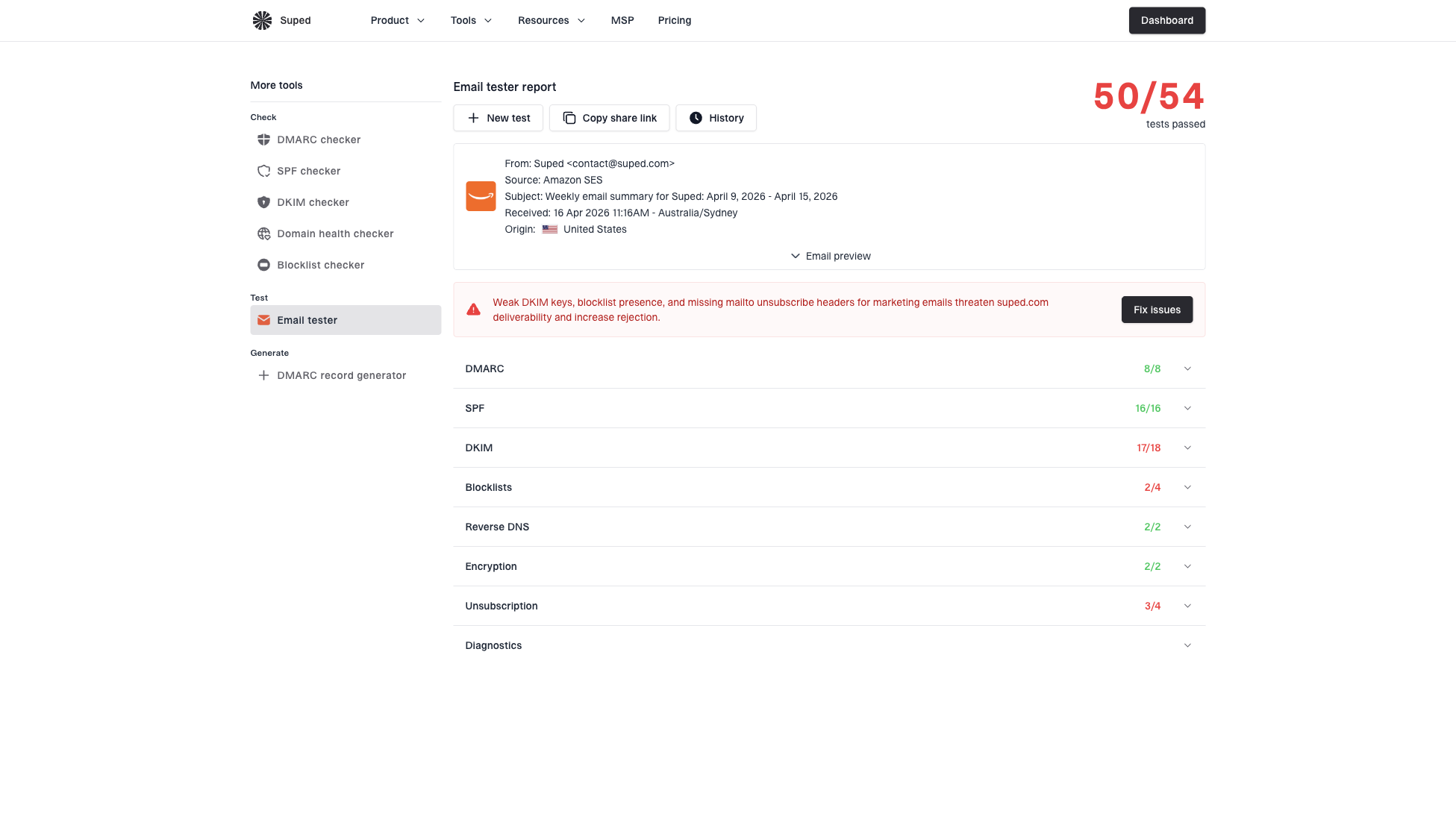
Email tester sample report showing total score, email preview, issue summary, and per-section results
How to measure your own audience
The best answer for your list comes from a controlled test. Start with a normal multipart message, keep the offer and core copy consistent, and add measurement that separates requests to HTML links from requests to plain text links. If you also test a simple HTML treatment against a richer HTML design, label that separately because it does not measure text/plain views.
Email tester
Send a real email to this address. Suped shows a results button when the test is ready.
?/43tests passed
Use Suped's email tester to check authentication and sending-setup issues on a real message before comparing engagement. Separately inspect the raw MIME source and test rendering in your target mail clients; the tester does not measure which MIME part recipients view.
- Build both parts: Create a complete HTML version and a complete plain text version with the same offer and deadline.
- Separate links: Use distinct URLs or tracking parameters for HTML and text links that lead to the same destination. Confirm the sending platform preserves the distinction in its reports.
- Filter automated clicks: Exclude known security-scanner traffic and investigate bursts that request every link in both MIME parts. Check landing-page activity or conversions for supporting evidence; bot filtering is imperfect.
- Segment domains: Use recipient domains to select test groups, then verify client settings directly. A corporate domain does not identify the mail app or display mode.
- Control copy: Keep the core message and call to action equivalent. If you compare simple and rich HTML designs, randomize the groups and keep the subject line and send timing consistent.
- Check text surfaces: Review terminal clients and user-selected text mode. Verify whether watch previews and SMS gateways use the supplied text part or extract text from HTML.
- Review replies: Use reports of stripped links or display issues to guide testing. Quoted text and missing images do not prove that the text/plain part was selected.
Report "text-link clicker share" as unique recipients with a filtered text-link click divided by unique recipients with any filtered click, multiplied by 100. For example, 4 text-link clickers among 1,000 total clickers is 0.4%. This describes recorded click behavior, not the share of all recipients or readers who viewed plain text. It is not a lower bound on viewing share, because format-specific click propensity differs and automated traffic or forwarding can affect the result. Recipients who click both formats overlap, so separate HTML and text clicker shares need not add to 100%.
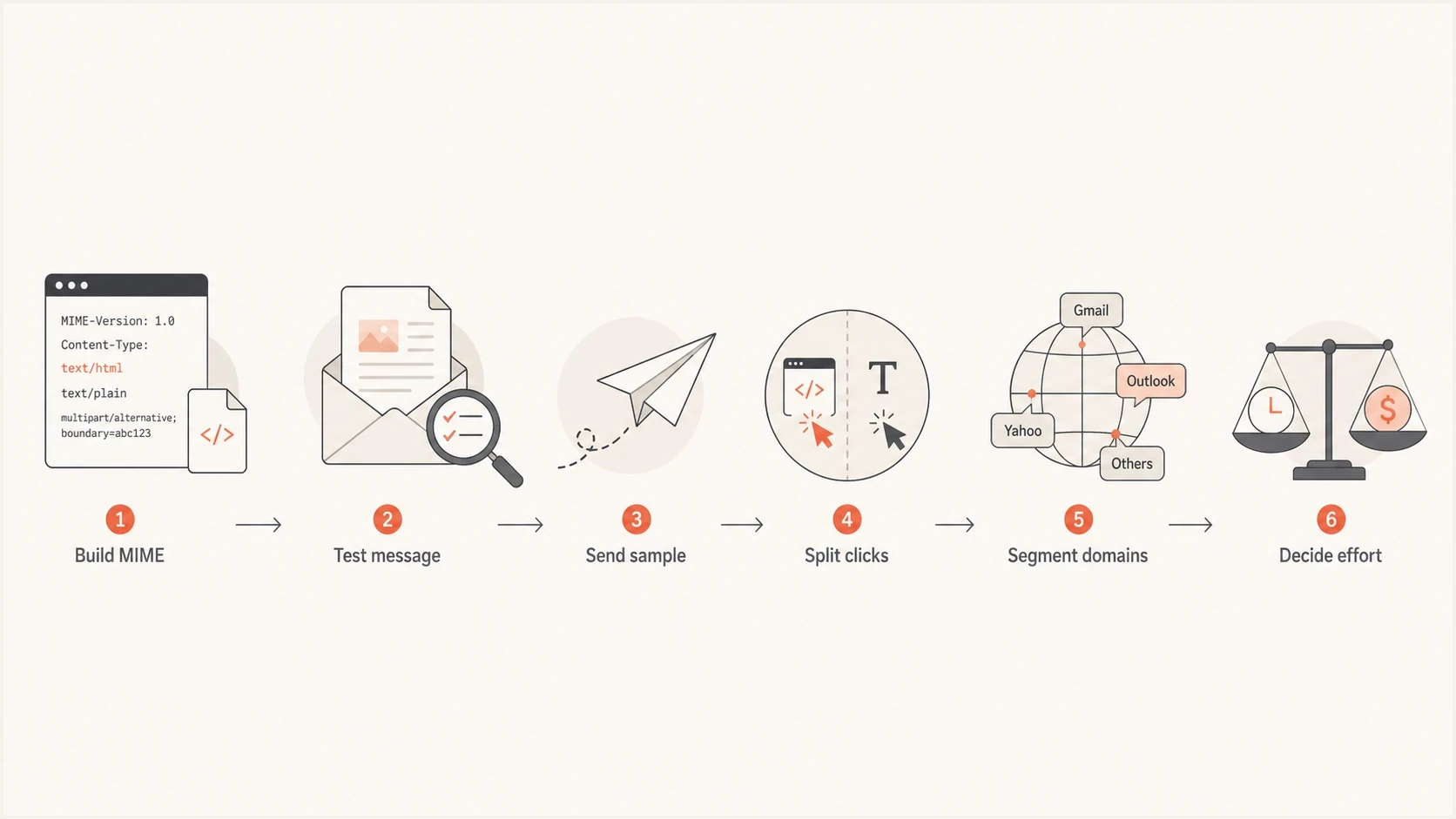
Flowchart showing how to measure HTML versus plain text email engagement with click data.
How much effort to put into plain text
For a normal marketing sender, the right answer is not to abandon HTML. HTML is the normal display path in mainstream clients and supports layout, links, images, accessibility structure, and analytics. Keep the HTML simple enough to render well while making the text part complete enough to stand on its own.
HTML version
- Primary path: Design HTML for the clients and settings your audience uses.
- Simple markup: Avoid fragile layouts, excessive images, and hidden copy.
- Accessible HTML: Use real text, clear links, alt text, readable contrast, and semantic structure where supported.
Plain text version
- Fallback path: Write it as a complete message, not a placeholder.
- Readable layout: Use short lines, clear sections, visible URLs, and enough spacing for scanning.
- Action clarity: Make the CTA understandable without buttons or styling.
Plain text removes layout complexity, but it is not inherently more accessible. Semantic HTML can supply headings, lists, descriptive link text, image alt text, and a logical reading order that assistive technology uses for navigation. Keep both versions readable and test accessible HTML instead of treating text/plain as the accessibility solution.
Plain text is consistent and fast because there are no images, CSS, or dark mode styles to break. The tradeoff is that you lose buttons, brand styling, tracking pixels, and anchor text links, so the full URL and surrounding copy need to carry the action.
A simple HTML email can perform better than a heavy design because it feels more personal and is easier for clients to render. Treat that as a reason to simplify design, not as proof that every brand should send only true plain text. Dark mode and uneven CSS support are further reasons to keep HTML simple when the message does not need heavy design.
Fast loading matters, but the practical fix is usually smaller images, real text, clear hierarchy, and fewer fragile layout tricks. Do not chase a fixed text-to-image ratio. Make the main message readable with images off, then use images to support the copy.
Spend most production effort on the HTML version, then spend enough time on the text part to make it accurate, complete, and easy to click or copy. If your audience includes restricted mail systems, spend more time on text copy and test it directly. For machine-readable mail, alerts, SMS gateway output, and watch notifications, put the key message and visible URL near the top.
Deliverability implications
HTML versus plain text is usually not the main deliverability driver, and the presence of a text/plain part is not an inbox placement shortcut. Authentication, sender reputation, complaint rates, content quality, list hygiene, recipient engagement, and blocklist or blacklist status carry more weight. Message format still affects filtering and user behavior when the HTML is broken, image-heavy, misleading, or hard to parse. Gmail's Promotions tab is an inbox category for promotional messages, separate from spam. Choosing plain text does not guarantee placement in the Primary tab.
- Malformed HTML: Broken markup can make a message look suspicious or render poorly. More on malformed HTML is useful when debugging odd results.
- Image-heavy email: Recipients and filters struggle when the actual message is hidden inside images.
- Bad fallback: A missing or useless text part does not usually block delivery by itself, but it hurts edge cases.
- MIME mismatch: If text/plain and text/html carry different messages, or the text part uses broken charset or transfer encoding, filters and recipients have less consistent content to evaluate.
- Weak auth: If SPF, DKIM, or DMARC fails, format testing becomes harder to interpret.
HTML-only mail does not automatically fail modern mailbox filters, but multipart email with a maintained text part reduces ambiguity and gives constrained clients a usable version. The bigger risk is a misleading alternative where the text and HTML versions disagree.
Suped's DMARC monitoring helps identify sending sources and authentication failures in receiver reports so you can investigate delivery problems separately from format engagement. DMARC reports do not show opens, MIME-part selection, or complete inbox placement. If a relay changes the signed body after DKIM signing and verification fails, make the final body changes before signing or preserve the signed content.
Best practice: send multipart/alternative, keep the HTML simple, make the text/plain part complete, use UTF-8 for text, test the MIME output, and treat filtered link clicks as engagement evidence rather than a viewing percentage.
Views from the trenches
Best practices
Use separate text and HTML click URLs, then filter automated requests before comparing results.
Keep the plain text part complete enough for security-restricted readers to act on it.
Segment results by recipient domain type before changing global production effort.
Common pitfalls
Do not compare HTML opens with plain text opens because text has no tracking pixel.
Do not assume a simple-looking email is true plain text if it still uses HTML links.
Do not ignore government or security-heavy recipients when planning plain text fallbacks.
Expert tips
Treat filtered text-link clicks as engagement evidence, never as a floor for viewing share.
Test MIME output before launch so broken alternatives do not skew the observed data.
Choose true plain text sends for confirmed recipient needs, then test the resulting message.
Marketer view
Marketer from Email Geeks says true plain text usage varies heavily by audience, and B2B lists with strict security controls can sit well above normal consumer averages.
2024-11-27 - Email Geeks
Marketer view
Marketer from Email Geeks says mainstream mail clients support HTML and usually display the HTML part rather than letting the user choose the text part.
2024-11-27 - Email Geeks